Hello Plexers,
Recently this week, I noticed that my media was no longer syncing to my Android device. I have a bunch of TV shows that I have set to always sync unwatched episodes, so as soon as they are added to my server, it would automatically convert and download to my device.
I see that the media is converted, but on my Syncs & Downloads section, everything is Pending! I tried to sync from the Web Interface too, but same result.
I tweeted @plex and they sugessted I post the android logs to the forum for help.
Any ideas on what is wrong? It just happened suddenly =(plex-log-clearheatvision.zip (391.5 KB)
Sorry you’re experiencing issues. I see a lot of this in your logs:
[Sync] Error updating sync list (sync will continue): [ Code=ServerRequestError; extras={} ; cause= No cause ].
Can you restart your PMS, try a sync operation from the Android client (with the “refresh” button in Downloads & Sync), and then share both client and PMS logs?
Although I also see this in the logs you shared:
10-06 18:36:15.207 i: [Sync] Sync location changed from /data/user/0/com.plexapp.android/app_sync to /storage/3566-6333/Android/data/com.plexapp.android/files.
That means you manually changed the storage location, which as a side-effect would reset Sync on the device meaning that you might not be able to reproduce the problem anymore?
Hi Manuel!
Thank you for responding! I really appreciate it. I had the problem that I reported, but to try to fix it, i changed the directory in order to delete all the synced content. Then it did. But then when I tried to re-sync, it would convert but downloads would always be pending.
I did what you said though by toggling the play/pause button and refresh and then it started.
But now, I have a new problem…none of my synced data works offline, so effectively useless when I am on an airplane. I know the data is there because:
1.) Plex sync shows me the list of things that are synced (see screenshot)
2.) When I navigate through my Android File Explorer, I can see all the videos and play them with the Android Video Player.
I really dislike the offline mode as mentioned in other threads. I liked it when you could just select the local data from a drop menu.
I attached new logs in the hopes of a new diagnosis / fix.
Thanks
plex-log-clearheatvision (1).zip (300.4 KB)
Did you hit play for something before getting the log? I don’t see any attempts to playback a file.
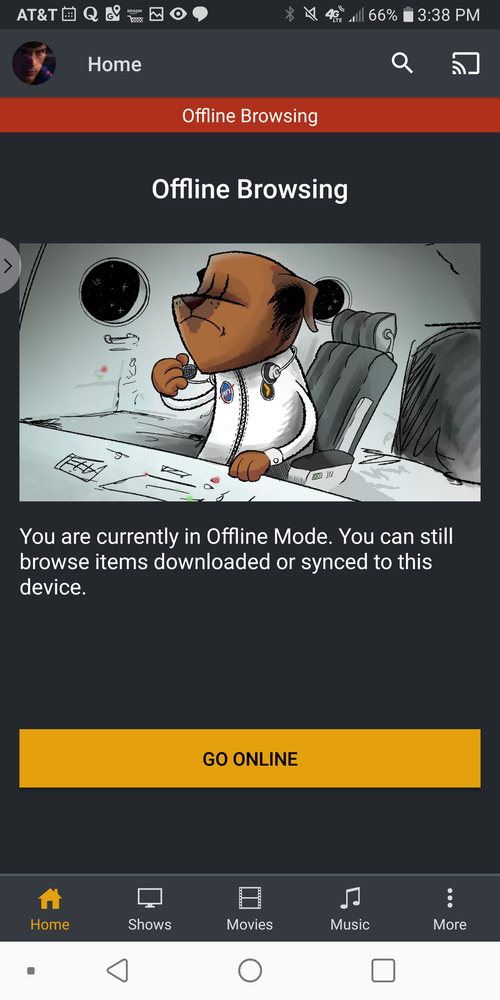
I can’t even see my synced data. All I see is this screenshot
@clearheatvision It’s normal for the Home tab to be empty in offline mode. Do the other tabs (and more specifically Shows since that’s apparently the type of content you synced) also show up empty?
Yes, all modes show the same thing. I’ve had to downgrade plex Android version to a 6.x version for better stability unfortunately.
In the latest version I am writing to you about, often times, I would have to log out and log back into my android app for it find my server and play media.
The only thing I can think is that your device takes extra long to initialize the sd card, so if you open Plex at a time when the sd card isn’t available, your synced content can get lost. There is a fix in the 7.7.0 beta that addresses this issue. That might help. Another thing I found that helps is if you have the sync location on an sd card, move the app to the sd card too. This way, the app is only available when the card is available and there is no chance of the synced content not be available when you open the app.