Hi. This is another one of those sad “I cannot enable remote access” stories.
I have tried for a log time to make my server accessible from outside my network, to no avail. I have tried to follow the instructions in several threads in this forum, and I have no idea where the problem is.
The router from my ISP is Kaon brand, and I have an Apple Time Capsule connected to it, in bridge mode. I do not get any double NAT messages.
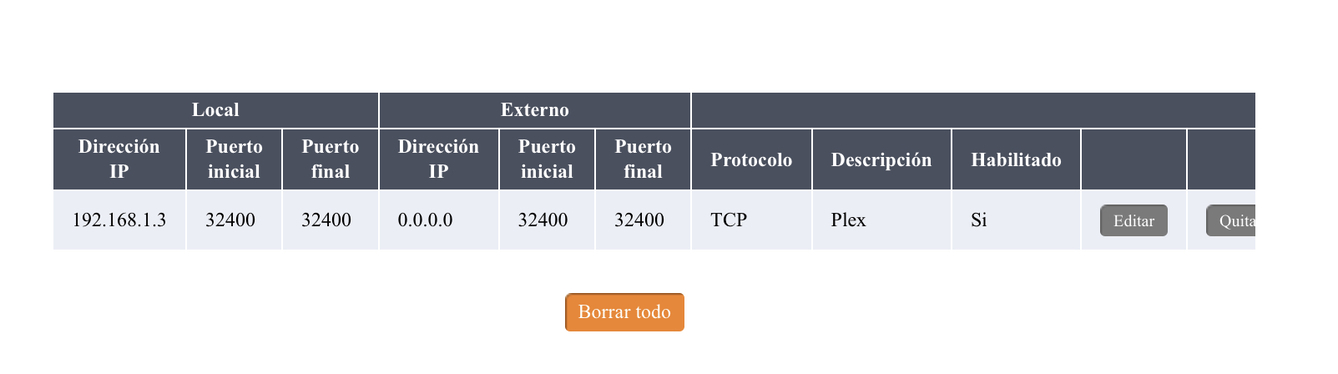
I have already assigned a static IP address to my Synology 218+ NAS, and I have followed the instructions on port forwarding as much as I can, with my limited understanding. But I cannot make the server accessible.
This is my router with the port forwarding settings:
Please check if you can access your public IP address over the given port from outside your home network (e.g. using canyouseeme.org).
If you can’t… retry after assigning a different external port in your router and Plex (preferably between 20000 and 50000).
If you still cannot reach the port/IP, you might want to contact your ISP to check if they’re blocking some part of that communication.
A lot of other users are experiencing an issue with remote connection at the moment where the Plex settings screen won’t show it as accessible despite everything working as it should . It will still show a red cross rather than a green tick. Have you tried connecting to your plex server externally using you WAN IP address? Have a look at the post in the thread Remote access failure to see whether your PMS is registering and is accessible.
You guys are awesome! For some reason, when I try what tom80H says, canyouseeme.org tells me it can’t see my IP address. But I did what kesawi said, and I connected in my iPad using my phone as a hotspot (outside my network), and it connected (S-L-O-W but it did connect)! Unfortunately, because of the quarantine I will not be able to test it in a decent network outside, but this looks promising!
Thank you both!
Just disable the WIFI of your phone/iPad (forcing them to use their mobile data instead) to have an actual remote connection.
If canyouseeme cannot see you this implies there’s some issues with your remote access setup (not just an issue with the status indicator within Plex)
Additionally you can compare the WAN IP on the router with the results of http://www.whatsmyip.org/ , if they don’t agree you have CGNAT which would require ISP assistance.