Server Version#: 1.24.5.5173
Player Version#: Apple TV 7.24
Hi all,
I have a very strange thing happening. Last night I decided to refresh all of the metadata for my TV show and Movie libraries. The operation completed successfully, and Plex works normally on my iPad Plex client and my iPhone Plex client.
However when I tried to use my Apple TV clients (which all worked in the past), they now no longer work, in very strange ways:
On the Plex home screen, if I try and resume a TV show from the “continue watching section”, selecting it, results in the Plex app minimizing (appears that the app is crashing as selecting the app again causes a full reload).
Selecting a movie however does not produce this result from continue watching, and brings me directly to the movie as expected.
If I go to the TV show section of the library and attempt to select a TV Show, the show loads, the them music starts to play, and then the app goes back to the TV show browse page right away (no button pressed). Saying it a different way, it is impossible to get to a season or an episode (though I see the seasons load for about a half second before I am kicked back).
I am able to brows movies, select moves, and play movies without issue from the move library page.
If I shuffle or play a TV show from the TV show library screen, the show plays normally.
Everything was working normally until I did a complete metadata refresh of the entire library so I assume this has something to do with it. I have tried force quitting the app, restarting the Apple TV, uninstalling the app, re-installing the app, signing out of the app, and every combination of the above. On the server side I have tried to refresh all of the metadata again for TV shows, I have tried cleaning bundles, optimizing the DB, and emptying the trash.
I attempted to record a video but have not found a way to attach it. Let me know what you would suggest, happy to try anything.
With what Apple TV model and tvOS version are you experiencing this behavior?
Would you mind reproducing this and sharing the logs of the Plex app on your Apple TV?
I see some warnings for sure. Let me know if you need me to do more. For additional context I also tried creating a new TV show library (same files but new library), and sadly the results were the same behavior.
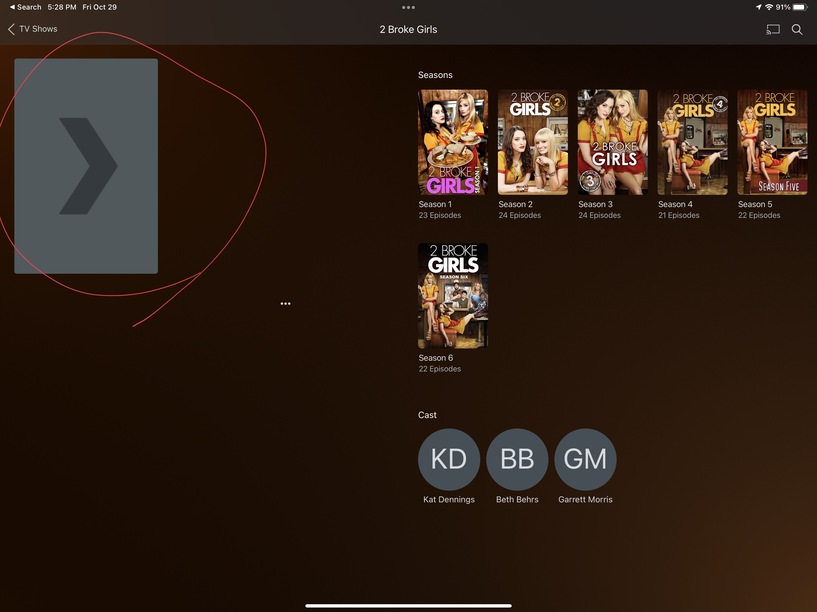
I will leave it to you to read the logs, but it looked to me like there were issues loading an image resource. While the same behavior is not happening on my iPad and iPhone client, loading a TV show now results in a missing thumbnail for the show. I attached an image as well (not sure if that is the cause but wanted to add the data point).
Same issue here; but in my case, it started when I installed the newest Plex Server version (1.24.5.5173).
I did install it manually (i.e. download from plex.tv and install it by copying to the /Applications-Folder) over an existing 1.23.x.yyyy.
When I then quit the previous Plex and started 1.24.5.5173 the problem started happening.
Plex-Server: macOS
AppleTV: HD, TvOS 15.0 as well as 15.1
Everything works perfectly.
What I saw in the console log was that Plex-Server had issues with the database (sqlite). So, right now I have deleted all Plex Server Data (in ~/Library/Application Support) and am re-creating all my libraries again.
If this fixes the issue, I will let you know.
UPDATE:
Yes, it works now after having recreated the database from scratch. So, could this be an issue of incompatibility between Plex Server and Plex AppleTV?
(Havinf said that, Plex AppleTV is getting worse by the day, really)
Hi chfredrickson, thx a lot for your update. I just updated it… but the issue apparently is still there
I also deleted and reinstalled Plex from scratch on my Apple TV … but nothing … any hint?