From what version did you update and to what version? Nothing has changed in the client side regarding that functionality.
Changelog from todays update:
[Mobile] App can crash when displaying preplay.
[Mobile] App could crash when attempting to cast.
[Mobile] App can crash when skipping tracks in the new audio player.
In certain artist stations is not populating songs even though I have songs related to that artist in my library.
Maybe is not Plex but I’m just wondering because I didn’t notice that before the update from today
No one else that has tested this scenario (playing a library radio) has had problems with auto advance, but now we have one we should be able to find out what is the bug.
Is just populating 1 or 2 songs and then stops and is not for all artist Radio, since the metadata info is coming from Gracenote maybe in there database they don’t have the list complete. Or is coming from somewhere else?
Hey, first sorry to hear you’re experiencing issues with the app. In order to investigate it, I’d love to ask a couple of questions
If I listen to a song and hit the back button to start over the progress bar doesn’t reflect that. It just keeps on advancing and once the progress bar reaches the end it just sits there until the song is finished too.
Do you mean that hitting back button, the song should start from the beginning? As far as I know, the “vanilla” Android Auto doesn’t do that. I clip of that behaviour would be super useful.
Sometimes when I play a song it doesnt show up on the center screen and the screen in my dash shows audio stream detected. Once the next song starts playing it’s back to normal.
I tried this on my end, but in the “vanilla” Android Auto app the mini player is displayed in the “main” screen as soon as I start playing something. Again, a video and logs of this issue will be super useful.
Android Auto doesn’t remember were I left off. When I get back into my car I have to manually select the playlist and song again even though the Plex notification on my phone is still there showing the right song.
I’m really sorry but I tried this one too on my end and it worked fine. I played something in the app, then pause it and open the Android Auto app and I was able to see the mini player in the main screen.
I haven’t noticed this being posted it yet, but please ignore if it has.
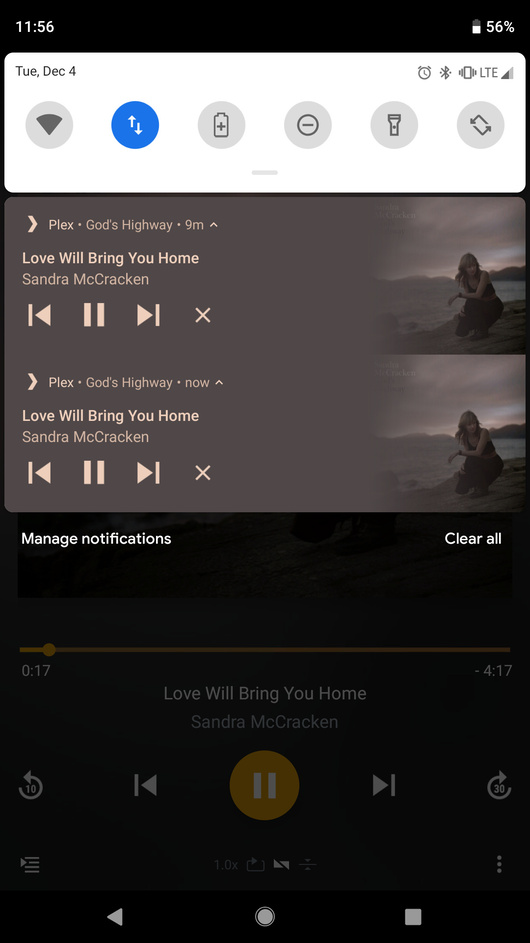
Every so often a song finishes and the next song in the playlist does not start. When I open the app it goes through the splash screen and now a second instance of the song is in my notification bar. The song is shown as buffered, but it is in a paused state.
I can resume the song manually and only one “instance” plays, but if I attempt to close the “old” instance it closes both.
Attached are screenshots and a log that hopefully contains helpful information. It’s around the 11:55AM to 11:57AM mark.
e: added a third screenshot to show that the new instance is the only one playing because it has advanced to the next song despite the notification bar showing both as playing.