I noticed this the other night for the Community Xfinity web episodes, they were listed as airing on October 8th 2019.
I didn’t think much of it at the time as I was tired but seeing you post I had a quick look and there is no airdate in tvdb. And to cap things of the Blu-ray set came out in 2018 which is where I ripped these from, so this is definitely wrong.
This release was already cut and in QA testing before this issue was fixed, which is why I’ll refer to “future” release when talking about bug fix releases. It is in the next release however.
All the episode summaries that should be in English are entered as Spanish.
TVDB has the correct English summaries but we’re currently preferring the TMDB ones and because those have data in them we’re using them. We’re currently discussing the priorities for which summaries we should use.
Can the summaries be based upon which provider is selected under episode ordering?
If someone is naming files based upon tmdb, then it makes sense that this is where the data should come from
similar if someone is using tvdb ordering, then the data is picked up from tvdb
Not sure this is right or not, but from what i can see looking at mine, the specials work like this, but all other seasons prefer tmdb
@drzoidberg33 know you are busy but when you get a chance would you mind checking into if there is a problem with https://www.themoviedb.org/tv/73536-dinotopia-the-mini-series. I made some changes over a week ago on TMDB and they have not arrived into plex yet.
I made other changes to this series https://www.themoviedb.org/tv/15775-dinotopia and they came in within 2 days which I would expect.
I suspect there could be some metadata problem on the backend in plex causing a problem with the miniseries.
S37E23 onwards of the episodes in Plex no longer have a description for the episodes
tvdb has descriptions for all episodes upto E52 (which was yesterdays airing)
This seems to be happening with other shows also, if the episode does not have meta data when it is added to the library, it does not automatically fix itself, in the past i am sure when an episode was added it checked other episodes for missing data and downloaded it
This is a resent change, not sure if it’s to do with the scanner or a server update
Server Version#: 1.22.0.4163
Player Version#: 4.53.0
Discovered while updating a large number of my TV shows with posters from TPDb, and through troubleshooting on the subreddit in this post. I’m posting here since I couldn’t find a similar issue reported on the forum and would love to see a fix since I doubt it’s anything complicated.
Steps to Reproduce :
Open a TV show
Click the pencil icon next to a season, then go to the Poster tab
Add a new poster (using any method) → the poster will be uploaded but it won’t be selected (indicated with the yellow checkbox)
3a. However, the poster will still change to the newly uploaded one, which was why users think it worked.
Click save
Add a new episode for the show (doesn’t have to be for the season that you just changed the poster for) and re-scan the TV library → the poster for the season will revert back.
As a workaround you can manually select the poster after uploading, and then click the save button.
This doesn’t happen at the Show level, or for Movies or Collections. It only appears to be affecting seasons. A very frustrating realizing after updating all my season posters and then seeing them reset (especially for long running shows like One Piece or Law and Order).
@frankrende more passing along my experience than making a recommendation or solution to your problem. Anyhow, about a year ago TMDB done a purge of many posters and at the time it really frustrated me as I lost a huge amount of posters, art, backgrounds etc that I had manually set in plex.
At the time I said to myself, I’m sick of this so went down the road to setting local media assets for all my artwork, pretty much everything. This includes TV and Movies. Its a massive amount of up front work as you need to download posters for each movie, show, season etc… but once complete I would never look back. They now don’t change unless I change themselves which gives me full control.
Thanks @anon5074910! That was actually suggested in my original post as well. I had the same concerns of it being “a lot of work” upfront, but it definitely would be worth it in the long run. I was hoping there could be some plugin/utility that had Plex put the posters I uploaded through the UI into my filesystem with the correct name/structure
Over all, I’m loving the new Plex TV Series Scanner (even if I have to go through and change the way a lot of my specials/extras are named and organized).
However, I’ve noticed that it doesn’t appear to pick up the locally saved file for Season 00 poster art, unless I manually change that show’s episode ordering to The TVDB. If you have the episode ordering set to The Movie DB, it ignores the local poster art file for Season 00 (it picks up and uses the other poster art for other seasons just fine).
Noticed this on the original MacGyver, which was already in Plex, but I refreshed it and the poster art for Season 00 changed.
EDIT: Scratch what I said about it being fine on The TVDB. It appears that once you switch to the new agent and refresh, it ignores local poster art for Season 00 and switches back to the default for Season 00 no matter what the settings are.
I’ve noticed missing posters for seasons with the new agent (PMS Version 1.22.0.4163).
Usually PLEX would default to use the same poster as the one set for the series but this agent adds “ghost” posters for the seasons and as such they remain empty and have to be added manually.
This is how it looks after adding a series where this problem occurs:
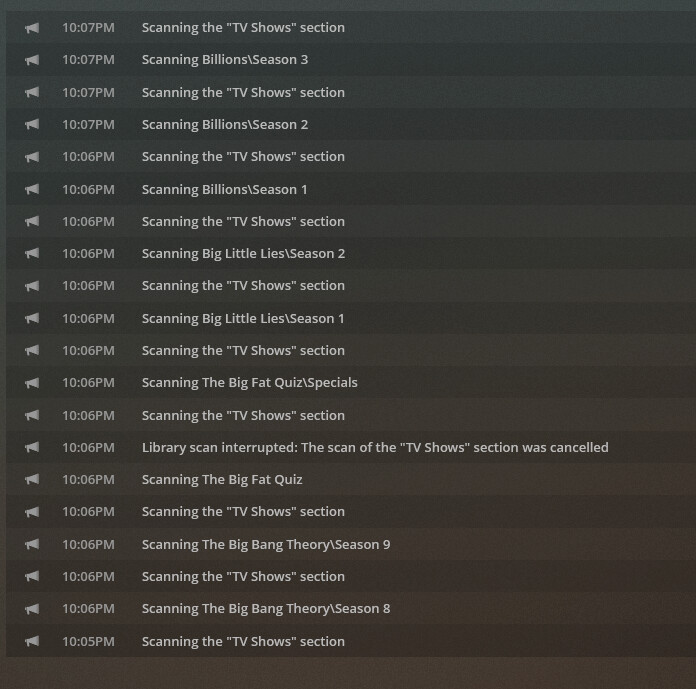
You see the ‘Scanning the “TV Shows” section’ live shows up between every folder it scans. It’s taking about 5 seconds per log entry line on that screen. And it takes 100% of the CPU while it’s doing this. Wouldn’t be so bad if it didn’t take all the CPU, because this gets in the way of Transcoding etc.
There is no concept of matching to a specific source in the new agent. You’re matching to the Plex item which may contain metadata from multiple sources or it may contain metadata from only one source.
That is why i have had to return back to the original scanner/agents
There is no way Plex can automatically decide what is the best metadata, if all sources have data entered
I have already found issues with the data being incorrect (imdb) or worse quality (tmdb) because they are trying to be combined, yes we can try and get these changed, but why, when the better data already exists online
Let the user decide what metadata they want to use instead of trying to force it