Bug hunted down: Overlapping DVR recordings of same channel

I usually record only episodes of TV shows (most of them are 30-60 minutes each).

Recently, I checked the TV show “Inspector Barnaby” to be recorded automatically, because ZDFNEOHD airs three or four episodes (each of them more than 90 minutes) per day.

Unfotunately, most recordings are unusable. I have the same symptoms on the second consecutive day now.

My DVR records 8 minutes prior of each episode and 8 minutes after each episode extra. Here is what happens - with yesterdays recordings as an example:

Channel Recording Start Recording End resulting file length
ZDFNEOHD 20:07 22:03 01:55:47
ZDFNEOHD 21:47 23:43 00:58:41 !!! (the fist 58 minutes)
ZDFNEOHD 23:27 01:23 01:37:05

The first recording is just fine, it stops at the time it was intended to stop and within a minute, the recorded file was available in the library while the second recording was on its way already.

The second recording of that channel should have stopped by 11:43pm.
The following image was taken eight minutes later:
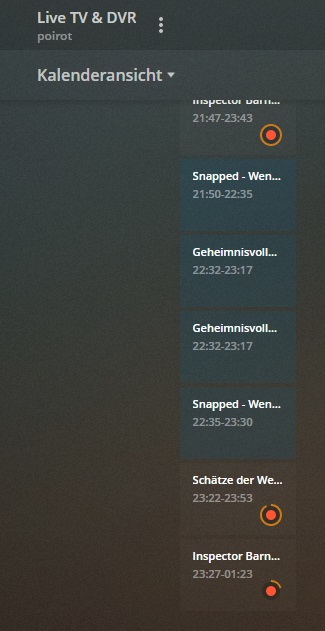
23-51
As you can see, second recording not finished, third on its way.
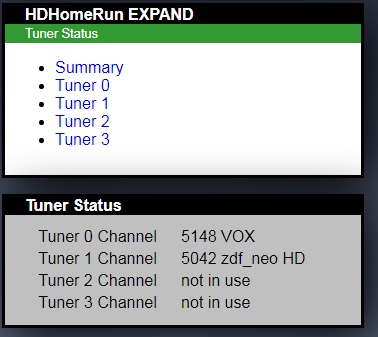
The HDHomeRun Expand shows that only one of the four tuners is used for that channel:
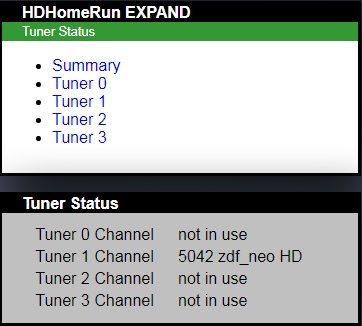
tunerstatus

Half an hour later, the same thing, second recording still unfinished, file not in library…
This was taken at 00:21am.
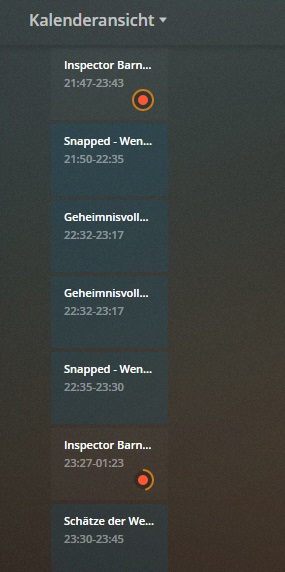
00-21
I checked this every few minutes and at 00:59am (more than an hour after the second recording should have ended), the second recording was finishing while the third recording of that channel was still ongoing.
00-59 zweite Aufnahme fertig
A few minutes later, I checked the resulting recorded file which should have similar length than the first recording (01h55m), but it was only 58m41s. I checked the content of the second recording result and the file contains the first 58m of the intended recording. About an hour of the recording was missing while the recording took one hour longer than expected!

The third recording of the same channel should have finished ar 01:23am.
But the third recording showed the same symptoms as the second. More than twenty minutes after the supposed end of the recording, it was still underway. Here are the screen shots I took at 01:45am.
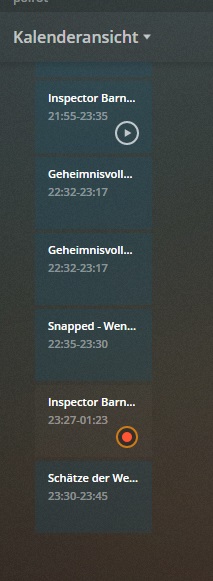
01-29
01-45

I then went to sleep at 02:06am (nothing changed until then) and checked in the morning… the third recording file length was 01h37m… not the 01h55m that were programmed to record.
Time stamp of the recording is 03:18am.
I checked the content again and the file contains the recording from the beginning, but the end was missing.

Sympoms (the same on two consecutive days with same channel):

  • first recording is okay, starts at intended time, stops at intended time
  • only one tuner channel is used for all overlapping recordings of the same channel
  • second and all further recordings start at intended recording time
  • those recordings take WAY longer before they stop (they do not end by the time they should stop, and the tuner channel stays locked for that recording for hour(s).
  • the resulting recorded files stop prematurely (at different times)

This is not only one big problem (recordings without the end of the episode) but two… the tuner channel stays occupied until the long waiting time (no idea what PMS does during that time) so it cannot be used for other recordings of different channels.

I grabbed logs at the following times:
23:56pm
01:03am
09:47am

@sa2000? Any Plex helper?

Same thing tonight:

The following screen shot is from 02:49am
image
The recording of an episode of “Medical Detectives” which is overlapping with another episode recording before and after - is long overdue… it should have stopped 16 minutes ago and i am sure, it will take another half an hour to finish and will be crippled.

Please help

Same symptoms: the last four recorded episodes of medical detectives are crippled:


Since two of them are sorted also incorrectly and shown as doublettes, I can only show proof by different screen shots:

Can somebody please start analyzing?

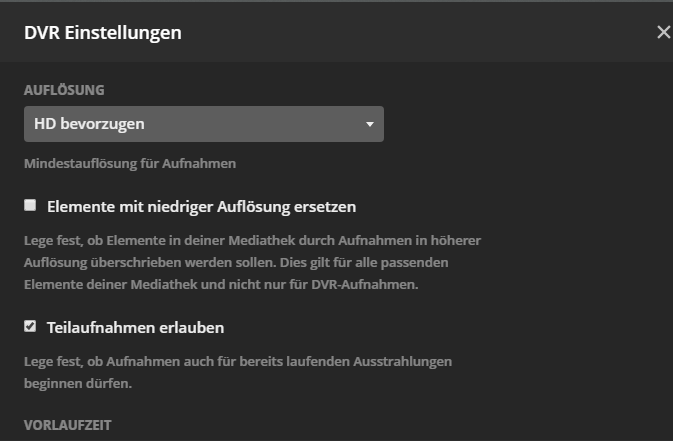
I don’t experience this, do you have “allow partial recordings” checked?

I have had something similar happen before, when recording multiple SD programs in a row, but have not seen it in ages and I don’t believe it was the same symptoms you describe. Mine just froze on one recording and never finished it, nor recorded anything from then on.

Yes, I do.
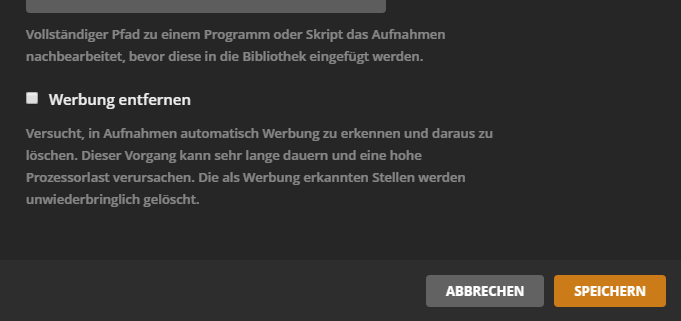
The following is my configuration for ALL recordings:
image
image
image

My tuner logs show nothing spectacular:

20191226-22:52:00 Tuner: tuner0 tuning 5148 VOX (a8qam256-6900:394MHz-53604)
20191226-22:52:00 Tuner: tuner0 streaming http to 192.168.94.50:50270
20191227-02:37:01 Tuner: tuner1 tuning 5163 NITRO (a8qam256-6900:402MHz-53110)
20191227-02:37:01 Tuner: tuner2 tuning 5143 tagesschau24 HD (a8qam256-6900:586MHz-50062)
20191227-02:37:01 Tuner: tuner2 streaming http to 192.168.94.50:60895
20191227-02:37:01 Tuner: tuner1 streaming http to 192.168.94.50:60894
20191227-03:07:59 Tuner: tuner2 http stream ended (remote closed)
20191227-04:58:01 Tuner: tuner1 http stream ended (remote closed)
20191227-05:17:04 Tuner: tuner0 http stream ended (remote closed)

If you look at tuner 0, then it sent the Medical Detectives stream and the stream ended promptly at the time it should have stopped.
So it must be some kind of stream division problem with Plex - if I would have to guess.

Update, just recorded five programs in a row on the same channel, all configured for one extra minute. Plex successfully recorded all of them and switched tuner around for each airing. I just checked and each recording is the correct length as well.

Note: I have ‘allow partial recordings’ disabled globally.

1 Like

Thank you for your input, dear @NDInnovations.
I only encounter this problem with long pre- and post-recording times. I have set up 8 minutes prior and after each episode.
I have no clue about the cause, but I definitely have a problem with this.

Well the important difference between us is you allow partial recordings, and I do not. If you disable that setting and then this behaviour disappears I think we’ve conclusively identified the cause of the bug. Then it’s just a matter of actually getting plex to do something about it, which I’ve been largely unsuccessful with my bug reports unfortunately.

Okay. Is there a way to disable this globally and change it for all existing recorded shows (I have about 100 of them) at once? Or do I have to change it manually in all recorded shows?

There is a global setting, but it will not change current set up recordings. So yes, you now have to do the painstaking process of changing every single recording. It’s possible you can modify some database somewhere, but I’m clueless about that. When I started my dvr two years ago ‘allow partial recordings’ was the enabled default, which i think is kinda dumb. I don’t ever want the surprise of finding incomplete episodes.

Well I can’t say it’s conclusive, but your thread here gave me the idea to check…basically I’ve noticed before that some of my recordings were missing a bit of the beginning, and just noted them down. Well now I’m cutting out commercials en masse and I see that any program like that was not recorded it’s full run time on occasion. Those episodes can be missing anywhere from 10-20s to a minute or two. When I looked at their recording rules every single program that displays this condition had ‘allow partial recordings’ enabled. This was an artifact from over a year ago, when plex had that enabled by default, and forced you to disable it on an individual recording rule. There was no global setting until some time in 2019, and when that global setting was finally introduced it did not affect anything previous. So now any show set up before then still allows partials and is a toss up on whether it will start recording at the instant it should. I was pretty good at disabling it when I set up a rule before it went global, but I still forgot on about a third of all rules it appears…and now those are the only shows that are incorrect lengths. Total hassle to go through and manually disable that stupid setting on so many rules…ugh.

I know correlation is not causation, but when every “incomplete recording” also had “allow partial recording” enabled I’m very suspect.

Ooops…meant this reply to be here since it’s your thread that brought it to my attention…

Yup. Just found a show with that had this enabled and recorded eight airings in a row. First was ok but 1 minute long, 2nd was barely ok and 1 minute short, 3rd not ok and missing 2.5 minutes, 4th not ok and containing extra 2 minutes, 5th not ok and missing 2.5 minutes…etc.

I’d say that ‘allow partial recordings’ is a guaranteed way to completely mess up back to back recordings.

This topic was automatically closed 90 days after the last reply. New replies are no longer allowed.