Can not add local resource to Plex Media Server

Server Version#: 4.12.3
Player Version#:

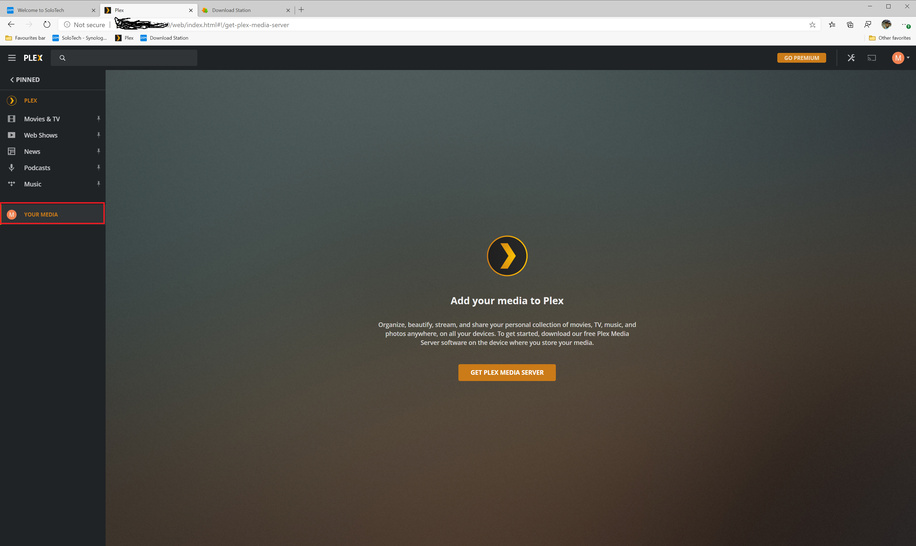
I install Plex Media Server in my NAS (Synology) and login to my Plex account. I click on the YOUR MEDIA and a page displayed to ask me download the Plex Media Server. The page shows every time I click YOUR MEDIA menu even I reinstall the plex.
My plex works before (I can add local resource)

Regards

There is no MORE menu to click at the left panel. Just the YOUR MEDIA menu and other standard menu like NEWS/Music/Web Shoes/Movies & TV … if I click YOUR MEDIA, it ask me to install the server again

His is the page displayed

Add your media to Plex

Organize, beautify, stream, and share your personal collection of movies, TV, music, and photos anywhere, on all your devices. To get started, download our free Plex Media Server software on the device where you store your media.
Oh sorry, there is a MORE button but it goes to the page to the menu YOUR MEDIA

It works fine before (not a new installation). I added my resource before.

After I click MORE… it goes to this page

Thank you for that. Everything I see there looks great.

Now please do the following:

  1. Restart Plex.
  2. Make certain nothing is used / touched for 2 minutes ( I want to see the full uninterrupted sequence to see what It’s doing by itself)
  3. Download and attach the logs ZIP again please.

Please find the log attached for your reference

Plex Tuner Service.log (2.4 KB)

Plex Media Server.log (67.7 KB)

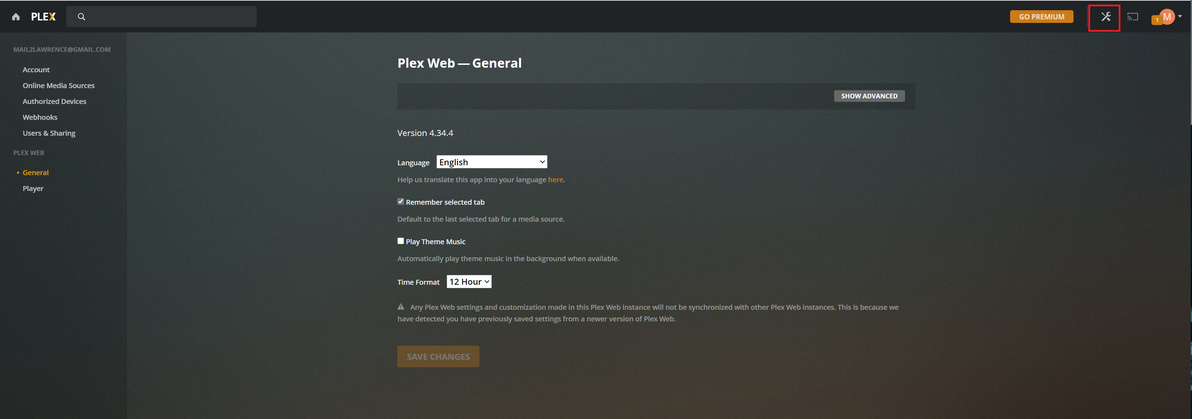
This is the page after I click setting and no Server and Troubleshooting menu

My Plex Sever is not installed in Window. It is in NAS - Synology

Logs.zip (4.4 MB)
Please fin the Log.zip file

Thanks very much. It works fine now.

This topic was automatically closed 90 days after the last reply. New replies are no longer allowed.
