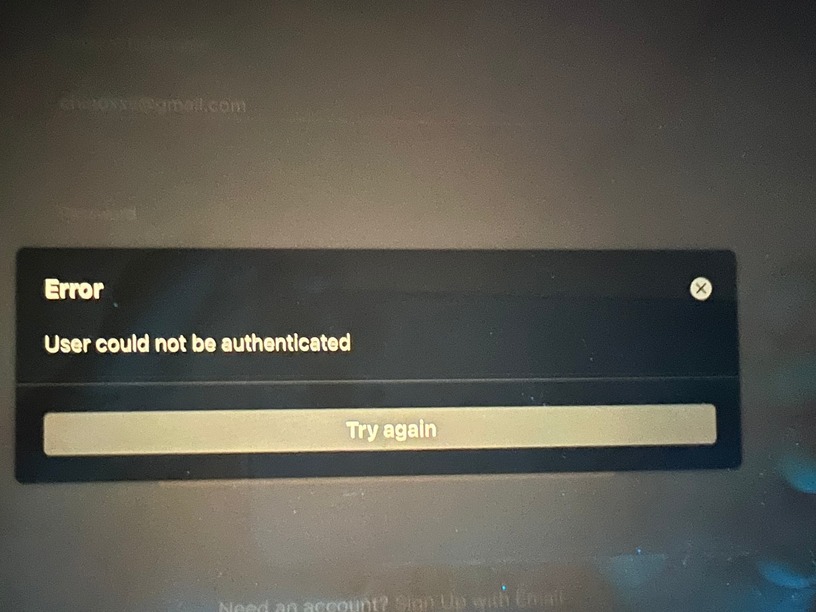
Since the user leak I’ve had issues logging into my plex ipad.
I’ve searched but nothing has helped. I can log in everything else but my ipad. Even the new tv has no issues.
I’ve read having someone reset my logins.
Can anyone please help?
Hello. You can open your Settings → Authorized Devices → iOS
by using this link in the web app and see all the devices still authorized to your account. Remove the one that misbehaves. On the iPad delete the Plex for iOS app, then install it again. How did that work?
Yes I have deleted app and checked password and everything is correct but same issue with “could not be authenticated”.
What I have done:
Deleted app several times
Stayed logged in on my iPhone while I logged in my iPad
chaged password
turned off VPN
From what I have read resetting I believe log-ins is what helps but not sure.
Once I deleted iPad from authorized account it hasn’t work since and it’s the only one that won’t log in at the moment. Thank you for any help.
Only the iPad refuses to work, hmm. After the password breach did you reset your password and use the checkbox to sign out of all devices? And the iPad is the only one that still doesn’t work after signing them all back in?
This may get redundant, but we can try to carefully remove the app and reset the iPad.
The procedure would be
Delete the app from the iPad.
Check Authorized devices and remove it if it’s listed.
Power off the iPad, shutdown not sleep.
Turn it back on and install Plex.
The Plex app when you run it the first time should ask you to Sign-in to Plex.
Use the email and password associated with your Plex account.
Don’t use the Sign-in with Apple tool. Just use email for now.
After you sign in, that iPad will be attached to your account.
The iPad will have access to the servers authorized on that account.
Are you saying that exact procedure doesn’t work?
Would you screenshot the error please?
In Authorized Devices is the iPad now listed?
In Authorized Devices is your PMS server listed? Does it have a recent access time like today?
The idea was this:
After the user info breach, you would go to Plex and change your password.
During that password reset there was a checkbox to reset all devices.
Resetting them removed the authorization token for each of those devices.
Those devices were then required to go through sign-in.
Now when you remove a device from your list of Authorized Devices like I described above, you’ve done the same thing as the checkbox. You’ve reset the device to being unauthorized by anyone. It would not work until signed in.
So the iPad should successfully be signed in to your current account.
We would then try to verify that the PMS is also signed into your current account.
Yes I have done the steps and still nothing since the breach.
I have changed my password as well and have deleted the ipad from settings.
I forgot originally to delete the ipad and when I went back to log in that’s when the issues started.
I’ve been hoping that updates would of fixed it but nothing.
I’ve turned off verification just in case and same issue. I
I don’t have a server. I just stream from my devices.
I’m always worried about to many attempts and I have gone over the limit and hoping the reset from attempts but it does not.
I’ve tried for several months searching for answer but there’s with the same issues with no answer.
Most people use a Plex Player in combination with a Plex Media Server they install at home that catalogs their media and sends it to the Plex Player.
Some folks only have the Plex Player and use it to stream Plex provided, ad sponsored tv and film or stream from a friend’s PMS their friend’s private collection.
What category do you fall in? Once I know a bit more I think I can reach out to the right Plex person, if they haven’t seen this already.
We should hear from you how your iPad reaches the Internet, too, and whether you have any other Plex Players using that same connection to the Internet, e.g a laptop and iPad that use the WiFi at home.
I also have deleted any old activity in case one of the safari connections was from the ipad. The only ones still active or have recent activity are all working right.
Anything since our last chat? Also if I can’t log in my ipad anymore can I at least get my money back from buying the access pass since I can’t use it anymore.
Would either of you be able to assist a user who can’t sign-in on their Player?
We have cleared the player from Authorized Devices, and deleted and reinstalled the app, but it keeps giving errors. Thanks!