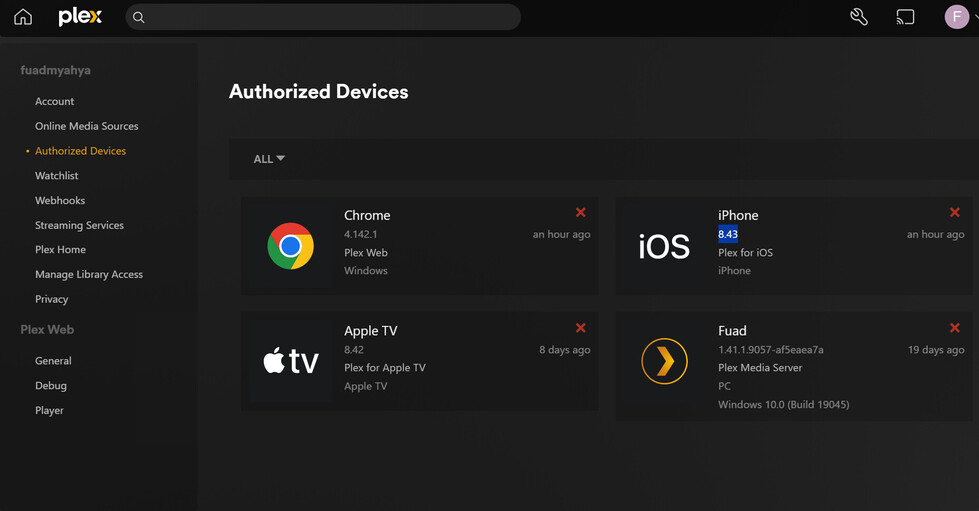
Server Version#: 1.41.1.9057-af5eaea7a
Player Version#: Chrome 4.142.1, Apple TV 8.42, iphone 8.43
<If providing server logs please do NOT turn on verbose logging, only debug logging should be enabled>
I cannot access my movies, music, or photos. Under Authorized Devices, each devices shows a red cross.
This problem recurs far too frequently. Usually, it is solved by either updating the server version or restarting the desktop (Windows 10) or both. I did both this time, but no luck so far. On the iPhone app, under “More,” the top item on the menu is my name (Fuad) and the initial F in a circle. Next to that is “Offline” in red.
Here is a picture of the Plex interface on my desktop. Clicking on the + sign used to bring up my media. Now, it only offers me to install the latest version of the server, which I have already done, to no avail. I have also signed off and signed in and restarted Windows. My media is not accessible through Plex, although it is there on the drive. I can see it through Windows folder system.
Following the provided link, here are the instructions to “Easily Gather Logs”:
Go to Settings > Manage > Troubleshooting in Plex Web App
Click the Download Logs button
Save the resulting zip file
The steps seem simple, except that the “Setting” page does not have a “Manage” button or link. There is a “Manage Library Access.” When I click on that, I don’t find any link named “Troubleshooting.” I find a button labeled “Grant Library Access.” When I click on that, I am prompted to select my email address. When I do, it tells me that I don’t have any connected servers.
With this method failing, I tried the next suggested method, " Manually Finding Log Files" for Windows in the folder “%LOCALAPPDATA%\Plex Media Server\Logs.” The folder has two other folders within plus a whole bunch of files, only five of which are named “Plex Media Server.” I tried zipping the entire big folder and posting it last time, but it was too large. It was rejected. So I surmised that only the five files were required. That is why I sent you that “handpicked” selection in my previous email. I have now zipped all the files in the folder minus the two sub-folders. I hope it will go through and it will do and I can watch my movies again, at least in the new year.
As to the suggestion that I have “either a router problem or a DNS rebind problem,” I don’t know what that means. My router does not have any detectable problem, and nothing has changed router-wise. I certainly don’t know what DNS is or what “rebind” means, and even if I did, I would not be any closer to fixing this problem.
There are two main huge problems with Plex:
This problem that I am having now occurs far too frequently – basically every time there is an update to the software, which is often. The problem typically resolves with a simple Windows reboot. This time, no luck.
Fixing problems with this software requires an inordinate amount of intimate knowledge of software that should not be expected of an end user.
We are three quarters of an hour from Christmas morning. Merry Christmas to you and yours. I just wish my wife and I could watch Polar Express. Plex DLNA Server Neptune.zip (4.4 MB)