I got on my Mac laptop and tried this and I’m getting “connection refused”.
Where is your Plex Media Server hosted?
I made a typo in my instructions, it should be ‘127.0.0.1:8888/web’. And, as mentioned above, you may need to provide your username (if not the same as the system from which you’re accessing the server).
Wait, I think I forgot something…
Yeah, it doesn’t work for me. This is running in a jail, so I don’t think any user account will work.
Well, it is a matter of connecting to the locahost of the Plex Media Server, wherever it may be hosted, either a container, server on any supported OS platform.
You either connect to the console of the hosted server with a UI capable of http to the localhost ip of 127.0.0.1:32400 or setup a tunnel as mentioned earlier to do the equivalent over the network.
This should even work on a container image. You will have probably tunnel to the host OS server first and then tunnel to the container itself.
Which I may be right on this one or not. Maybe someone from the community may provide insight on a container scenario…
I can connect to the actual host of the system, but the jail has its own networking stack and local IP on the network.
Hmmm…
You should be able to enable SSH in your jail (from its CLI) with something like:
sysrc sshd_enable=YES
Then SSH to its (the jail’s) IP address. I’m oversimplifying it, but it can be done.
Particularly if it’s a thick jail, it should be treated, more or less, as a separate FreeBSD install.
I have to do more research now…
The tunnel connects but it wants an account password, and I have no idea what it would be. When I access the jail normally with jexec I’m just let in as root without entering anything. It’s not the same user list as the host.
I don’t usually work with containers so I am out of my depth here. Hopefully someone else may be able to assist you…
I don’t need assistance  . But thanks
  .
.
I got it reclaimed. I ended up adding a new user to the jail’s BSD install for the SSH tunnel to connect with. I tried setting a password on the existing plex user, but even after adding a home directory to use I still was not able to get a working connection for the tunnel that way.
Now to go undo all the changes I made to the OS there…
I am having the same issue as many others in that after changing the server password, the local resources are no longer available with error “FreeNASPlex is currently unavailable” Everything I could find has not provided a fix. This server has been working fine for years but now is unusable. What am I missing?
Are you still able to browse to the LOCALIP: 32400/web address and log in there?
Yes but only drilling down to get “https://app.plex.tv/desktop/#!/” I am able to login with the new password.
Afterward this appears:
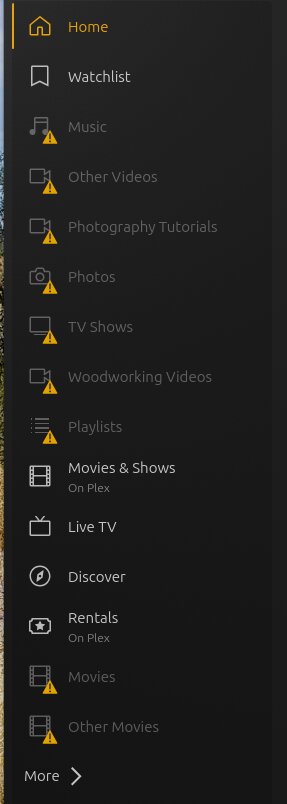
When attempting to access any of those resources I get:

Just for clarification, I am running TrueNAS Core 13.0U-6.8 with Plex 4.149.0.
Not app.plex.tv, the local address.
In that case the answer is no. The address is pingable but login does not happen until it translates to app.plex.tv
For TrueNAS containers. (Should also work for FreeNAS - please advise)
- Go into Apps → Plex
- EDIT the config
- Obtain a new claim token from https://Plex.tv/claim
- COPY it
- PASTE into the “Claim Token” window in the config
- SAVE
- Restart the container

Thanks for that but I am not running containers. Plex was installed years ago via the plugin. It is running in a jail.
Thank you @ChuckPa , but this is not Scale/C.E. – this is TrueNAS Core.
Is it actually translating to app.plex.tv? What does your address bar say? When you browse to http://localip:32400/web/ it should be staying on that server IP. It does not redirect to a remote page.
