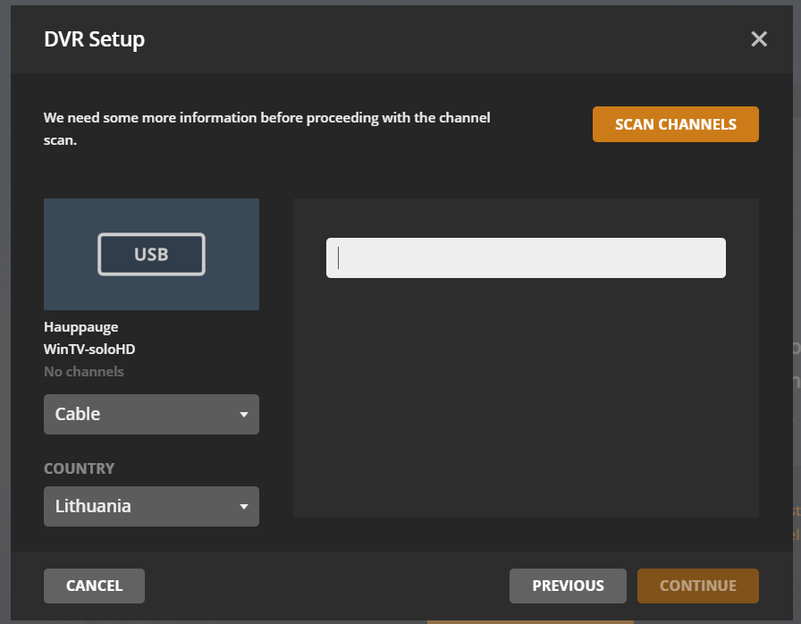
Hey everyone, my first post, sorry if posted in a wrong category.
When trying to add channels via plex.tv I get an option to enter something, not even disclosed what, by checking HTML source ID=“provider”, hence, I have entered my postcode, cable provider etc, nothing works. Gives a message “Could not communicate with device”
In addition to that, I have downloaded NextPVR in order to test if the device works properly, and yes, DVB-C channels were discovered and successful playback of HD channels was made without any issues.
Ok, Problem solved-ish, found a workaround, thus, all of my cable tv channels are encrypted, there is probably no workaround or hardware to put in between tuner and OG cable, so the signal would come out decrypted? (I hear how stupid it sounds)
Thanks.
A short tutorial for anyone who stumbled upon here how to add DVB-T/C listings, including your own cable TV listing.
Head to \Plex\Plex Media Server\Resources\Tuner\Shared\scanners
Select accordingly - DVB C or T folders.
Download a DVB C/T scanner (DVBviewer or NextPVR)
Continue with a scan. Upon it’s done - export the list with “frequencies”.
Create a new file in the DVB-C/DVB-T folder - 5999.ini
[SATTYPE]
1=5999 - File name i.e. 5999.ini
2=DVB-C LT (Cable Provider Name) - Displayed title
3=LT - Country ISO
[DVB]
0=1 - Number of channels
1=362000,V,6950,QAM64 - Extract Position 1, Position 3 and Position 5 from scanned file before (362000, 6950, QAM64)
2=362000,V,6950,QAM64
Save the file as admin.
This is an answer what does this field look and edit:
By adding a 5999.ini file to dvbc folder, now I get an option to actually scan and search for my Cable Providers channels and map them later on to EPG.
Windows 7 (64 bit), wintv-quadHD, Plex pass premium
winTV-quadHD installed with latest drivers – scans for channels and finds over 40 digital channels and plays each properly as normally expected – same channel numbers as picked up by my TV tuners
I have a Plex pass subscription for live TV and DVR – when I scan for channels using Plex with the digital cable selection it finds the wintV tuners (identified as PCIE), but it finds completely different channel numbers and none play live and I get a Plex error message when attempting to play any of the channels
I don’t have a cable TV subscription, but am able to pick up the digital TV cable feeds given my high speed internet subscription (some are scrambled, but most are not). My cable input goes directly to my winTV tunner installed in my computer with the Plex server (no set top box).
How can I get wintv tuner to feed the proper channels to the Plex DVR and server? How can I set up a EPG for the wintv channels?