Server Version#: 1.32.2.7100 on Raspberry Pi 4
Player Version#: 4.107.2
I got an email this morning saying someone had logged into my Plex account (wasn’t me) so I did the normal thing and updated my password and logged out all devices. This seemingly worked fine for all players, however I now cannot see my server. When opening the server’s build-in web player there is no server shown and in settings there is no server listed. It just says “Get Plex Media Server”
I have (unsuccessfully) tried a number of suggestions I’ve found online to try to make the server visible again:
- Restart PMS (and the Raspberry Pi)
- Logging out and back in to the “Bundled Version of Plex web app” from Why can’t the Plex app find or connect to my Plex Media Server? | Plex Support
- Remove existing server from Authorized Devices
- Removed specific settings from Preferences - from Why am I locked out of Server Settings and how do I get in? | Plex Support
- Update PMS to latest version
My raspberry pi says PMS is running, but when I open the web app the player loads but there is no server shown, and no server options listed in Settings.
Usually my server is listed here, but it just says “Your Media” which when I click on that it says “Get Plex Media Server”

And here it usually has lot of Server settings listed in a section below the Plex Web section
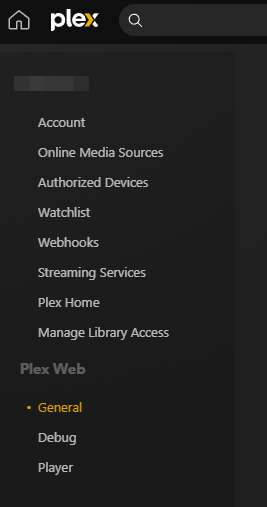
Other than maybe completely removing PMS and installing fresh (I’m not even sure that would work) what other suggestions can I try to make my server visible again? I am guessing (perhaps incorrectly) that the problem is it’s now not authorized, I just don’t know how to get it authorized again to make it visible.
Appreciate any help.
Thanks
