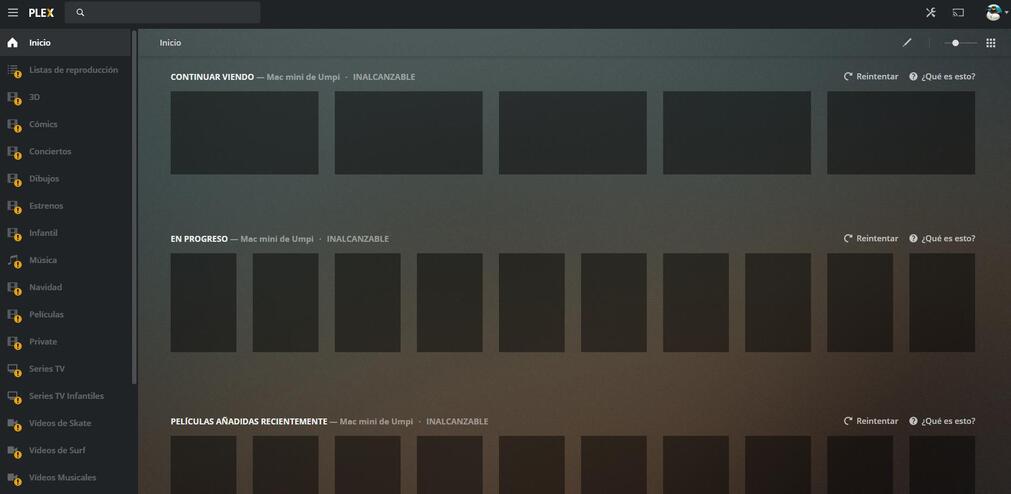
Server Version#: 1.18.6.2368
Player Version#: Plex web Versión 4.24.1
Good afternoon, I have a Plex server on a Mac Mini that has been running for 4 years perfectly. A few days ago, in early February, while listening to music through Plex Web, all my libraries appeared with a yellow exclamation mark and the server was unreachable. I restarted everything and I could verify that I could not access from any other device. All those with whom I have shared my libraries had the same problem. After doing a search on google for information I could verify that many people had the same problem and that it seemed a problem outside my server, so I left everything as it was and the few hours everything worked again … until yesterday, Only now I can access via plex from the Android app, but not from the work computer with Google Chrome. I have a message that says it is not possible to connect securely. If I select to allow unsecured connections, you can see the server, but when trying to play content, an orange circle appears spinning forever. I have the latest version of Plex media server installed, I have tried with 1.18.6, with 1.18.3, with 1.16, with 1.15 … and with all of them I have the same problem.
It does not work on Samsung TVs, nor LG …
It seems to be a security, API and authentication issue
Any solution to this ???
Thank you…
My Plex app opens and shuts immediately now on OSX. It was working fine last night (and even captured . new show around 1am), but nothing is working now. I’m really frustrated.
Is this just a Mac issue? For me, it started at least around 1am (and now its 10:30am), since thats what I got a notification from Plex of a new show being added.
How do you check logs to see error codes if you can’t get Plex to load? Trying to visit it by the IP address (web access?) does not work
This is very weird, I share my libraries with 9 members of my family. Some of them can access normally through their smart TV’s but others can’t. I have logged in through google chrome from my computer, in my sister’s account, to take a look, and
everything seems to be ok, I can see libraries, and play content… but my sister at her home has an orange exclamation sing on every library. She tried through her iPad, LG Tv, and chrome browser, and the same problem on every platform… The server is unreacheable…
With my own account, I can access through local network… but externally I can connect with android app, but not with google chrome from work…
A week ago, everything worked perfect…
I was having the same issue and had to connect using an “unsecured” connection.
Removing the check from “Enable support for IPv6” seems to have fixed the problem.
“Enable support for IPv6” location:
Didn’t fix it here (IPV6). Only thing that fixes it now is to enable transcoding. Nothing will play if transcoding is disabled on the server. However, if you hit retry on the android app and QUICKLY change the quality back to Original, it plays PERFECTLY fine. Unfortunately I cannot do this quick enough on the TV at my parent’s place.
I’m wonder what they actually broke with this update. Is there a way to actually roll back to the previous version? If so, I’m going to do that. Can’t take this anymore.
Same issues going on here.
PMS is Linux Docker: 1.18.6.2368
Plex Web App: 4.24.2
I have currently solved my issues with video playback by disabled hardware-based transcoding. I fully understand that in some cases this is not a viable solution, but it appears to be one of the correct paths currently for me.