Do you have a PlexData share in Control Panel - Shared Folders?
You should now.
Edit the share properties and give your username permission.
Once done, you can open FileStation and go into PlexData -> Plex Media Server
Now, right-click “Logs” and compress to the ZIP file.
When done, attach that ZIP here.
(this is a lot easier than getting logs from the shell )
It seems to be grayed out, nothing happens if I click on it
Go to the top and REMOVE the share (delete any contents)
Next, Create a fresh one as you deem appropriate for you to access.
Lastly, restart Plex.
(When Plex starts, it populates “PlexData” with the links)
Will that delete my library at all? I dont want to delete my files
No.
Your library/metadata is stored in /share/***/.qpkg/Plex Media Server/Library
The only thing I am providing here is a linkage which you can use to access that for backups or logs from File Station.
It also allows you to access your metadata (backups) over SMB
Here is message I get, what should I do?
Correct. Remove the PlexData share
check the box.
Ok removed. You want me to Create a new folder? Or just restart Plex and it will create one for me?
You can do either.
If you create one, you can specify the access properties (permissions) as you’re doing it and can place it anywhere you want.
If you let PMS create it. It will be created on whichever volume Plex is installed on .
(it only uses 4K bytes of space no matter where it is). After Plex creates it, you’ll still need to set the access permissions (I do not assume anything because everyone is different)
Ok, I did that. And I edited permissions to read/write, same problem
if you restart Plex, (it’s ok that it fails to start)
Open File station
Do you see a Plex Media Server link in the “PlexData” share?
cool.
Now click it and go into it.
Now you’re actually looking at your PMS installation (under the QPKG directories)
See Logs ?
Right-click logs and then select Compress (zip)
It will zip it up for you,
When that’s done, download the ZIP to your computer then attach it here for me to see.
We’ll find out what’s happening with your Plex server
Ok here it is, Logs.zip (900.7 KB)
I know we pulled teeth to get here (which i’ll continue to try and resolve about why that was so tough to create)
Your database got corrupted.
Jul 30, 2020 20:20:48.161 [0x7f6d95ab9740] ERROR - Exception thrown during migrations, aborting: sqlite3_statement_backend::loadOne: database disk image is malformed
Jul 30, 2020 20:20:48.178 [0x7f6d95ab9740] DEBUG - ChangestampAllocator: initialized to 25036656
Jul 30, 2020 20:20:48.178 [0x7f6d95ab9740] DEBUG - Opening 2 database sessions to library (com.plexapp.plugins.library.blobs), SQLite 3.26.0, threadsafe=1
Jul 30, 2020 20:20:48.178 [0x7f6d95ab9740] ERROR - SQLITE3:(nil), 26, file is not a database in "PRAGMA cache_size=2000"
Jul 30, 2020 20:20:48.178 [0x7f6d95ab9740] ERROR - Database corruption: sqlite3_statement_backend::prepare: file is not a database for SQL: PRAGMA cache_size=2000
Jul 30, 2020 20:20:48.178 [0x7f6d95ab9740] ERROR - Error: Unable to set up server: sqlite3_statement_backend::prepare: file is not a database for SQL: PRAGMA cache_size=2000 (N4soci10soci_errorE)
here’s where this “PlexData” share is going to make life a LOT easier.
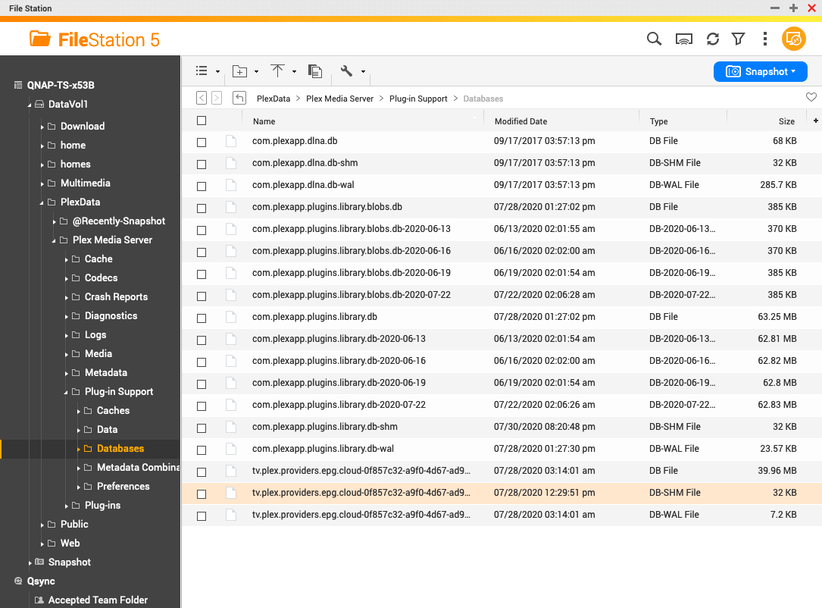
Navigate into PlexData/Plex Media Server/Plug-in Support/Databases
You’ll see all the databases which make Plex work.
Can you show me (screenshot) what you have?
Ok.
here is the sequence.
- Rename
com.plexapp.plugins.library.db to plex.broken.db
- Copy
com.plexapp.plugins.library.db-2020-07-22 (make a duplicate)
- Now rename the dup to be
com.plexapp.plugins.library.db
- Delete
com.plexapp.plugins.library.db-shm
- Delete
com.plexapp.plugins.library.db-wal
What we’ve just done is:
- Moved the corrupted DB out of the way
- Copied the newest backup to use as the ‘current’ DB
- We deleted the two runtime files (WAL & SHM).
The WAL and SHM are normally removed when PMS shuts down cleanly (as ordered by QPKG ).
This implies to me your NAS suffered an abrupt power off. Did it ?
Well my NAS died about a month ago. And it shut down. I had it repaired, but when I reinstalled drives the NAS didnt find the files. So I was told to power up the NAS and install 1 drive at a time. When I put in one drive it asked me to put in 2nd drive and it rebuilt the Raid 1 I had. But it worked after that, it stopped working after I did the recent firmware update
Thanks. That explains how we got to this point. I greatly appreciate it.
This sequence will take PMS as you have it and restore to the date of that backup.
After Plex comes back up, you only need “Referesh All Metada” for each section and check your settings to make sure everything is as it should be.