Hi I am having huge difficulty, I cant add media, as I am told to download the plex server, server is downloaded and active and logged in and it wont allow me to add a server. Dont know how to solve. Any help would be welcomed I want to upload all my media to plex. I only get the link to download lex server that is already downloaded and working. @support please can you assist. Thank you.
Hey there,
I need more information… You installed Plex Server on a Windows PC ? Linux? Docker… ?
WINDOWS PC - plex is working on Roku, bit wont display server on plex media server , cant sync or add new media
You installed the Plex server on your Windows computer, but probably didn’t register it to your account?
Usually you need to access the server’s own web client by going to 127.0.0.1:32400/web on the server itself. It should ask you to “claim” it. Make sure you are doing this on the same account that you are logged into on the Roku (I say this in case you have multiple accounts.)
Once you claim this server on the account, ANY other player/client you log into on the same account should automatically see the server.
In Plex/Web, go to Plex Settings > (Manage) Libraries and click on Manage Recommendations beside your library name and make sure you check/uncheck the various settings under the Home column.
This tells Plex to display the library etc. on your Home page in Plex/Web and that should also make things visible on the Roku.
Assuming the Roku is similar to Fire TV, you may also need to scroll down to the more… tab (left of screen) on the Roku and then select the server/library you wish to display on the Roku.
You will need to repeat the process for each server or library you wish to add to the Roku home page.
HTH

Hi there
I cant find the manage library option, see screenshot. I also cant friend to share with it says I have no servers and I cant add servers, so I am going around in circles
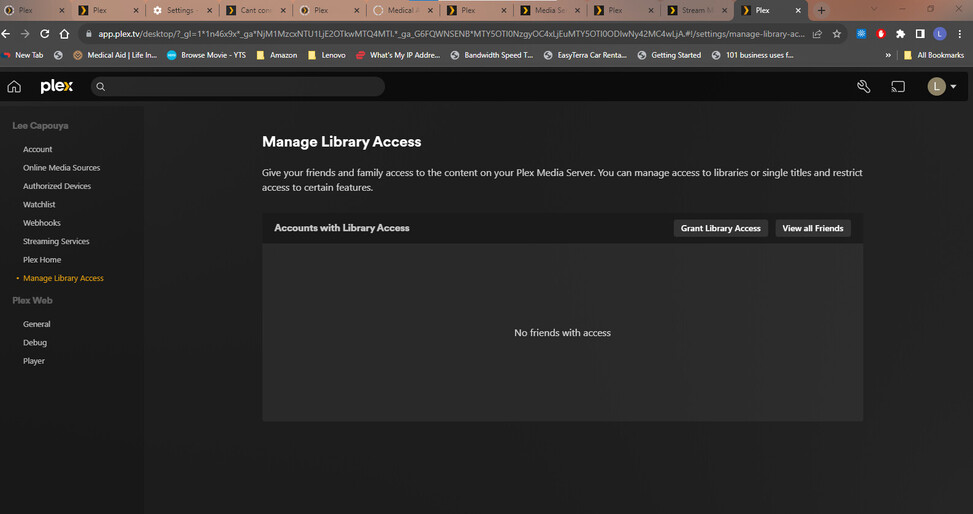
To open your server:
-
The server software must be installed on your machine
-
The server must be running on your machine (click/double click on it’s icon to run the server)
-
You must open the server in your browser with the address: http://Your_Server_IP_Address:32400 E.G. http://192.168.0.22:32400 or by right clicking on the Plex icon in your system tray (bottom right of screen) and select Open Plex.
-
Sign into your Plex account
Once you have verified the 4 steps above, then you should be able to add media and access the server etc.
If however, you are still unable to see the server, then try downloading the software again, uninstall Plex and then reinstall Plex using the latest download.
Then follow the 4 steps above once more.
Hi there, thanks for all your patience and help I did all of the above and even unistalled and reinstalled plex server and still cant find my server. I am so confused. Please can you advise what to do next. i logged into 192.168.4.45:32400 and it said there is an unclaimed server and I must log in to claim it. I logged in and still nothing
To claim the server, you must open Plex/Web using http://Your_Server_IP_Address:32400 on your PC, and then go to Plex Settings (Spanner/Wrench icon, top right corner) > General.
There you will most likely see a Claim Server button. Click on it and your server should then be claimed.
Fingers crossed, you should then be able to setup the server.

If it’s regular Windows: New Claiming Requirement for Windows
if it’s a Windows Server edition: Plex install fix for Windows Server (Claim issue)
