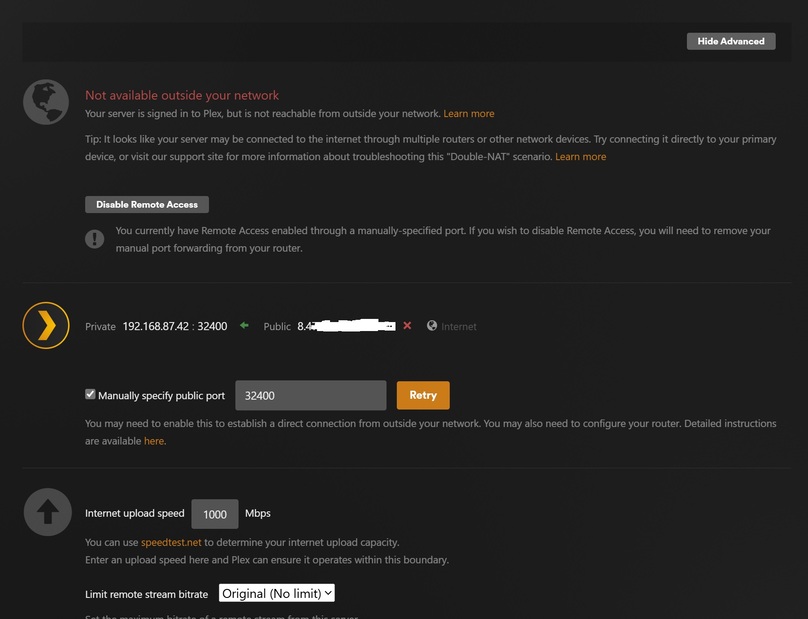
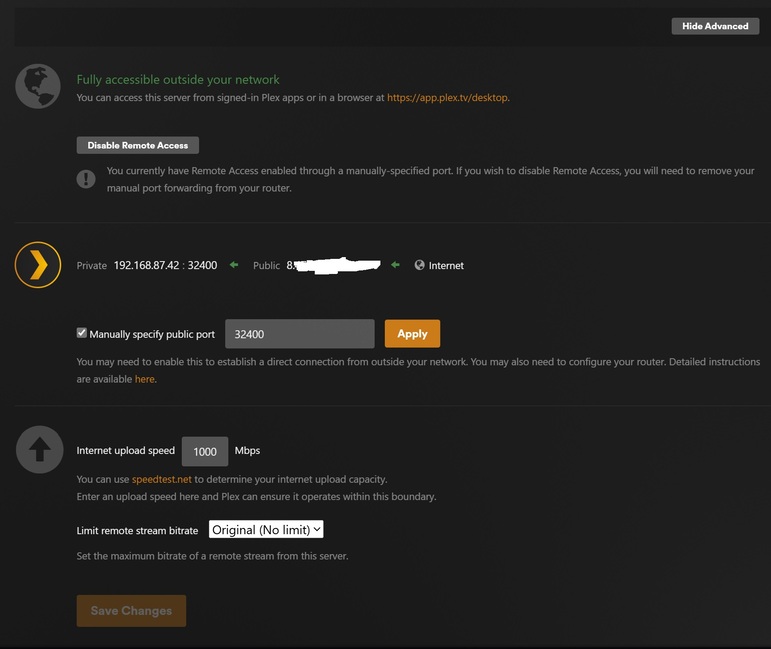
Server Version#: Version 1.40.3.8555
Player Version#: 10.17.0.868
I cant figure out how to get remote access working. If the remote viewer is on the network (wifi) it works fine. But it doesn’t see the server over the 5g connection.
I started with this link Troubleshooting Remote Access | Plex Support
UPnP is turned on. I turned it off and on again. I’m on a Google Home mesh wifi.
Temporarily turned off the built in Windows firewall.
If I manually specific port 32400 it shows as “Fully Accessible” for a minute or two but then goes back to “Not available outside your network”
When it says it’s accessible I cant see it on my phone and Open Port Check Tool – Verify Port Forwarding on Your Router (canyouseeme.org) does not show that port as available.
Not sure what to try next.
Relay works so I can transcode down for now.
Are you using a VPN? hardly any support port forwarding in the US.
Look at the tip in your first screenshot.
It appears you have two routers in your network. This places you in a double NAT situations, and Plex remote access will not work.
Besides the Google mesh, did your ISP provide a router?
If so, where is the Plex Media Server connected - to the Google mesh or ISP router?
And is it connected via wired Ethernet or Wi-Fi?
It never works. That is Plex trying, and failing, to activate remote access.
I have the Google Mesh and an ONT for my fiber optic connection. I dont think the ONT device has any routing options. The install documentation says you need to hook up a wireless router to it.
I set up tcp port forwarding in the Google Mesh interface for 32400.
But Open Port Check Tool – Verify Port Forwarding on Your Router (canyouseeme.org) is reporting that my public port ip:32400 connection timed out.
I guess the next step is verifying that the ONT box has no routing capability
It does not. I ran that exact same setup. The ONT is just your assigned public IP. However if you have other boxes on your network for TV service, they can be routers. If so make sure they are in bridge mode. And make sure the google mesh is in NAT in network settings, advanced.
also verify the IP that tool is detecting IS actually your public IP. For me it’s inaccurate because I have multiple here. This one allows you to type in any Open Port Check Tool - Test Port Forwarding on Your Router
I dont have any other boxes running. Google mesh is in NAT mode. And I set up a static ip and port forward for 32400 in the google mesh interface.
Plex is showing my public ip. I checked with your tool and that port is still closed.
Also tried running ethernet from the google mesh box to the computer.
Next step will be running ethernet from the ONT straight to the computer (but I need to move some stuff around to make that happen). For now I’m just running in relay mode.
Man it sure sounds like something is missing…from everything you said, it should be working…
Call your ISP and ask if you have a publicly routable IPv4 address. It usually costs extra fee or a business service is required.
Can you log into your Google mesh router and see what it shows for its public/WAN IP address? If so, ensure that matches what Plex and/or canyouseeme.org show for your public IP address. They should match. If not, you are indeed in a double-NAT situation, either of your own making or of your ISP’s (possible CG-NAT).
turns out my ISP is using CG-NAT.
I can upgrade to a static ip. I will do that before I go on my next trip so I can stream full res.
You should do that well in advance.
Nothing is worse than struggling with network issues while you are supposed to prepare for the trip.