when i follow the instructions it wont let me save the info, thats when the error pops up…
well lol it just turned red…
BTW im using almost all 720p with an occasional 1080p…
Given the number of permutations of setups and routers, you need to first understand what is going on. The problem that is being solved is that your PLEX server is sitting on a private network. Its IP address is a private address which is not reachable from the internet.
However, unless you are unlucky enough to be sitting behind multiple NAT devices or CGNAT, your router to the internet has an internet-reachable IP adress which it “shares” with all the devices on your private network.
So now let’s look at a PLEX connectivity setup that is working:

You can see that Plex is sitting on the private network IP of 192.168.3.13 and listening on port 32400. This works for devices on the private network, but is not reachable from the outside world.
However, you can see that from the outside world, it is reachable from a public IP address which I have blacked out and port 10346. My router translates connection requests sent to its public ip address on port 10346 to requests on the private IP of 192.168.3.13 and port 32400.
No matter the setup, this is what is happening. But there are two things that need to happen to make the setup work:
a) The router needs to know what translation is set.
b) Plex needs to find out what the public ip address and public port are so it can tell your client devices how to connect.
Let’s deal with (a) first.
The simplest way to make this happen is to use UPnP (Universal Plug’n’Play). This is what I use. Let’s look at a router status screen for where UPnP is working:
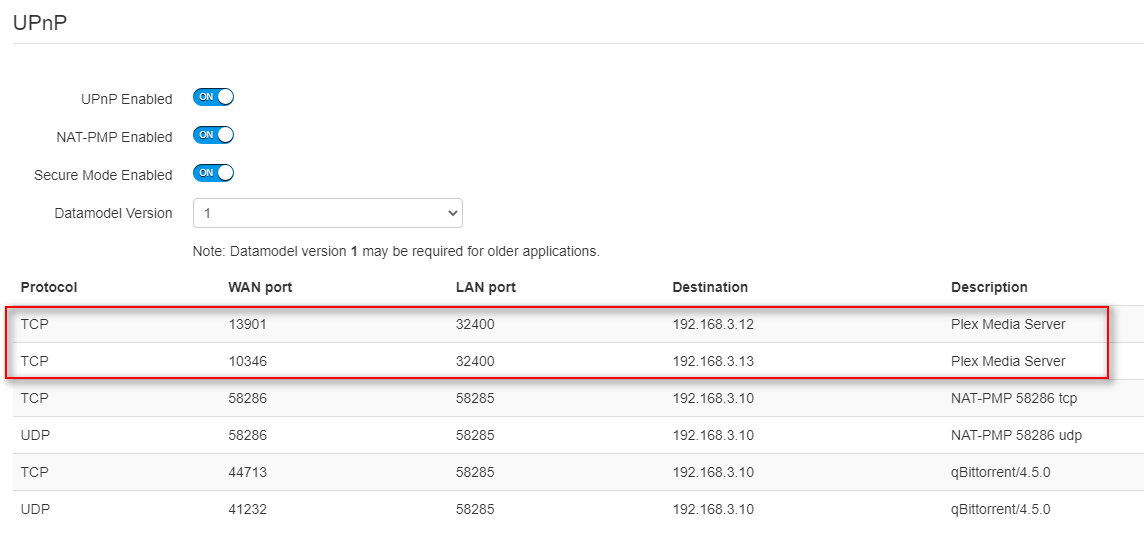
Here you will see that connections that come in to the public IP of my router on port 10346 are forwarded to the PLEX server in the picture above on port 32400. The local port is always 32400 as far as I know. You’ll also see that connections coming in the same public IP but with a different public port 13901 get forwarded to a different PLEX server, but also with local port of 32400.
But what if you aren’t using UPnP either because your router doesn’t support it or because you don’t like UPnP because it can expose security vulnerabilities?
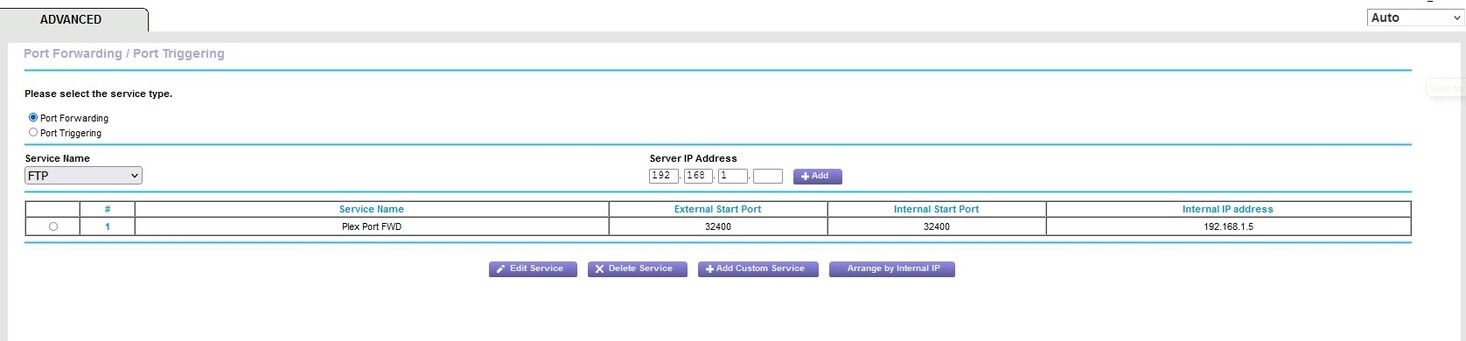
You need to manually do what UPnP does automatically. You need to set up port forwarding on your Internet router. An example of a port forwarding table is below:

I don’t need to set up port forwarding for PLEX, but I do need to set it up for Tautulli. Now on the local network, Tautulli by default listens on port 8181. I have two tautulli servers on my network, so I have set one up such that a connection from the outside on port 8182 goes to one PLEX server, and a connection on port 8183 goes to the other one.
Sweet.
So if you are going to set up port forwarding for PLEX, you need to set up a rule that forwards Public IP:Public port to Local IP: Local Port.
Public IP is the external address of your router which wil probably change from time to time, but that’s OK because you don’t have to configure that in anywhere. Plex finds that out. Public Port by default is 32400, but you can change that as long as you tell Plex in the configuration screen. If you leave that Public Port blank, then you need to configure 32400 on your router. If you change the public port on your PLEX server, then you PLEX and the router need to have matching public ports.
Where this can go wrong is if the local IP of your Plex server keeps changing because it gets its IP address using DHCP and is dynamic. Your router will potentially be forwarding to an out-of-date address. You either need to configure your server with a static IP address or you need to configure router so it always gives the same IP address to the server using DHCP. How you do this varies by your preference and the capabilities of the DHCP server in your router and is beyond the scope of this reply.
Now let’s talk about (b) - how does PLEX know what public IP and public port your clients should be trying to connect with?
Your PLEX server knows the public port either because it found out from the router using the UPnP setup, or because you are using port forwarding and it defaults to 32400 or uses what you configured into the manual public port field.
When your PLEX server talks to the PLEX in the cloud, it tells thge PLEX cloud what the public port is. The PLEX cloud knows what the public IP address because that is the Source IP for the connection you just made, and it will tell your Plex server what it is. So now the PLEX cloud knows a pair Public IP:Public Port which it will communicate to your clients so they know how to make a direct connection to your server.
I hope this has not been too confusing.
LOL i stayed with you for awhile, i understand the gist of how it works but what is the first issue? Is it because i cannot complete the port forwarding due to the error/ conflict? if so is that something i need to clear up with my provider? BTW do i have to put in an upload speed? i attached my test…

would it be easier to do it through UPnP?
Do i want to manually specify port 32400?
UPnP would greatly simplify things, IF IT WORKS. For now, disable the “manual specify port” checkbox, and enable UPnP in your router.
WARNING: UPnP enabled is considered a bit of a security risk. It won’t let any virus into your house, but if you have one already, UPnP can open a large hole for worse viruses further on.
It looks like you already have a port forward rule for your server, and the ports look correct. Double check that your server’s internal (in your house) IP hasn’t changed in all this time. The only screenshot I see that confirms your server’s IP is one of your first ones. Is it still 192.168.1.5?
Next, I want to see what happens when you check that radio button on the left-hand side of the row for the existing rule, and click Edit Service. Specifically, I want to know which protocol you are forwarding, TCP or UDP, Both, or All.
If you wish to add an upload limit, go ahead and enter… I’d say 40 Mbps. I don’t think it should effect your ability to get external access working, but it wouldn’t hurt.
1 Like
NO. You would only do that is you had more than one PLEX server and wanted them to be individually accessible using different public ports.
OK there is another reason why you might change the public port. If there is ever a known vulnerability in PLEX, then black hats are going to go around scannning for port 32400 because they know that PLEX servers will be listening to that port. If you change your public port to, say, 33400, then those scans will just bounce off your router rather than getting to your PLEX server.
I’m not an expert by any means, but I see in your screenshot there is a type of service dropdown. I don’t believe you want that to be FTP, but if there’s a TCP in the dropdown, select that.
You may have to delete/remove the forwarding rule for FTP first. As I said, not an expert…
And probably most important, as mentioned previously, make sure the computer has a static IP on the local network first.
1 Like
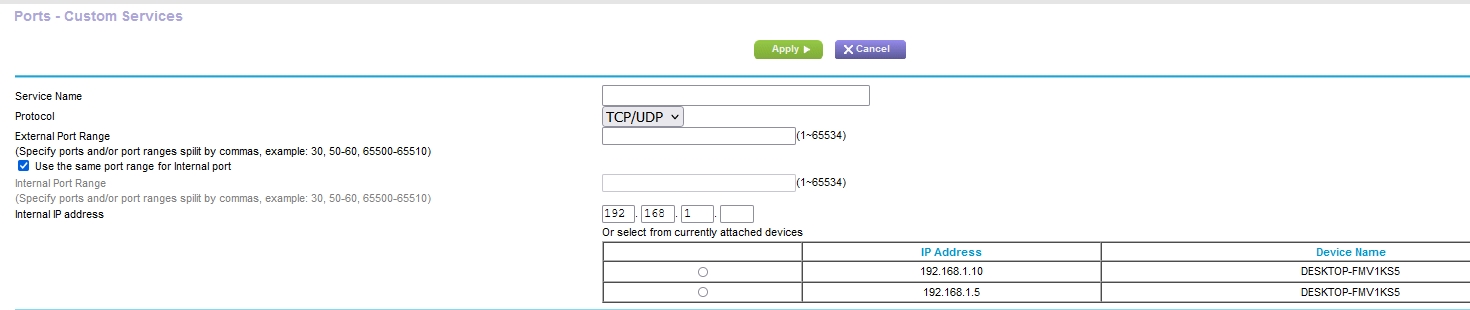
My manual button was already off, i added the upload speed. Now if you were referring to port forwarding (or UPnP when you said click the radio button etc (I assumed you meant port forwarding. I clicked it, then clicked add custom service and the pic i added here is what comes up (its when i complete this section the error message comes up)… and BTW there is no TCP in the FTP drop down…
Looking at a screenshot, it looks like the router is a Netgear type. I found a tutorial on how to do port forwarding, and it uses screenshots from a Netgear R6080, and it seems to match up with the OP’s screens. Feel free to look around on the tutorial here.
I THINK the FTP drop down is a way to quickly pre-fill certain common pre-sets for forwarding. I don’t believe it has any effect on existing forwards. The one that is there right now looks correct to me, but I’d need to sit down and fiddle with it myself to be totally sure.
That’s curious. Your computer shows up under two IP’s, meaning the router thinks that your computer is in both. Did your server IP change recently?
I followed the instructions but when it asks me which port do i want to use, do i use the 32400 or the 25850?
Never that i know of
32400. Your server is listening on port 32400, and not any other port. If you turned off that checkbox in the Plex server settings to Manually specify public port, then the only number you need to worry about is 32400.
External port is either 32400 or whatever you set up as the manual public port in your PLEX server.
Internal port must be 32400.
when i do all that i get an error message, when i looked it up online its a firefox issue supposedly…
If your computer is connecting with both a WiFi and an ethernet connection, wouldn’t it show up as two IP’s? I’ve disabled the wifi connection on mine a long time ago… maybe it was because of a problem with Plex, but can’t remember why.
im using ethernet is it showing up as wifi also?
