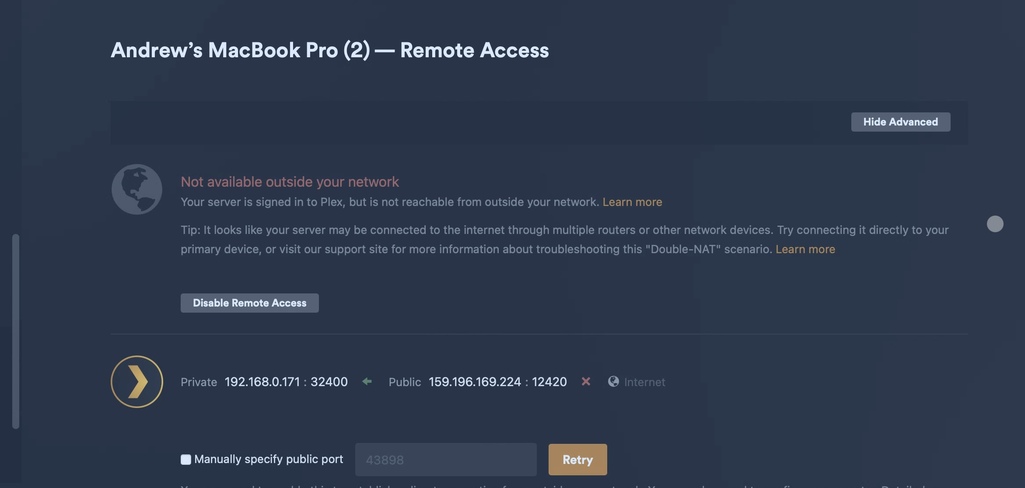
Server Version#: 1.40.5.8854-f36c552fd
Player Version#: 4.136.0
Hello, I’ve already posted on here before requesting help for the same topic but I said I’m going to give up because it’s over my head. I’m not good with port forwarding, I find the tutorials hard to follow as someone who isn’t tech savvy when it comes to anything like that. But I’d really like to get it working.
So if someone on here who knows exactly what they are doing could somehow help me? Maybe I could send them screenshots of what I’m seeing or something so they can help me get this bloody remote server working, that’d be amazing.
I have a D-Link DSL-4320L router with UPnP enabled. I believe Plex has an exception in the firewall and I tried port forwarding with no luck but I probably did it wrong honestly. I’m just super frustrated and in over my head. So if someone would be kind enough to reach out and offer assistance, that’d be fantastic.
take a screen shot of your port forward settings.
im in the same boat, ive tried multiple times. i think ive got a static ip but i keep failing sometimes it last 10 mins other times 10 seconds.
ive had it working at my previous house, but i had an enternet cable. here is new router new provider but trying to use wifi not tried ether net cable simply cause i actually cant find it as of yet. super frustrated tried following the trouble shooting but to be honest. i have no idea and ive learnt alot but im at my witz end and about to launch my pc off my balcony
what model router? which ISP? maybe others have the same and can give advice
I’m in the same boat. I have enable port forwarding in router settings, manual port in Plex server (pictured) as well as auto. Has no bearing.
Yer I know as in I’ve tried both! Took a screen shot of that page at that point.
I am having the same issue. Anyone have a solution? I have a cox modem and router and I cant seem to get into it to change any of the settings and Cox was absolutely not help as it was an older model. I found the website to log into the router but the name and password that is printed on the bottom of the router did not work. I bought the plex pass just for this feature but I suppose I will cancel since I can’t get it to work.
I am having the exact same issue. I turned off VPN, router firewall and windows firewall and it didn’t help. I have double checked my port forward setting, no issues there neither.
I am having the same issue. Remote access is enabled and a few seconds later disabled. Manual port 32400 forwarded. VPN disabled and enabled.
Any suggestion?
I wish there was more fault finding on this.
Sorry for not getting back to everyone, I ended up resolving it myself purely out of luck. I turned my VPN off one day and it worked, turned the VPN back on and it didn’t work. I use Nord VPN and there’s a setting in there to allow remote access features, turn it on and it’ll sort it out. If not, there’s also a setting to do with tunneling or something… I can’t remember exactly but I’m sure all VPN’s will have a similar set up, do some Googling around VPN’s and remote access and hopefully you can find a solution and this is somewhat helpful for everyone.  good luck! I’ve had no issues since discovering this.