Hi,
for the first time I’m facing with PLEX issue which I can’t fix it in any way.
My PLEX setup:
server version 1.25.4.5487 installed on Synology DS1520+
client version 8.10.0.21911 installed on Sony KD-55XE9005 with Android. TV is connected via WiFi AC, which guarantees 860 Mbps.
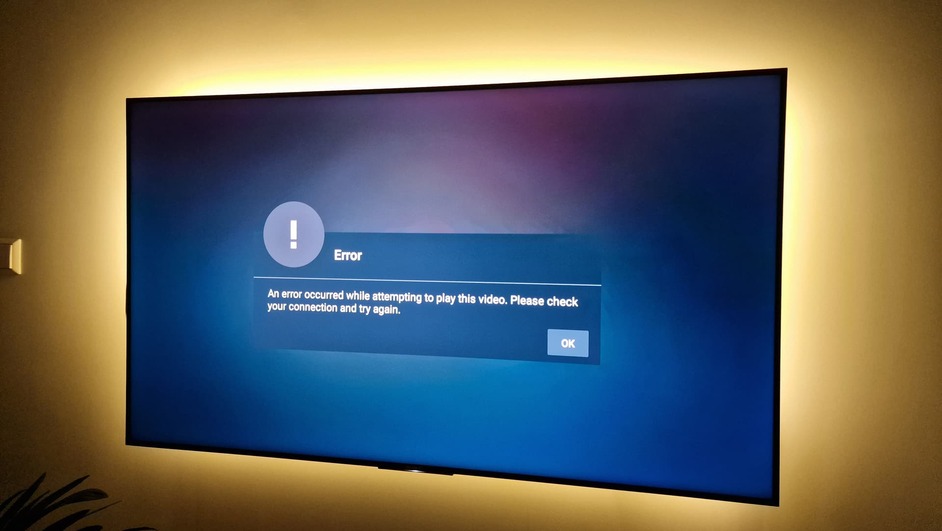
I had no issues even with playing 4K movies: no buffering, no video stuttering. Then I decided to upgrade everything to the latest versions (server 1.29.0.6244; client 9.9.0.35519). After the update I realized, that 4K movies started to buffer, so I decided to rollback to the working setup. Now, with previous setup I can’t play anything. Any video, which I was able to play before. When I start any video, I see blurred picture, spinning circle:
I haven’t changed anything in this setup, except upgraded and downgraded PLEX server and client versions. I I install the latest versions again, I can play videos, but 4K movies are buffering in comparison with previous versions.
Please help to solve the issue and help me to make previous setup working. I’ve attached logs from server console view.
Server Version#: 1.25.4.5487
Player Version#: 8.10.0.21911 plex server logs.txt (4.8 KB)
It’s great to hear it was working smoothly in the past. I try to lock my server version too before then end of summer when it’s stable.
Synology devices require a series of unique steps to downgrade as you know.
Please tell us exactly what you did during the downgrade.
Have you been following the pinned topics in NAS & Devices - Plex Forum as your guide?
okay thank you sir
Hey! Thank you for your reply
Actually, in the past, I was just uninstalling the PLEX server package from Synology and installing previous one, which was working for me. And such solution was working without any magic and additional steps. I will read pinned topics, because I haven’t read them before, since I’m facing with such downgrade issue for the first time… Get back anyway with the findings and results
Manually installed the package PlexMediaServer-1.25.4.5487-648a8f9f9-x86_64_DSM6.spk
PLEX service has started automatically on Synology
The issue is still here… BTW, I’m using DSM 6.2.4-25556.
Also, I’ve installed PLEX media server on a laptop for testing purposes and added it to my PLEX account. When I try to play a movie from it, I see the same issue. So maybe it’s not PLEX server side issue, but the client related issue? But that would be also strange, since I’ve done factory reset of my Android TV and installed PLEX client on completely fresh Android OS on the TV
Any suggestions what else to check and fix?
Does the playback issue only occur on that TV?
Regardless gather smart tv logs so that it logs to your server logs
drop both zips into your reply. The txt you attached was only a snip.
Ok while I look at the logs do this. Remove the Plex App from the Smart TV. Turn the TV off. Unplug the TV for a minute, then plug it back in, and install the Plex app. Then test again. It’s worth a try if you haven’t done exactly those steps.
EDIT: I’m seeing Peer Certificate errors in the player log. Maybe TV app reinstall fixes that.
10-04 19:54:11.992  i: [FFmpeg] [INFO] [Cache] Opening source from https://192-168-1-200.c348d1dcd8b5433d9eb4d27b910087fa.plex.direct:32400/library/parts/6581/1663180363/file.mkv?autoAdjustQuality=0&hasMDE=1&location=lan&mediaBufferSize=117120&X-Plex-Client-Identifier=f8668ab7024ffd77-com-plexapp-android&X-Plex-Client-Platform=Android&X-Plex-Device=BRAVIA%204K%20GB&X-Plex-DRM=widevine%3Avideo&X-Plex-Platform=Android&X-Plex-Platform-Version=7.0&X-Plex-Product=Plex%20for%20Android%20(TV)&X-Plex-Token=...31yT&X-Plex-Version=8.10.0.21911.
10-04 19:54:12.071  i: Fetching [method:GET] https://plex.tv/api/v2/user/profile?X-Plex-Token=...31yT
10-04 19:54:12.337  i: [PictureInPictureBehaviour] Picture-in-picture is not supported on this device.
10-04 19:54:12.465  i: [MenuSheetHud] Item changed (and fetched), invalidating settings...
10-04 19:54:12.782  i: Resuming PlayerActivity.
10-04 19:54:12.783  i: [ThemeMusic] Starting fade out.
10-04 19:54:12.808  i: [SystemUIBehaviour] Hiding the system user-interface.
10-04 19:54:12.808  i: [FFmpeg] [ERROR] [tls @ 0x857f49e0] Peer certificate failed verification
and the server’s version of those errors:
Oct 04, 2022 19:12:48.047 [0x7f7500b9bb38] DEBUG - Completed: [192.168.1.74:51097] 200 GET /player/proxy/poll?deviceClass=pc&protocolVersion=3&protocolCapabilities=timeline%2Cplayback%2Cnavigation%2Cmirror%2Cplayqueues&timeout=1 (9 live) TLS GZIP 20001ms 5 bytes (pipelined: 4)
Oct 04, 2022 19:12:48.061 [0x7f75004b1b38] DEBUG - Request: [192.168.1.74:51116 (Subnet)] GET /player/proxy/poll?deviceClass=pc&protocolVersion=3&protocolCapabilities=timeline%2Cplayback%2Cnavigation%2Cmirror%2Cplayqueues&timeout=1 (8 live) TLS GZIP Signed-in Token (Etas)
Oct 04, 2022 19:12:48.061 [0x7f75004b1b38] DEBUG - Content-Length is -1 (of total: -1).
Oct 04, 2022 19:12:53.455 [0x7f7500b9bb38] DEBUG - CERT: incomplete TLS handshake from [::ffff:192.168.1.74]:38090: sslv3 alert certificate unknown
Oct 04, 2022 19:12:53.674 [0x7f7500b78b38] DEBUG - CERT: incomplete TLS handshake from [::ffff:192.168.1.74]:38091: sslv3 alert certificate unknown
Oct 04, 2022 19:13:08.062 [0x7f7500b9bb38] DEBUG - Completed: [192.168.1.74:51116] 200 GET /player/proxy/poll?deviceClass=pc&protocolVersion=3&protocolCapabilities=timeline%2Cplayback%2Cnavigation%2Cmirror%2Cplayqueues&timeout=1 (5 live) TLS GZIP 20001ms 5 bytes (pipelined: 6)
Oct 04, 2022 19:13:08.099 [0x7f75004b1b38] DEBUG - Request: [192.168.1.74:51162 (Subnet)] GET /player/proxy/poll?deviceClass=pc&protocolVersion=3&protocolCapabilities=timeline%2Cplayback%2Cnavigation%2Cmirror%2Cplayqueues&timeout=1 (5 live) TLS GZIP Signed-in Token (Etas)
Oct 04, 2022 19:13:08.099 [0x7f75004b1b38] DEBUG - Content-Length is -1 (of total: -1).
Oct 04, 2022 19:13:11.983 [0x7f7500b9bb38] DEBUG - CERT: incomplete TLS handshake from [::ffff:192.168.1.74]:38111: sslv3 alert certificate unknown
Oct 04, 2022 19:13:22.568 [0x7f7500b78b38] DEBUG - WebSocket: client initiated close
Thanks for your interesting findings! I fallowed your suggestion, to uninstall PLEX client, completely switch TV off and reinstall the client, but the issue didn’t disappear
I see these errors, but as not being PLEX developer, I have no ideas what is the root cause and how to fix them.
By the way, older PLEX client version I’ve downloaded from apkmirror.com , since PLEX doesn’t provide a possibility to download older versions (for unknown reason…). But the same package I was using in the past and it was working.
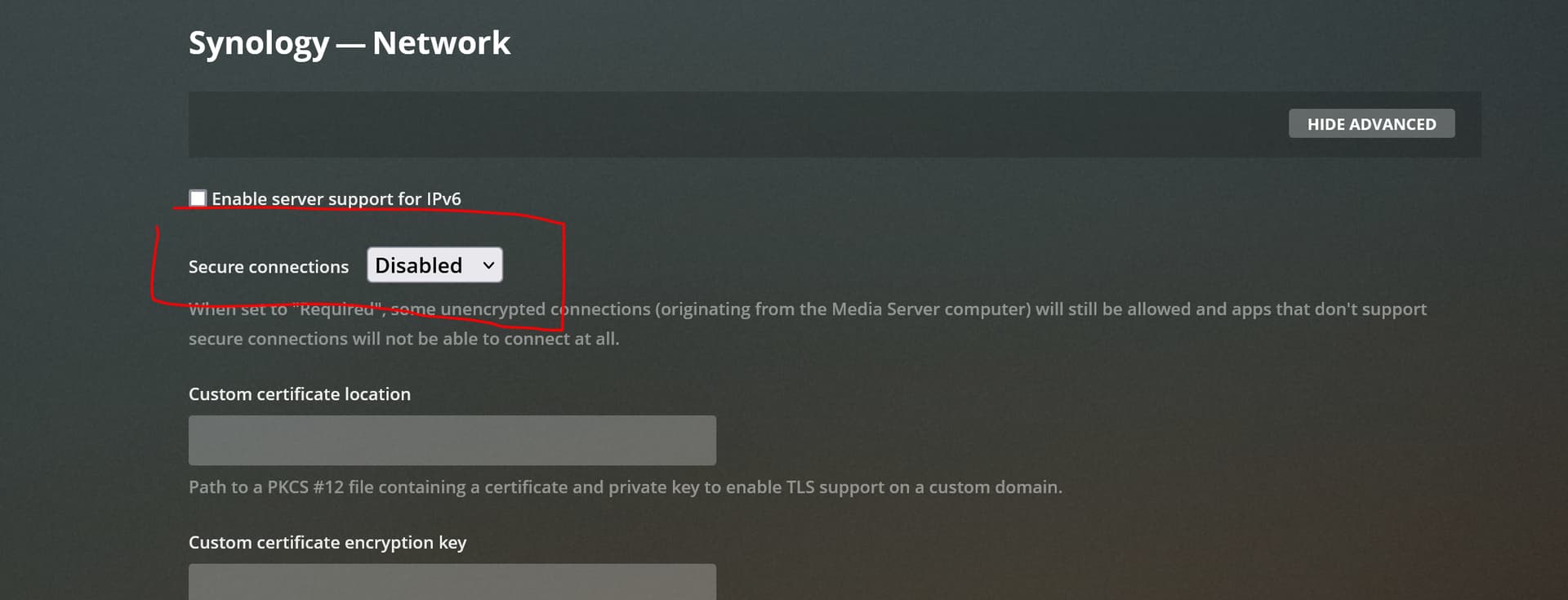
I don’t know from which version exactly, but from version 1.25 (PLEX media server), “Secure connection” has only two options: “Preferred” and “Required”. Default value is “Preferred”. I can only presume, that due to this setting, for some reason PLEX client can’t communicate with the server and we see these TLS handshake errors. Why 8.10 stooped working with 1.25 for me is still mystical case, because it was working. This is why I have no other option, than disable “Secure connection” and use that PLEX media server version (1.21), which allows me to Disable it
Another question is, why still new PLEX Client versions, higher than 8.10 start buffering, even if network setup is the same. That looks very confusing…
Smart TVs don’t all support secure connections. Plex brings that up in the first two blue boxes in the supported Smart TV article
You can work around that by:
Setting server to prefer secure connections which is the default.
Setting the player to Allow Insecure Connection on Local Network Only in which case it will connect the only way it can, insecurely, which is perfectly safe for playback.
Although it used to work before, things change and security gets more strict. So you’re proper move is to follow the work around listed in the article.

 Thank you for your reply

 Woo hoo!