Could you provide some more details around how you did this? Just want to make sure when the fix hits testing we can cover this case.
Very happy to. I have a simple test case here (Reddit - The heart of the internet):
I setup a new Movie library with 1 unmatched movie. I then manually type in a Writer / Producer credit.
Library Settings: Imgur: The magic of the Internet
This is the XML entry: <?xml version="1.0" encoding="UTF-8"?><MediaContainer size="1" allowSync="1" i - Pastebin.com
The web app renders the extra producer / writer no problem. They do not show up in the iOS item view.
Web App: Imgur: The magic of the Internet
iOS: Imgur: The magic of the Internet
I’m doing all of this with the Plex web app GUI so I think all of this would be “supported”. Of course I can also update the actor list manually by running a PUT /library/sections/19/all?type=1&id=601418&actor%5B0%5D.tag.tag=Jon%20Actor command for example. This will update the Cast & Crew section in the web app (Imgur: The magic of the Internet) but the iOS item view is unchanged (ignore the Jon?tor entry, i dropped a %20 accidentally when making the PUT request).
Some testing suggests that the iOS item view does not use any Cast & Crew data from my llibrary – it seems to be pulling from some global list that Plex maintains.
I confirmed this by intercepting the request from iOS’s app for a matched movie (i.e. the GET /library/metadata/ request) and rewriting it to remove all actor/writer/producer etc fields. The iOS app STILL shows the list of actors, which suggests to me the iOS app just ignores all the local data for these fields. The previous version (i.e. before the big update), happily shows my library defined Cast & Crew: Imgur: The magic of the Internet
Hopefully this helps! As an aside, I suspect the behavior comes from the fact that Plex wants to direct people to a nicely laid out Person page, which would require Plex to maintain all this data on your side. I might suggest defaulting a click on a “non-matched actors” to the old app’s behavior of filtering the browse view for that actor. I’ll also add that the filtered view of the old app allowed you to sort / filter that list (vs currently it just seems to display an unsortable, unfilterable list).
Thanks for the details. IMO this feels like it’ll be related to the issue reported here. I’ll be on the look out. Thanks again for reporting!
The fix for this is in the next update 2025.16.0 which is currently in Beta release.
Include non-acting roles in cast & crew when Discover is disabled.
Took a look today and while Cast & Crew is back it’s now scoped per library when selecting someone and not across libraries. Discover credits don’t load, it’s per library credits only.
Grrrr. Thanks for reporting back. Follow up issue created.
I’m using the 2025.16 TestFlight beta now, and when selecting a cast/cast member from a movie/episode, it’s just opening the Home Screen, not an actual page listing the person’s credits and files. When searching for a cast member and selecting that person from the results, the app just loads the Browse section of the entire library that result was from.
@dklein can you provide the full build number (Settings > About > Build)? Also can you provide a bit more details about your setup, specifically the following:
- Do you have the Discover source Disabled?
- Do the libraries in which your selecting a person have the Advanced Library setting
Allow matching to explicit contentenabled?
Logs may also be helpful (Settings > About > Download Logs). Please share your logs here or DM me.
This happens because the performance of the app (and/or the server side api its calling) is abysmal and its hit or miss if the credits page loads due to how many credits a cast member has. It will then fall back to the home page if it takes too long.
I see “Cast & Crew” for both my libraries in iOS but it doesn’t show any cast info at all in the 2 libraries a friend shares and we both have our library settings the same. Can’t add his Movies or Tv to Watch List either. Also, I can see these things and work with them (in the case of the Watch List) in the browser, but not on the new iOS app.
It’s an instantaneous fall back for me, so it doesn’t even look like it’s trying to poll the server for info.
Build: 2025.16.0 (1068) on both iOS and tvOS
Server: 1.41.7.9784, macOS 14.7.6, m2 Pro
Discover is disabled on the server, but Cast and Crew work completely fine in both legacy tvOS and iOS clients.
Explicit Content is allowed on all my libraries.
I’ll PM you the logs, thanks.
For myself, it falls back immediately to the library, but I do notice that it seems to be filtered on the movies that the actor I selected are in.
So it’s at least filtering, but not working how I’d expect it to work.
Mine’s not filtering on the actor…unless Mark Hamill is in 3 Ninjas, Twisters, and Mad Max 
EDIT: Correction, if I choose an actor from a MOVIE library on iOS, and tap on them from inside the movie itself, it is now filtering the library content to show just that one person. This does not work for TV Episodes, or when searching for an actor using search. There is no actual filmography information or bio, and no way to go back without locating the film in the filtered list.
I’d bet the client or server has cached your previous request and then falls back immediately. From the limited testing I done before reverting back my client to the legacy one that’s what appeared to be happening for me.
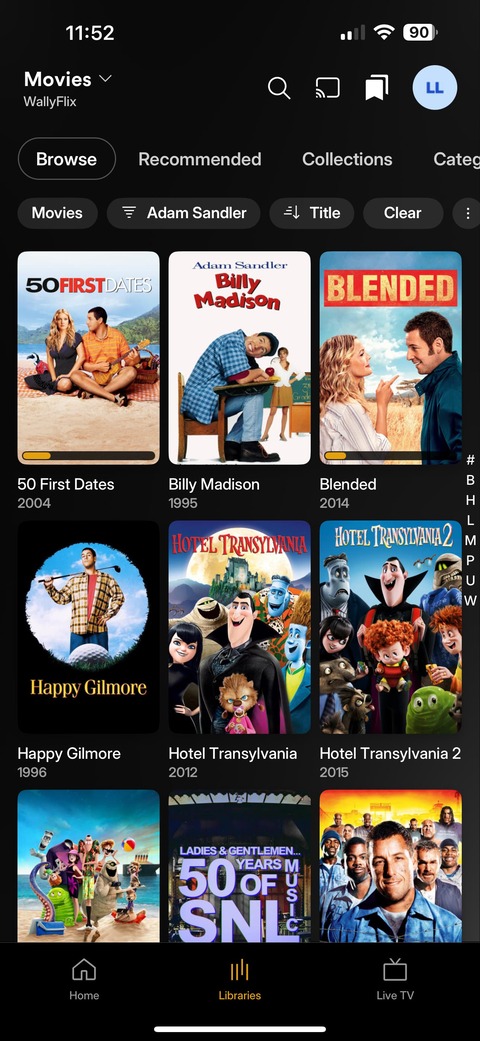
Thanks, yes, I just did a force quit on the app and tried it again. If I choose an actor from a MOVIE library on iOS, and tap on them from inside the movie itself, it is now filtering the library content to show just that one person. However, this does not work for TV Episodes, or when searching for an actor using search. There is no actual filmography information or bio, and no way to go back without locating the film in the filtered list.
Thanks @dklein for reporting. I’m able to reproduce what you’re seeing to.
What should be happening when selecting a Person in the Cast & Crew hub in a PMS Detail Page is routing to the Person’s Detail Page. However, there is an exception for Libraries that have the Advanced Library setting Allow matching to explicit content enabled. For these Libraries, you’ll be routed to the Library’s filtered view of the selected Person. It seems like the fault is in the call mistakenly falling back to the wrong pathing due to Discover being Disabled.
As a quick test, I’ve disabled the Allow matching to explicit content setting, and I’m still seeing the same filtered view on Movies Libraries. After changing the setting on TV Libraries I’m seeing the same outcome. Neither setting on Allow matching to explicit content provides a Person’s Detail Page on iOS, even after force quitting and launching the app
I’m seeing the identical issue as @dklein with regards to Cast searching except I’m running on Android.
Client Version 2025.16.0 (960828399)
Windows 11 PMS Version 1.41.7.9795
I have put an uncountable number of hours ~5 days a week for year and years entering MP4 metadata to tens if thousands of videos and it would be soul crushing for this issue/FEATURE not to be corrected.
I’m waiting for the server logs to download and I can dm them if they are still needed.
Looks like we have a fix coming soon  . I’ve confirmed the expected behavior has returned. Summarizing the thread:
Previously corrected
- Cast & Crew hub contains Cast & Crew
- Cast & Crew hub has an end cap View All (when applicable)
Recently corrected
- Selecting a Cast or Crew person’s avatar in a PMS details page will route to their Discover Credit page
- Same as above but within a Library with
Allow matching to explicit contentenabled, will route to a filtered Library view of the selected person
All points above  apply regardless of having Discover enabled or disabled.
I don’t have an ETA when this will be released but hopefully it’ll make it into the next release which would be 2025.18.0? ? Just wanting to share any progress when I see it and can share it.
