Server Version#: 1.40.0.7998 (Was on 1.20 - Same behavior before Upgrade to 1.40)
Hello…I am having an issue when PMS is trying to access the movies and TV libraries that are on a NAS share. I am using CENTOS 7 (Plex MS is installed on this server) and a Synology NAS (Movies and TV files on shares are stored on this). I updated to DSM 7 and I just now noticed that all my files are no longer accessible by PMS. The CentOS 7 operating system can see the files / shares and I can browse to them no problem. I check the logs in PMS and see the error below:
[139949489273656] ERROR - Couldn’t check for the existence of file “/nas/movies/.grab”: boost::filesystem::status: Permission denied [system:13]: “/nas/movies/.grab”
I am lost on how to fix this as PMS cannot see my library at all, but the CENTOS server can. Does anyone know how I can fix this? Where should I begin to look to fix this? I have been troubleshooting this for a long while now and stuck. Thank you in advance.
That is how I originally set up my environment (Using that article you provided) and it was working perfectly until I upgraded to Synology DSM 7.0. So I do not know what has changed, but my plex user has all the correct permissions on the CentOS O/S and the permissions did not change on the NAS shares. So what in DSM 7 changed (Keep in mind this is my guess)? I can not see the Plex Media Library at all when logged into the web nor using the plex media client. Any ideas based on the error I provided? Anything else I should look at. Thank you.
NFS is NFS. There’s no rocket science to it.
If you’re using SMB then you’ve got problems as SMB doesn’t support multiple UIDs per mount in this environment.
Going down the list of things –
NFS export rules controls whether or not you can mount it
It further defines basic access rules
DSM shared folder ACLs (Permissions tab)
On the Centos host,
– Umount the shared folder
– Check the permissions on the directories (walk the path) BEFORE the mount
– Mount the shared folder
– Walk the path again.
At some point, you’ll see the permissions get cut off. That’ll be the problem point
That is the problem. I did all that and chased this gremlin for a week now. I unmounted it and mounted it and I ended up blowing the CentOS away and doing a fresh build. It is still messed up. CENTOS can see the shares with no issues. See the permissions below:
I am not trying to discount what you say, but it does not make sense since the O/S can see it. but plexms cannot see the files. I will continue to chase my tail but looking for a smoking gun. Thank you.
Are you using sec=sys or are you letting plex:plex be the access UID:GID
If using plex:plex, On the Syno — does there exist a username plex (forget about system internal user PlexMediaServer in this case) and does USER plex have access ?
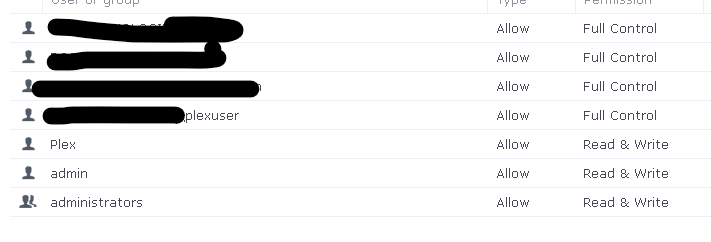
I am using plex:plex for the access to the shares on both the synology NAS and the plex media server O/S. Not familiar with the UID:GID (Sorry I am learning). See below:
192.x.x.x:/volume2/Movies /nas/movies nfs auto,defaults,nofail,nfsvers=4 0 0 (This is from the Synology share page for that specific folder: 192.x.x.x:/volume2/Movies)
Keep in mind it worked under DSM 6.0 with no issues. What do I need to do? Do I need to add Plexmediauser to the Synology NAS? I am not using the built-in Plex Media Server. Thank you.
Note: I have already blown my CentOS server away once and had to restore it from backup. So I know it points me to something on the NAS I think.
DSM 7 is an entirely new level of security pucker-factor.
This isn’t rocket science.
user plex isn’t privileged. Your default username isn’t privileged either.
Here’s the mount from the command line:
root@lizum:/home/chuck# mount 192.168.0.71:/volume1/Animated /mnt
root@lizum:/home/chuck# mount | grep Animated
192.168.0.71:/volume1/Animated on /mnt type nfs4 (rw,relatime,vers=4.1,rsize=131072,wsize=131072,namlen=255,hard,proto=tcp,timeo=600,retrans=2,sec=sys,clientaddr=192.168.0.13,local_lock=none,addr=192.168.0.71)
root@lizum:/home/chuck# ls -la /mnt
total 436
drwxrwxrwx 104 root root  4096 Nov 19  2022  .
drwxr-xr-x  32 root root  4096 Feb  3 12:52  ..
drwxrwxrwx   2 1026 root  4096 Feb  8  2018 'Aladdin (1992)'
drwxrwxrwx   2 1026 root  4096 Sep 23  2017 'Alvin and the Chipmunks (2007)'
drwxrwxrwx   2 1026 root  4096 Sep 17  2017 'Alvin and the Chipmunks Chipwrecked (2011)'
drwxrwxrwx   2 1026 root  4096 Sep 17  2017 'Alvin and the Chipmunks The Road Chip (2015)'
drwxrwxrwx   2 1026 root  4096 Aug 11  2018 'Alvin and the Chipmunks The Squeakquel (2009)'
drwxrwxrwx   2 1026 root  4096 Sep 17  2017 'Atlantis The Lost Empire (2001)'
drwxrwxrwx   2 1026 root  4096 Sep 17  2017 'Bambi (1942)'
drwxrwxrwx   2 1026 root  4096 Sep 17  2017 'Beauty and the Beast (1991)'
drwxrwxrwx   2 1026 root  4096 Sep 17  2017 'Boundin'\'' (2003)'
drwxrwxrwx   2 1026 root  4096 Sep 17  2017 'Brave (2012)'
drwxrwxrwx   2 1026 root  4096 Sep 17  2017 'BURN·E (2008)'
drwxrwxrwx   2 1026 root  4096 Sep 17  2017 'Cars (2006)'
drwxrwxrwx   2 1026 root  4096 Sep 17  2017 'Cars 2 (2011)'
drwxrwxrwx   2 1026 root  4096 Feb  8  2018 'Cars 3 (2017)'
drwxrwxrwx   2 1026 root  4096 Sep 17  2017 'Day & Night (2010)'
drwxrwxrwx   2 1026 root  4096 Mar 11  2018 'Despicable Me (2010)'
drwxrwxrwx   2 1026 root  4096 Sep 17  2017 'Despicable Me 2 (2013)'
drwxrwxrwx   2 1026 root  4096 Feb  8  2018 'Despicable Me 3 (2017)'
Here you can see it coming through just fine as user plex
Meet the Robinsons (2007)/                       Your Friend the Rat (2007)/
[chuck@lizum ~.2005]$ su -s /bin/bash plex
Password:
[chuck@lizum ~.2006]$ sudo bash
root@lizum:/home/chuck# su -s /bin/bash plex
plex@lizum:/home/chuck$ whoami
plex
plex@lizum:/home/chuck$ ls /mnt
'Aladdin (1992)'				     'Mikey'\''s New Car (2001)'
'Alvin and the Chipmunks (2007)'		     'Minions (2015)'
'Alvin and the Chipmunks Chipwrecked (2011)'	     'Minions Training Wheels (2013)'
'Alvin and the Chipmunks The Road Chip (2015)'	     'Moana (2016)'
'Alvin and the Chipmunks The Squeakquel (2009)'      'Monsters, Inc. (2001)'
'Atlantis The Lost Empire (2001)'		     'Monsters University (2013)'
'Bambi (1942)'					     'Mower Minions (2016)'
'Beauty and the Beast (1991)'			     'Mr. Peabody & Sherman (2014)'
'Boundin'\'' (2003)'				     'Next Gen (2018)'
I have no problems with viewing the directory structure within CentOS and I have no idea what changed in DSM 7.0 that would keep the PMS from seeing the file structure. I am no wizard at this, but I can tell you from all the testing I have done that all permissions are set correctly wth CentOS. See my results below:
Do you have any idea how to fix with the proper command for the user plex? I do not know if it is on the Synology NAS or on the CentOS server. When I have tried using “chmod” I get Operation not permitted on the CENTOS server so I think it is on the Synology NAS, but where? It works for the root user, but NOT for the plex user. I have tried everything I know. Something had to lock / change something in DSM 7. This is at least in the right direction / smoking gun.
Thank you.
P.S. Apparently it is rocket science at this point.
[139949489273656] ERROR - Couldn’t check for the existence of file “/nas/movies/.grab”: boost::filesystem::status: Permission denied [system:13]: “/nas/movies/.grab”
The .grab is DVR recording temporary space.
Easiest fix
SSH into the syno
Grant the Everyone permission
FileStation
Right-click “Movies”
Properties
Permissions
When at the Permissions tab click “EDIT”
Now you’re in the permissions editor.
(This is where you ADD “Everyone” from the dropdown at the top)
If you’re more confortable with Linux ‘chmod’ style perms then , while ssh’d into the box, set them how you want.
This is where you also silence the .grab permission problems
chmod 777 /volume2/Movies/.grab
Synology’s ACLs are very “Windows” like … I find it extremely annoying.
DSM is still a Linux box underneath.
If you talk to it like a Linux box, it’ll respond.
If you talk to it through all the Synology’isms, you’ll deal with that
Perfect! It worked, but why do we need the “Everyone” permission to use Plex…Especially for the “plex” user. That is so convoluted and well very disappointing that they built it into DSM 7 like that. I spent so much time just for that setting that I would think should not even be there, but I guess they just want to get more user friendly / more Windows friendly. Thank you for your help!