bsm173
January 5, 2026, 6:59pm
1
Hi,
I just installed PMS on my Synology DS220+. I will provide the Version of the server later on. Maybe my problem can be resolved quickly.
I ensured, that PMS has authorization to access my share on the DS220. I created a new Media Library for “other movies” and selected a Scanner/Agent for Movie Files (Not Movies), because it about my Personal Video Data, but still my Media Library in Plex is shown as empty.
What can I check?
Thank you in advance!
Server Version#:server logs please do NOT turn on verbose logging, only debug logging should be enabled>
tom80H
January 5, 2026, 7:43pm
3
What version of DSM do you have installed on the NAS and to which user did give permission to access the share?
bsm173
January 6, 2026, 5:37am
4
Hi there,
I have installed:
DSM: 7.3.2-86009
PMS: 1.42.2.10156-720010156
The authorization I enabled is Read/Write for the desired volume for the internal system user „PlexMediaServer“ like it was written in the installation instructions. What Can I do further?
bsm173
January 6, 2026, 5:43am
5
Thanks for the logs.
9.933 [140664747531064] DEBUG - Activity: updated activity dac8a881-3121-4fe6-ac2f-4f8ec9964c85 - completed 77.3% - Scanning Andere Videos
Jan 04, 2026 19:19:19.933 [140664747531064] DEBUG - Scanner: Processing directory /volume1/SB/SB LOVELETTERS (parent: yes)
Jan 04, 2026 19:19:19.934 [140664747531064] ERROR - Couldn't check for the existence of file "/volume1/SB/SB LOVELETTERS/.plexignore": boost::filesystem::status: Permission denied [system:13]: "/volume1/SB/SB LOVELETTERS/.plexignore"
Jan 04, 2026 19:19:19.934 [140664747531064] ERROR - Couldn't check for the existence of file "/volume1/SB/SB LOVELETTERS/.plexignore": boost::filesystem::status: Permission denied [system:13]: "/volume1/SB/SB LOVELETTERS/.plexignore"
Jan 04, 2026 19:19:19.934 [140664747531064] DEBUG - Activity: updated activity dac8a881-3121-4fe6-ac2f-4f8ec9964c85 - completed 80.4% - Scanning Andere Videos
Jan 04, 2026 19:19:19.934 [140664747531064] DEBUG - Scanner: Processing directory /volume1/SB/Sonstiges (parent: yes)
Jan 04, 2026 19:19:19.934 [140664747531064] ERROR - Couldn't check for the existence of file "/volume1/SB/Sonstiges/.plexignore": boost::filesystem::status: Permission denied [system:13]: "/volume1/SB/Sonstiges/.plexignore"
Jan 04, 2026 19:19:19.934 [140664747531064] ERROR - Couldn't check for the existence of file "/volume1/SB/Sonstiges/.plexignore": boost::filesystem::status: Permission denied [system:13]: "/volume1/SB/Sonstiges/.plexignore"
Jan 04, 2026 19:19:19.934 [140664747531064] DEBUG - Activity: updated activity dac8a881-3121-4fe6-ac2f-4f8ec9964c85 - completed 83.5% - Scanning Andere Videos
Jan 04, 2026 19:19:19.934 [140664747531064] DEBUG - Scanner: Processing directory /volume1/SB/Theo (parent: yes)
Jan 04, 2026 19:19:19.935 [140664747531064] ERROR - Couldn't check for the existence of file "/volume1/SB/Theo/.plexignore": boost::filesystem::status: Permission denied [system:13]: "/volume1/SB/Theo/.plexignore"
Jan 04, 2026 19:19:19.935 [140664747531064] ERROR - Couldn't check for the existence of file "/volume1/SB/Theo/.plexignore": boost::filesystem::status: Permission denied [system:13]: "/volume1/SB/Theo/.plexignore"
Jan 04, 2026 19:19:19.935 [140664747531064] DEBUG - Activity: updated activity dac8a881-3121-4fe6-ac2f-4f8ec9964c85 - completed 86.6% - Scanning Andere Videos
Jan 04, 2026 19:19:19.935 [140664747531064] DEBUG - Scanner: Processing directory /volume1/SB/unsortiert B iPhone14 (parent: yes)
Jan 04, 2026 19:19:19.935 [140664747531064] ERROR - Couldn't check for the existence of file "/volume1/SB/unsortiert B iPhone14/.plexignore": boost::filesystem::status: Permission denied [system:13]: "/volume1/SB/unsortiert B iPhone14/.plexignore"
Jan 04, 2026 19:19:19.935 [140664747531064] ERROR - Couldn't check for the existence of file "/volume1/SB/unsortiert B iPhone14/.plexignore": boost::filesystem::status: Permission denied [system:13]: "/volume1/SB/unsortiert B iPhone14/.plexignore"
Jan 04, 2026 19:19:19.936 [140664747531064] DEBUG - Activity: updated activity dac8a881-3121-4fe6-ac2f-4f8ec9964c85 - completed 89.7% - Scanning Andere Videos
Jan 04, 2026 19:19:19.936 [140664747531064] DEBUG - Scanner: Processing directory /volume1/SB/unsortiert S iPhone 14 (parent: yes)
Jan 04, 2026 19:19:19.936 [140664747531064] ERROR - Couldn't check for the existence of file "/volume1/SB/unsortiert S iPhone 14/.plexignore": boost::filesystem::status: Permission denied [system:13]: "/volume1/SB/unsortiert S iPhone 14/.plexignore"
Jan 04, 2026 19:19:19.936 [140664747531064] ERROR - Couldn't check for the existence of file "/volume1/SB/unsortiert S iPhone 14/.plexignore": boost::filesystem::status: Permission denied [system:13]: "/volume1/SB/unsortiert S iPhone 14/.plexignore"
Jan 04, 2026 19:19:19.936 [140664747531064] DEBUG - Activity: updated activity dac8a881-3121-4fe6-ac2f-4f8ec9964c85 - completed 92.8% - Scanning Andere Videos
Jan 04, 2026 19:19:19.936 [140664747531064] DEBUG - Scanner: Processing directory /volume1/SB/unsortiert S iPhone 6s 11 (parent: yes)
Jan 04, 2026 19:19:19.936 [140664747531064] ERROR - Couldn't check for the existence of file "/volume1/SB/unsortiert S iPhone 6s 11/.plexignore": boost::filesystem::status: Permission denied [system:13]: "/volume1/SB/unsortiert S iPhone 6s 11/.plexignore"
Jan 04, 2026 19:19:19.936 [140664747531064] ERROR - Couldn't check for the existence of file "/volume1/SB/unsortiert S iPhone 6s 11/.plexignore": boost::filesystem::status: Permission denied [system:13]: "/volume1/SB/unsortiert S iPhone 6s 11/.plexignore"
Jan 04, 2026 19:19:19.937 [140664747531064] DEBUG - Activity: updated activity dac8a881-3121-4fe6-ac2f-4f8ec9964c85 - completed 95.9% - Scanning Andere Videos
Jan 04, 2026 19:19:19.937 [140664747531064] DEBUG - Scanner: Processing directory /volume1/SB/_Urlaubsvideos (parent: yes)
Jan 04, 2026 19:19:19.937 [140664747531064] ERROR - Couldn't check for the existence of file "/volume1/SB/_Urlaubsvideos/.plexignore": boost::filesystem::status: Permission denied [system:13]: "/volume1/SB/_Urlaubsvideos/.plexignore"
Jan 04, 2026 19:19:19.937 [140664747531064] ERROR - Couldn't check for the existence of file "/volume1/SB/_Urlaubsvideos/.plexignore": boost::filesystem::status: Permission denied [system:13]: "/volume1/SB/_Urlaubsvideos/.plexignore"
Jan 04, 2026 19:19:19.937 [140664747531064] DEBUG - Activity: updated activity dac8a881-3121-4fe6-ac2f-4f8ec9964c85 - completed 99.0% - Scanning Andere Videos
Jan 04, 2026 19:19:19.937 [140664747531064] DEBUG - Scanner [Plex Video Files]: Idle and left with 0 media items.
This tells us you did not click the Apply to this folder, sub-folders, and files box to propagate permissions into subfolders.
Here is an example how to do it.
bsm173
January 6, 2026, 8:00pm
7
Unfortunately the permissions window looks different then written in the FAQ, there is no such checkbox
Change the dropdown – Lokale Benutzer (Local User)
Scroll down and grant permission to PlexMediaServerGilt für diesen Ordner, Unterordner und Dateien.
This is shown in the screenshots in the How-To (FAQ)
bsm173
January 7, 2026, 4:19pm
9
I am sorry, but I dont know where:
bsm173
January 8, 2026, 5:59am
11
Unfortunately it looks the same
You are in the wrong place.
In FileStation, I right-click “MyMedia”
Click Properties
Click CREATE and type PlexMediaServer (or enough for it to show)
Click PlexMediaServer so it will be selected
Now the permission page opens
Minimally give PlexMediaServer READ permission
Click Done
The selector closes and returns you to the last step.Apply to this folder, sub-folders and files.
Click SAVE to apply the permissions.
bsm173
January 8, 2026, 5:51pm
13
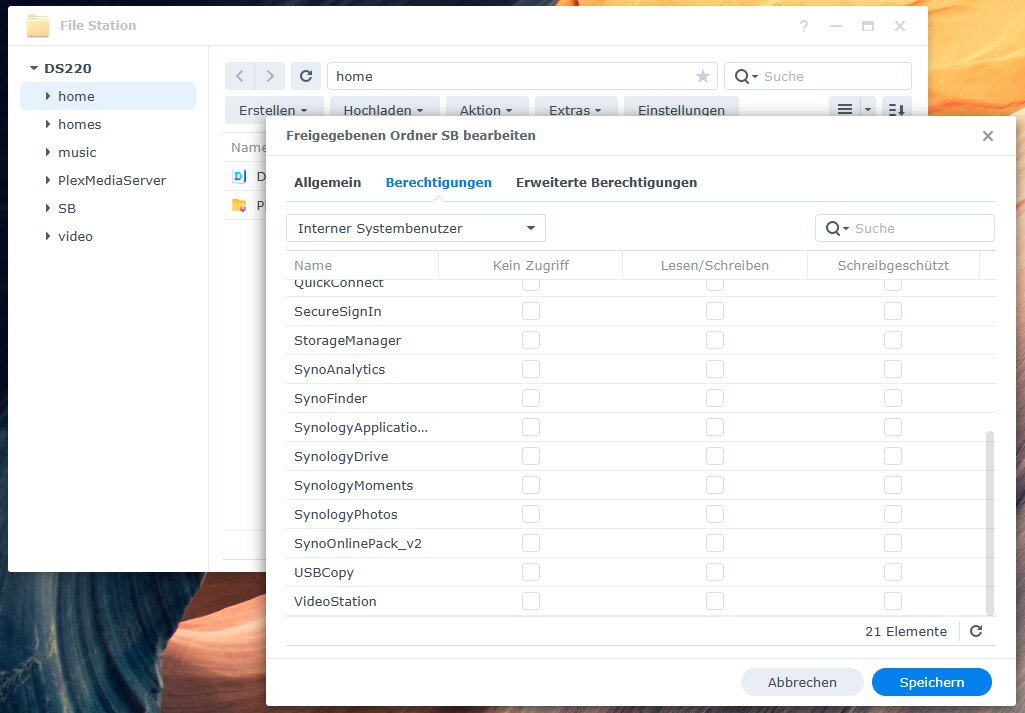
I did the same:
Then click on permissions:
Then switch to internal system users:
I dont see any possibilities to make the setting for subfolders….
Thank you for the screenshot.
Home is NOT a real shared folder
Create a normal shared folder , named Photos (?)
Move your photos there
Now grant permission
bsm173
January 8, 2026, 6:30pm
15
Sorry, the screenshot is misleading. The Folder to share is “SB”, not “home” - so it should be a regular shared folder
This photo shows you’re looking at the home shared folder.
When you repeat the procedure for the SB shared folder, what do you see ?
This is where you Create permissions for PlexMediaServer.
bsm173
January 9, 2026, 5:25am
17
Hey, I tranfserred the data to antother folder, gave the permission und now it is working. Thank you!
Plex is putting all data from the subfoldes into ONE Library right? So my organization is gone then. To avoid this I have to create different Libraries?
tom80H
January 9, 2026, 5:52am
18
Yes. You’ll need at least one library per media type (e.g. music, movies, shows, photos). Each library can point to one or more „library folders“ with the corresponding media.
https://support.plex.tv/articles/categories/your-media/