Hi, I was trying to do some testing to get meaningful info but navigating the logs is not an easy task. Hopefully, you find the following useful.
So, I was testing on 3 devices:
- Samsung TV QE65S95BATXXC with Plex for Samsung on Tizen 6.5 (2022)
- Samsung TV QE55Q60RATXXC with Plex for Samsung on Tizen 5 (2019)
- Laptop with Plex Media Player 2.58.0.1076-38e019da on Windows 10
The XML that defines the track info of the file used in the test is:
<MediaContainer size="1" allowSync="1" identifier="com.plexapp.plugins.library" librarySectionID="5" librarySectionTitle="TV Shows" librarySectionUUID="cc882905-7762-4fc1-9393-f8a7242ff514" mediaTagPrefix="/system/bundle/media/flags/" mediaTagVersion="1661864098">
<Video ratingKey="3374" key="/library/metadata/3374" parentRatingKey="3369" grandparentRatingKey="3368" guid="plex://episode/6290e85dd0a0d01768491fdf" parentGuid="plex://season/603986ea68c8b1002d19c8cf" grandparentGuid="plex://show/5d9c09123c3f87001f35b9ca" type="episode" title="Episodio 3" grandparentKey="/library/metadata/3368" parentKey="/library/metadata/3369" librarySectionTitle="TV Shows" librarySectionID="5" librarySectionKey="/library/sections/5" grandparentTitle="Amazing Show" parentTitle="Season 1" originalTitle="Nice Title" contentRating="es/12" summary="Whatever." index="3" parentIndex="1" audienceRating="8.2" skipCount="5" lastViewedAt="1664396878" year="2022" thumb="/library/metadata/3374/thumb/1664242226" art="/library/metadata/3368/art/1663881716" parentThumb="/library/metadata/3369/thumb/1663881720" grandparentThumb="/library/metadata/3368/thumb/1663881716" grandparentArt="/library/metadata/3368/art/1663881716" duration="2417280" originallyAvailableAt="2022-09-21" addedAt="1663887714" updatedAt="1664242226" audienceRatingImage="themoviedb://image.rating">
<Media id="3686" duration="2417280" bitrate="15948" width="3840" height="2160" aspectRatio="1.78" audioChannels="6" audioCodec="eac3" videoCodec="hevc" videoResolution="4k" container="mkv" videoFrameRate="24p" videoProfile="main 10">
<Part accessible="1" exists="1" id="3686" key="/library/parts/3686/1663888399/file.mkv" duration="2417280" file="/volume1/TV Shows/Amazing Show (2022) {tmdb-999999}/Season 1/Amazing Show (2022) - s01e03.mkv" size="4819749731" container="mkv" deepAnalysisVersion="6" requiredBandwidths="25394,24675,22750,20351,18291,17537,17537,17537" videoProfile="main 10">
<Stream id="15780" streamType="1" default="1" codec="hevc" index="0" bitrate="14924" bitDepth="10" chromaLocation="left" chromaSubsampling="4:2:0" codedHeight="2160" codedWidth="3840" colorPrimaries="bt2020" colorRange="tv" colorSpace="bt2020nc" colorTrc="smpte2084" frameRate="24.000" height="2160" level="150" profile="main 10" refFrames="1" requiredBandwidths="24370,23652,21726,19327,17267,16537,16537,16537" width="3840" displayTitle="4K HDR10 (HEVC Main 10)" extendedDisplayTitle=" (4K HDR10 HEVC Main 10)"> </Stream>
<Stream id="15781" streamType="2" selected="1" codec="eac3" index="1" channels="6" bitrate="768" language="English" languageTag="en" languageCode="eng" audioChannelLayout="5.1(side)" requiredBandwidths="767,767,767,767,767,767,767,767" samplingRate="48000" displayTitle="English (EAC3 5.1)" extendedDisplayTitle=" (English EAC3 5.1)"> </Stream>
<Stream id="15782" streamType="2" default="1" codec="eac3" index="2" channels="6" bitrate="256" language="Spanish" languageTag="es" languageCode="spa" audioChannelLayout="5.1(side)" requiredBandwidths="256,256,256,256,256,256,256,256" samplingRate="48000" displayTitle="Spanish (EAC3 5.1)" extendedDisplayTitle=" (Spanish EAC3 5.1)"> </Stream>
<Stream id="15783" streamType="3" selected="1" codec="srt" index="3" bitrate="0" language="English" languageTag="en" languageCode="eng" requiredBandwidths="1,1,1,1,1,1,1,1" displayTitle="English (SRT)" extendedDisplayTitle=" (English SRT)"> </Stream>
<Stream id="15784" streamType="3" default="1" forced="1" codec="srt" index="4" language="Spanish" languageTag="es" languageCode="spa" requiredBandwidths="1,1,1,1,1,1,1,1" displayTitle="Spanish Forced (SRT)" extendedDisplayTitle=" (Spanish Forced SRT)"> </Stream>
<Stream id="15785" streamType="3" codec="srt" index="5" bitrate="0" language="Spanish" languageTag="es" languageCode="spa" requiredBandwidths="1,1,1,1,1,1,1,1" displayTitle="Spanish (SRT)" extendedDisplayTitle=" (Spanish SRT)"> </Stream>
</Part>
</Media>
<Marker id="2078" type="intro" startTimeOffset="68585" endTimeOffset="97892">
<Attributes id="2078"/>
</Marker>
<Extras size="0"> </Extras>
<Related> </Related>
</Video>
</MediaContainer>
In summary:
-
Video track: 4K HDR10 (HEVC Main 10)
-
Audio track: English (EAC3 5.1)
-
Audio track: Spanish (EAC3 5.1)
-
Sub track: English (SRT)
-
Sub track: Spanish (SRT)
A couple of facts:
- All these codecs are played without any issue on the 3 devices and they are capable of being transmitted in Direct Play mode.
- The 3 players have the same settings including Allow Direct Play activated
I started all the tests by playing the audio track 1 (ENG) and switching to audio track 2 (SPA) while playing what seems to be the problem to me given the shift from Direct Play to Direct Stream (only in Device 1, the one about the latest fix released)
These are the Dashboard screenshots on the current playing:
Device 1 (Samsung Tizen 2022) The one with the issue:
First play (first audio track):

Changed language while playing (second audio track):
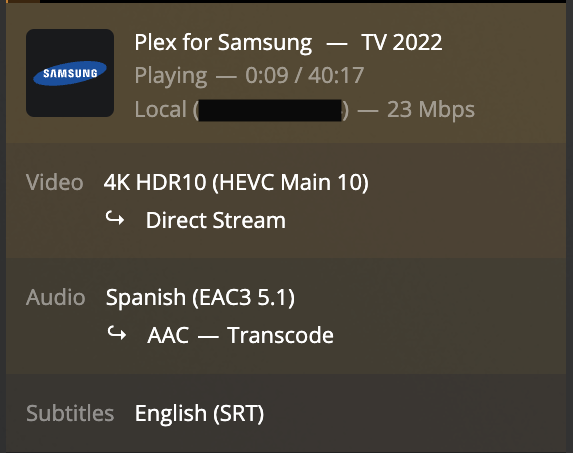
Interesting facts that could lead to finding the issue:
- When changing the audio track while playing the movie, this dashboard box doesn’t disappear and changes the playing mode on all the tracks
- In the other devices, this currently playing box disappears for a couple of seconds when changing the audio track and comes back with the track changes updated
Device 2 (Samsung Tizen 5) Works perfectly:
First play (first audio track):

Changed language while playing (second audio track):

Device 3 (Windows Laptop) Works perfectly:
First play (first audio track):

Changed language while playing (second audio track):

Regarding the logs, couldn’t find much that seemed meaningful to me, just two details:
- Both Samsungs (Device 1 and 2) throw client profile errors:
[Req#1dccd] Unable to find client profile for device; platform=Tizen, platformVersion=6.5, device=22_PONTUSM_QD, model=QE65S95BATXXC
[Req#2407c] Unable to find client profile for device; platform=Tizen, platformVersion=5, device=19_MUSEM_QTV, model=QE55Q60RATXXC
- Both Samsungs (Device 1 and 2) use heavily
/transcode endpoints even considering the 2019 one behaves as expected and the new one, 2022, it changes the playing mode which should not happen.
Given that the 2019 TV model with Plex for Samsung always uses Direct Play and to be honest, always worked like a charm, makes me think we sorted the audio track change issue but the app for Tizen 6.5 (2022) is still not behaving as it should.
I hope you can find this useful for debugging purposes and thanks again for the support @sLumpy 

 .
.