Server Version#: 1.18.8.2468
Player Version#: 1.6.3.1009-57cf57c8
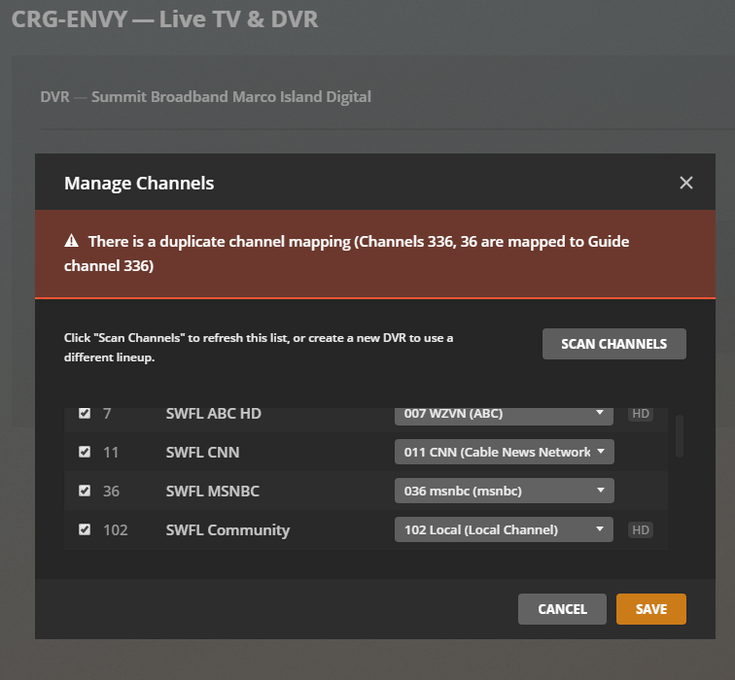
Starting several days ago my Summit digital swfl channel guide has 8 unplayable SD channels (11, 18, 36, 37, 40, 46, 79 & 90) that do not appear in the DVR manage channel list and is missing the 8 HD versions of those channels (311, 431(18 hd equal), 336, 337, 340, 346, 379 & 390) that do appear in the manage channel list. When I modified my HDHR Prime3 to unblock channel 11 & 36 and enabled them in the DVR they will play providing I don’t also try to enable 311 & 336. If I try to enable 11 & 311 I get an error message that both 11 & 311 are mapped to 311. Ditto for 36 & 336 - DVR says both are mapped to 336.
How do I get the 8 SD channels out of the guide and get the 8 HD channels back?
I believe this is a known issue with v1.18.8 that’s being looked at; I would recommend downgrading to 1.18.7 and make sure your update channel is set to public instead of beta):
Thank you. The 1.18.8 version is indeed the issue. I had deleted my plex data folder trying to fix the guide issue but found a 1.18.7 version in my downloads folder. I uninstalled the .8 version and installed the .7 version and the guide issues were gone until Plex automatically updated to the .8 version. This morning I uninstalled Plex and installed the .7 version again & set Plex to ask before updating. How will we know when Plex has fixed the guide issue for new versions?