In the following images, the white text is my labels, the yellow text is the subtitles.
The first image shows the inside the SRT file, showing that there is most definitely a space between “vessel” and “Maht”. The second part of the first image shows how this is displayed on Chromecast, the third part of the first image shows how it displays on the iOS app.
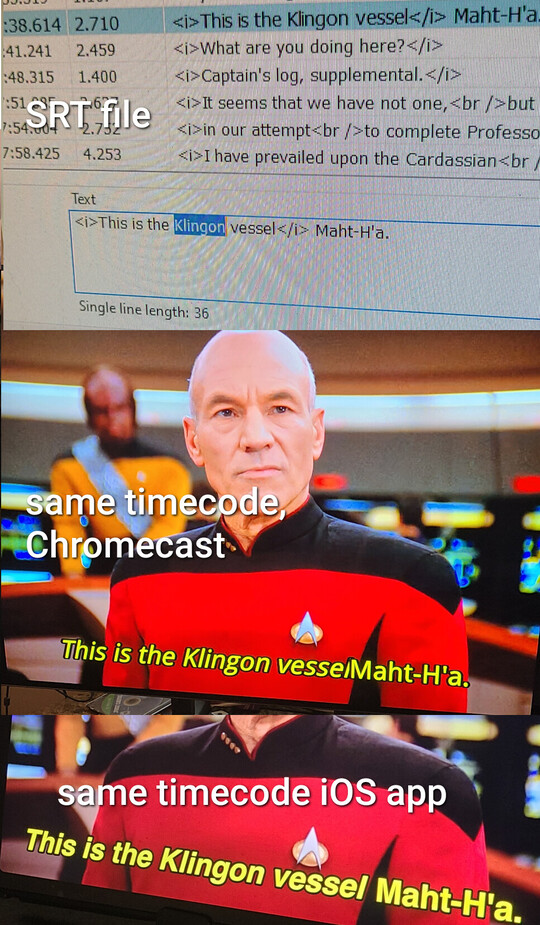
Because it displays properly on Android and iOS, you can’t simply go in and throw an extra space, because then it will display two spaces when watching from the apps.
It does not make a difference whether I start the cast from an Android or an iOS device.
I’m also including a screenshot of how it appears in the Android app but since the Android app is having issues pulling from the correct subtitle file, I’ve had to include a screenshot that includes a look inside a different SRT file to show you that we are in fact looking at the same thing. The first part of this second image shows the inside of the second SRT file, the second part of this second image shows how the subtitle is displayed in the Android app.
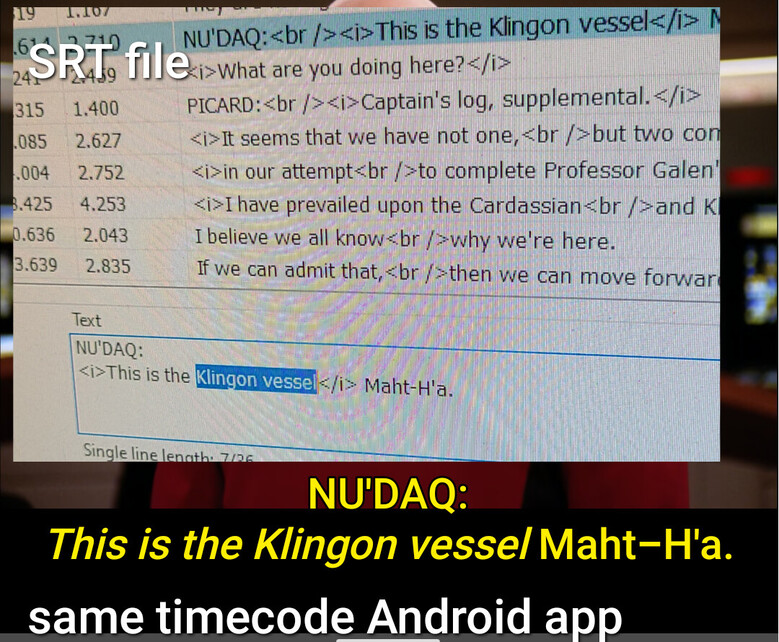
It always does this, this isn’t something that just happens sometimes, and it does it whether the italicized word comes first or second, if there’s an italicized word in a non-italized word on the same line, Chromecast removes the space between.
*Eta I just double checked, and the subtitles do display properly on the fire stick as well.
