Clear / Delete / Remove Corrupt Metadata Posters

Server Version#: Unraid 7.3.1 / LinuxServer PMS Docker
Player Version#: 1.43.2.10687

Linking here first, I am coming from this last issue of mine, where I had a corrupt metadata poster, which was causing PMS crashes. Linking this article here, just as a reference, but not required for this issue.

ISSUE:

After solving the metadata refresh crashes, I have found myself with many TV Series posters that are corrupt. I am unsure why they became corrupt. However, I can no longer ‘automatically’ fix them.

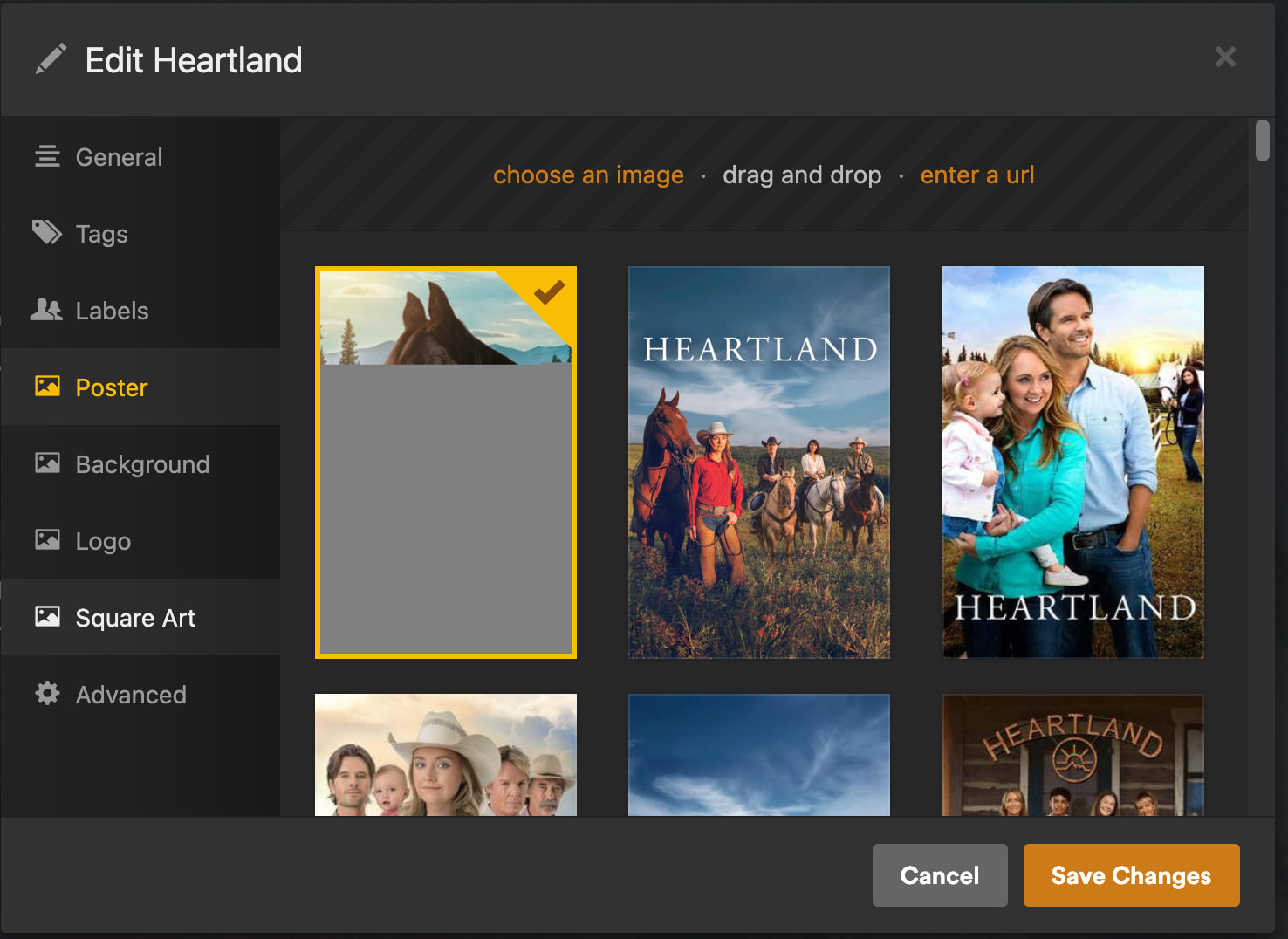
You can see in the example below, the show poster image was only partially shown/downloaded. Even in the edit screen, it’s partially corrupt.

TROUBLESHOOTING:

  • Yes, I could use local media assets. I normally do, however currently I don’t have the time to fully incorporate that yet.

I have performed the Plex Dance with the example shows.

  • Removing the show completely, re-scan. Empty trash, clean bundles, optimize database.
  • Re-start Plex
  • Re-add show to TV Show library, re-scan. Corrupt Posters Remain

WORKAROUND / Temp Solution:

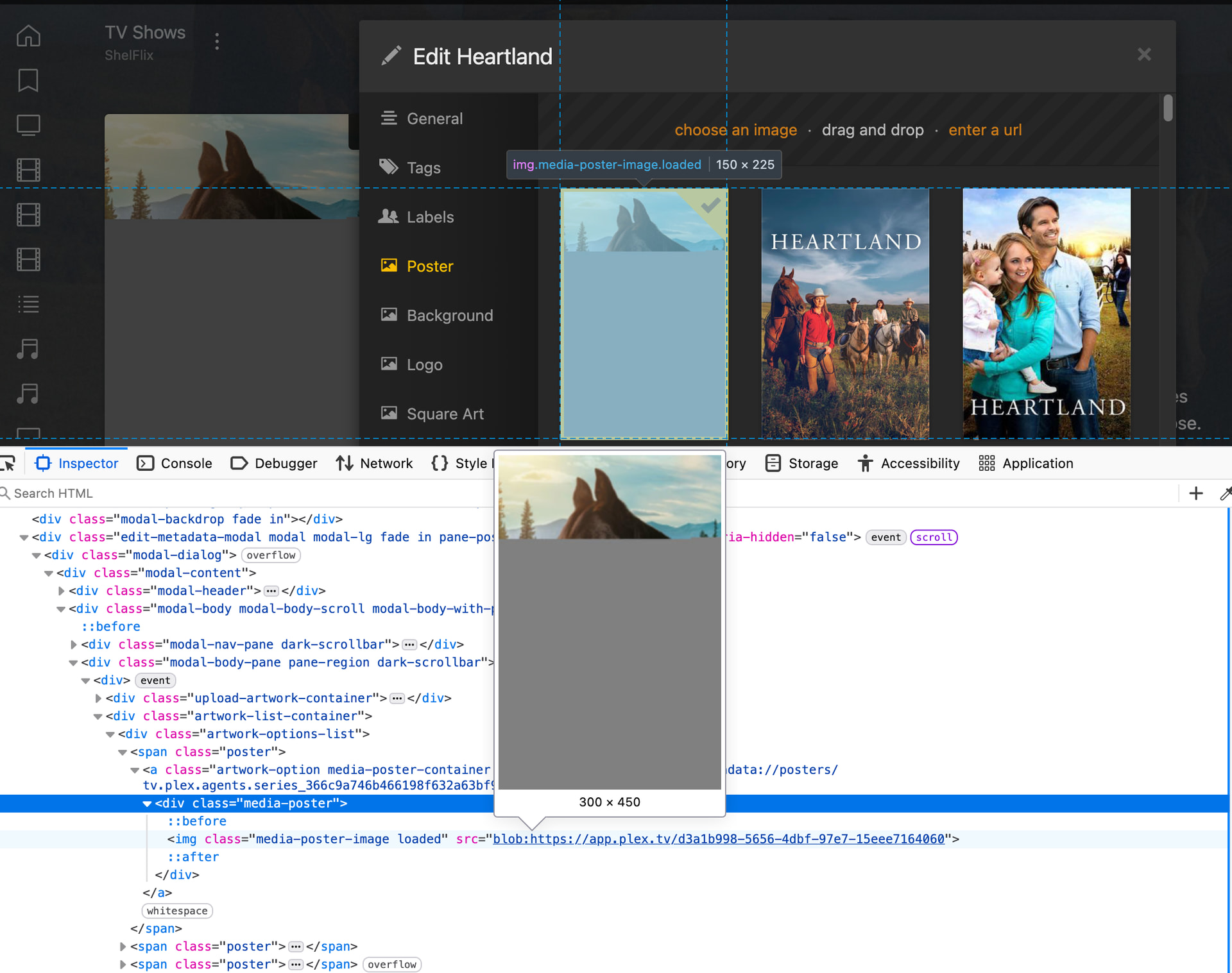
  1. On the TV Series edit page > poster, I right click on the corrupt image, click on inspect.

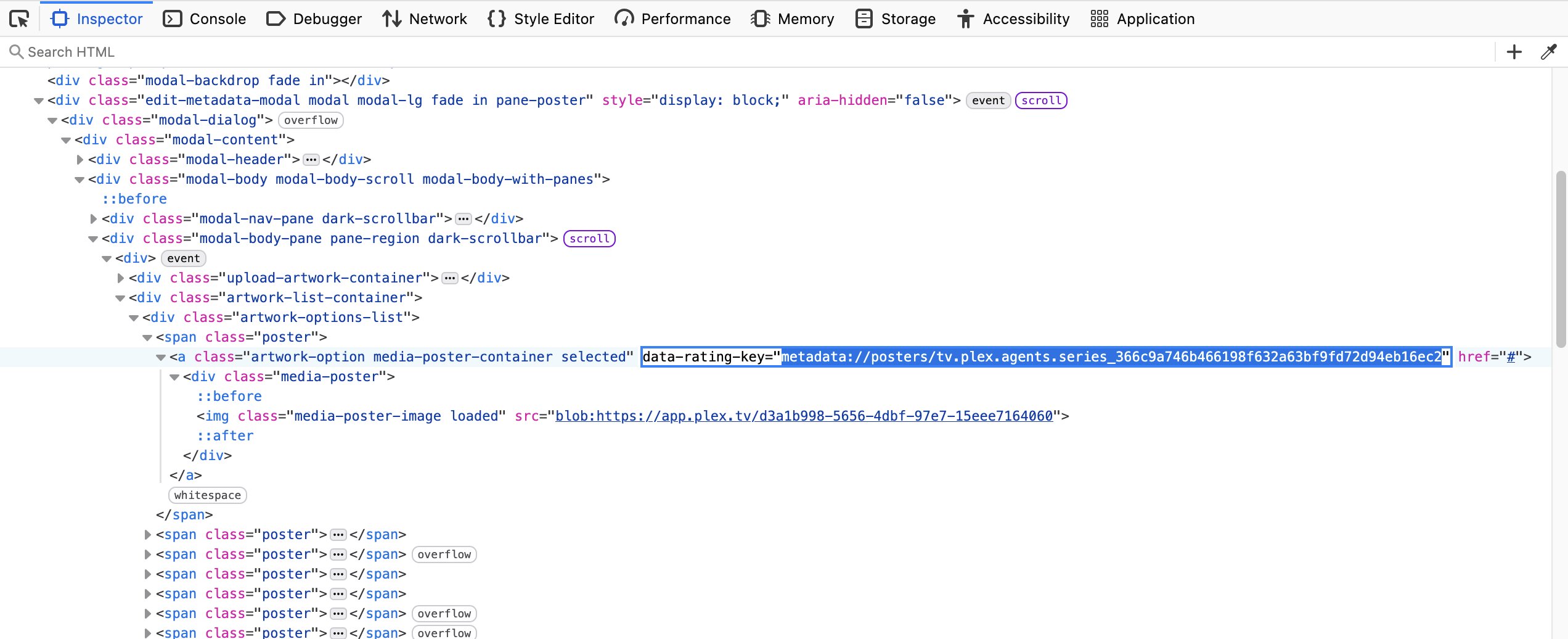
  2. You can see the preview of the corrupt file in the inspection window. I look for the line above, and get the rating key, series agent id. 366c9a746b466198f632a63bf9fd72d94eb16ec2

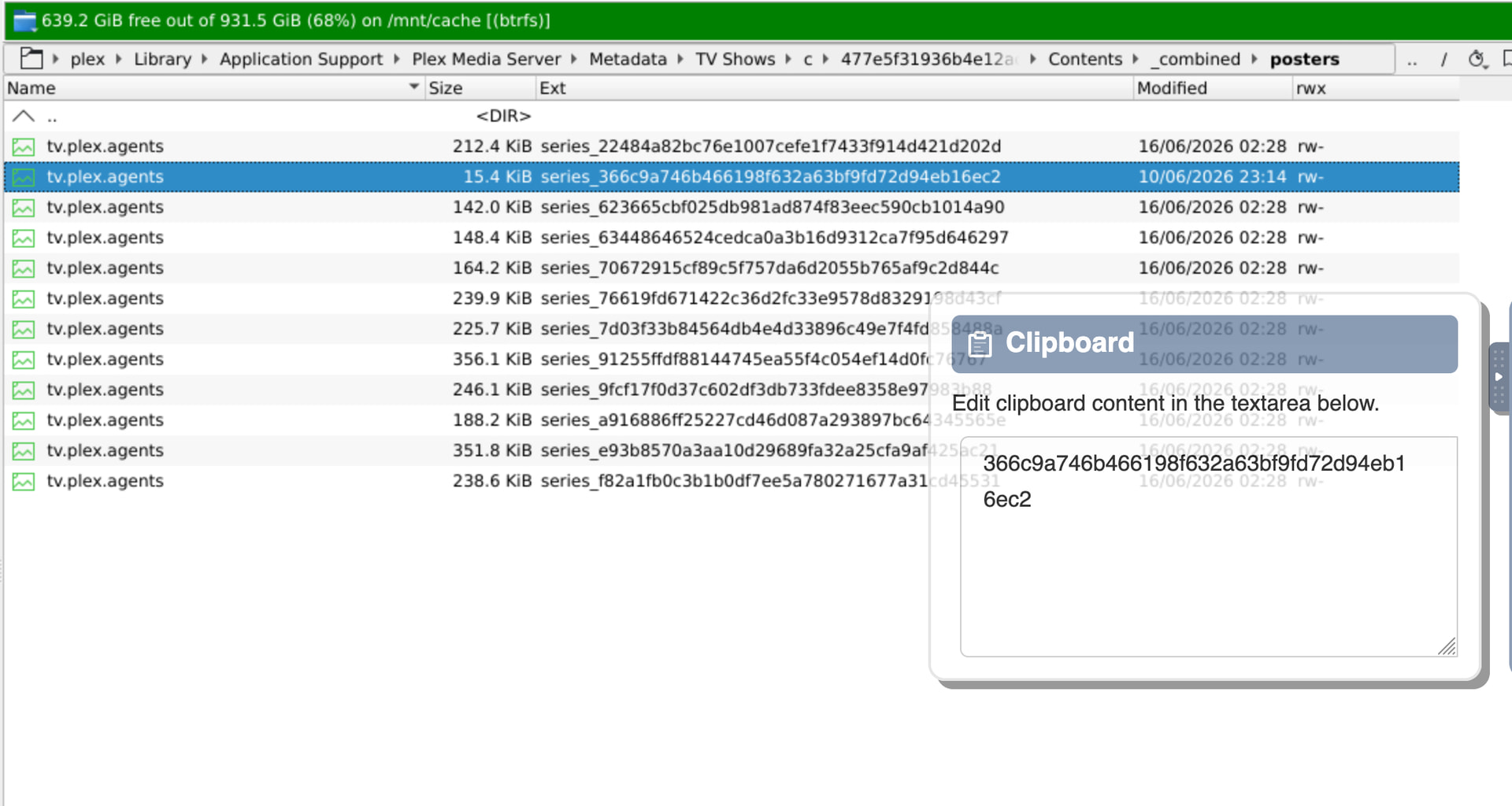
  3. Next I search in the Metadata/TV Shows folder for that rating key

  4. I then go into the folder where that rating key was found, and delete (move to a backup location) the item with the rating key I found earlier. I moved the item highlighted below

  5. Back on PMS, on the TV Series page, I click Refresh All Metadata. The Poster is Fixed.
    ** Caveat is that the edit>poster thumbnail image is still corrupt.

Before you invest too much time, you might want to spend some time checking your DB. If it is corrupt, it doesn’t make sense to keep making changes to it. Check out ChuckPA DBRepair tool.

Thank you for the suggestion! I forgot about that tool.

I went ahead and ran it on ‘auto’. There was some damage that was able to be fixed. However, the images issue still persists.

Here is the output from the DBRepair:

==================================================================================
2026-06-16 16.06.25 - ============================================================
2026-06-16 16.06.25 - Session start: Host is Docker
2026-06-16 16.06.41 - Stop - PASS
2026-06-16 16.07.17 - Auto - START
2026-06-16 16.07.34 - Check - Check com.plexapp.plugins.library.db - PASS
2026-06-16 16.08.13 - Check - Check com.plexapp.plugins.library.blobs.db - PASS
2026-06-16 16.08.13 - Check - PASS
2026-06-16 16.19.52 - Repair - Export databases - PASS
2026-06-16 16.21.41 - Repair - Import - PASS
2026-06-16 16.21.55 - Repair - Verify main database - PASS (Size: 1833MB/1691MB).
2026-06-16 16.21.58 - Repair - Verify blobs database - PASS (Size: 6363MB/6423MB).
2026-06-16 16.21.58 - Repair - Making repaired databases active
2026-06-16 16.21.58 - Repair - Move files - PASS
2026-06-16 16.21.58 - Repair - PASS
2026-06-16 16.21.58 - Reindex - MakeBackup com.plexapp.plugins.library.db - PASS
2026-06-16 16.21.58 - Reindex - MakeBackup com.plexapp.plugins.library.blobs.db - PASS
2026-06-16 16.21.58 - Reindex - MakeBackup - PASS
2026-06-16 16.22.15 - Reindex - Reindex: com.plexapp.plugins.library.db - PASS
2026-06-16 16.22.18 - Reindex - Reindex: com.plexapp.plugins.library.blobs.db - PASS
2026-06-16 16.22.18 - Reindex - PASS
2026-06-16 16.22.18 - Auto - FTS Check: fts4_metadata_titles - FAIL (Error: stepping, database disk image is malformed (11))
2026-06-16 16.22.19 - Auto - FTS Check: fts4_metadata_titles_icu - FAIL (Error: stepping, database disk image is malformed (11))
2026-06-16 16.22.19 - Auto - FTS Check: fts4_tag_titles - FAIL (Error: stepping, database disk image is malformed (11))
2026-06-16 16.22.21 - Auto - FTS Check: fts4_tag_titles_icu - FAIL (Error: stepping, database disk image is malformed (11))
2026-06-16 16.22.21 - Auto - FTS Check (blobs): fts4_metadata_titles - PASS
2026-06-16 16.22.21 - Auto - FTS Check (blobs): fts4_metadata_titles_icu - PASS
2026-06-16 16.22.21 - Auto - FTS Check (blobs): fts4_tag_titles - PASS
2026-06-16 16.22.21 - Auto - FTS Check (blobs): fts4_tag_titles_icu - PASS
2026-06-16 16.22.21 - Auto - FTS Check - FAIL
2026-06-16 16.22.21 - Auto - FTS damaged, attempting rebuild
2026-06-16 16.22.21 - FTSRbld - MakeBackup com.plexapp.plugins.library.db - PASS
2026-06-16 16.22.21 - FTSRbld - MakeBackup com.plexapp.plugins.library.blobs.db - PASS
2026-06-16 16.22.21 - FTSRbld - MakeBackup - PASS
2026-06-16 16.22.22 - FTSRbld - Rebuild: fts4_metadata_titles - PASS
2026-06-16 16.22.24 - FTSRbld - Rebuild: fts4_metadata_titles_icu - PASS
2026-06-16 16.22.29 - FTSRbld - Rebuild: fts4_tag_titles - PASS
2026-06-16 16.22.36 - FTSRbld - Rebuild: fts4_tag_titles_icu - PASS
2026-06-16 16.22.36 - FTSRbld - Rebuild (blobs): fts4_metadata_titles - PASS
2026-06-16 16.22.36 - FTSRbld - Rebuild (blobs): fts4_metadata_titles_icu - PASS
2026-06-16 16.22.36 - FTSRbld - Rebuild (blobs): fts4_tag_titles - PASS
2026-06-16 16.22.36 - FTSRbld - Rebuild (blobs): fts4_tag_titles_icu - PASS
2026-06-16 16.22.36 - FTSRbld - PASS
2026-06-16 16.22.36 - Auto - FTS Rebuild - PASS
2026-06-16 16.22.36 - Auto - COMPLETED
2026-06-16 16.35.54 - Vacuum - MakeBackup com.plexapp.plugins.library.db - PASS
2026-06-16 16.35.54 - Vacuum - MakeBackup com.plexapp.plugins.library.blobs.db - PASS
2026-06-16 16.35.54 - Vacuum - MakeBackups - PASS
2026-06-16 16.36.14 - Vacuum - Vacuum main database - PASS (Size: 1733MB/1731MB).
2026-06-16 16.37.17 - Vacuum - Vacuum blobs database - PASS (Size: 6423MB/6423MB).
2026-06-16 16.37.17 - Vacuum - PASS

UPDATE to #4-5 ABOVE

In order to get the entirety of the TV Series’ images to show correctly,

  1. I find the for the folder(s) that the rating key was found in and then delete the folder from its parent folder.

Below red underline is the rating key I searched for, so I would go to the folder:*
/mnt/cache/appdata/plex/Library/Application Support/Plex Media Server/Metadata/TV Shows/8/*
Then delete the folder: dc64ae0ce2070991469dd92856celb23bea57f2

Then I would move the TV Series’ folder out of of the TV Shows Library folder, Plex Dance.

  1. Then replace the TV Series’ folder back into the TV Shows Library. Plex will automatically scan the folder, add the show, and all images are reset.