I have multiple devices set up to work with PLEX. This includes a Roku TV (TCL), and multiple Roku Ultra devices. I love PLEX and it works great. One thing that I would like to know is this: How can I eliminate the items the appear on my “Home” screen (or tab). For many months, the same “Recently Added” photos appear here, but they are hardly “recent.” I loaded them well over a year ago. Nothing else (photos only, no videos) ever seems to find its way onto my Home screen.
Two questions:
-
How do I clear these items, and remove them from my Home page?
-
Is it possible to eliminate the Home page altogether? (There is never any useful links or information on my Home page, so I would prefer that PLEX start up in some other tab or library.)
Please advise. Thank you.
JA Motter
- unpin the library(s) from your sidebar, which feeds the hub in question
- no
Take also a look at Settings - Server - Manage - Libraries
I have done what you advised . . . unpinned my photo library (the only one that causes this problem) from my sidebar. When it is unpinned, the photos do disappear from the Home screen. However, I want this photo library to be pinned, so I pinned it again to the sidebar. Unfortunately the “recent” photos return.
Is there a way to clear this? I would prefer to have no “recent files added” appear on my Home screen.
Please advise. Thank you.
Go to the page OttoKerner showed. (Settings - Server - Manage - Libraries)
There should be a pictures library you created in that list. Point at the library and see the text “Manage Recommendations” appear. Click that to expand the options. There are 3 columns here.
- First column will be the various horizontal categories shown when you click on the library and view the “recommended” section. These can all stay here if you never use that and go straight to “Library”.
- Second column is where we want to be. Anything checked here will have a section on your “Home screen” itself. Uncheck everything here you do not want to show up. This will allow you to have the pictures pinned to home WITHOUT it showing a “recently added” section on home.
- Third column affects which of these show up for other users you may have invited to share it with. Uncheck those too if you want.
There is no way to remove the home menu item. It always returns to this on app boot. Sorry.
FYI, I used to hate it the home menu (I know what my library has, I don’t need you (server) to “recommend” something to me thanks!), but after a while I spend more time here than anywhere else. The “Continue Watching” option to resume the few TV shows I am watching is much faster than digging down into my many shows to refind that one show and play the episode or movie I was just watching the other night. And since I am constantly adding movies and shows, the “recently added” from each show/movie library allows me to find the most recent additions, without having to (again) hunt in my massive list of movies to find the one I just added).
I understand this may not apply if you are using it for photos/pictures. But at least you can remove the unnecessary “recently added” section for that.
@Divideby0 has excellent directions for customizing Home Screen but I wanted to add an extra comment - you can add Smart Collections to the Home Screen now.
For movies, for example, I have removed some of the built in rows and use custom rows\hubs like “Recently Released Unwatched” and “Random Nostalgia Action” smart collections as hubs:
Collections: https://support.plex.tv/articles/201273953-collections/
Adding Collections to Hub: https://support.plex.tv/articles/manage-recommendations/ (see bottom of article - there’s a few ways to do it though).
Example of my “Random Nostalgia Action Movies” smart collection filters:
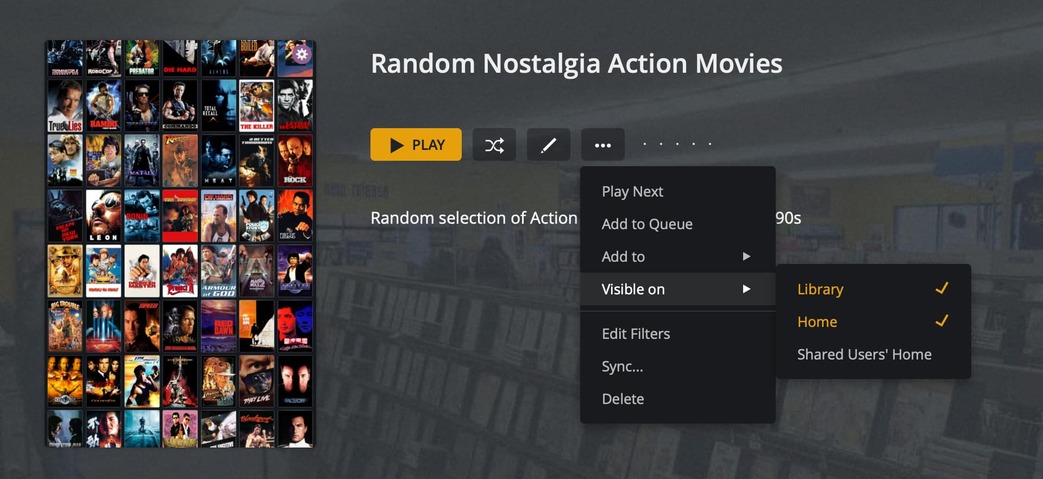
Add it to Hub from Collection page (couple ways to do this though):
I then set the collection to be hidden so it doesn’t show up anywhere but in my Collections tab and use the “Manage Recommendations” screen or that “Visible On” above I can set where it shows up in the different hubs\screens.
This has made the Home Screen much more personalized and useful for me - might be useful for others as well. I’m a huge fan of this recent feature addition (even with the few bugs still being worked out). 
For the Pictures rows maybe some form of “random pictures” row would be more useful than the static “recently added” row. You can use @Divideby0 instructions to turn off that “recently” added row and set a custom row. That’s why I created that custom “Recently Released Unwatched” to replace the built in “recently released” because it was too static.