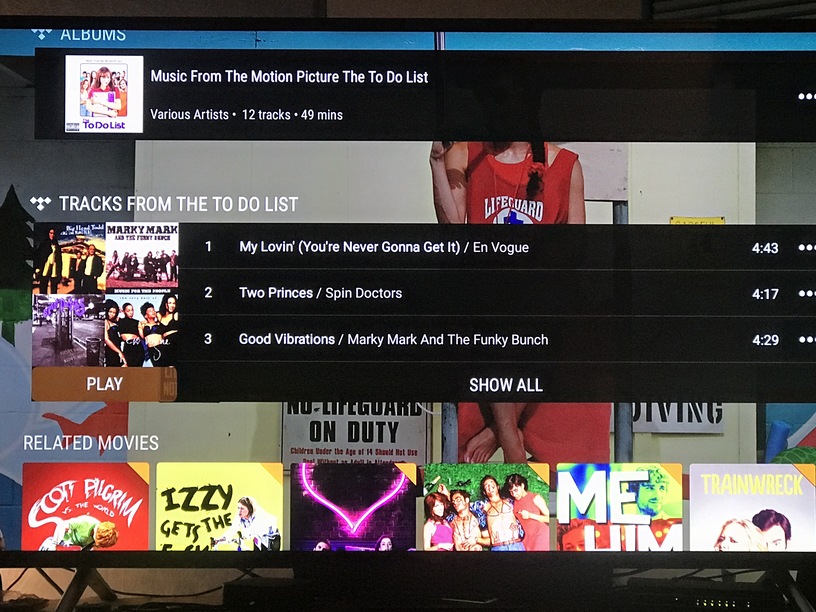
Yeah, it’s using Tidal to give you a 30s preview of those songs, if you don’t have a Tidal subscription.
30s are usually enough to confirm “yes, that’s the song I heard in the movie” and then go and acquire it from anywhere.
It’s probably not going to convince you to enable it, but if you do, you can still ‘unpin’ the tidal library so you won’t see it, then you can get the tidal related/recommendations in the movie/tv/music libraries.
I find it useful to help identify music in various movies/episodes, even if only 30 seconds preview.
Confirming, I have the Online Media Options disabled as well, my Sony Android TV exhibits the same behavior (Collections not showing on preplay screen), my FireTV Stick works as advertised (Collections do show on the preplay screen). All apps on all devices and Windows server updated to latest. AndroidTV and Windows server use the beta channel.
At home, some movies have expected related hubs, other movies have only reviews and NO related hubs.
I do not see any obvious difference between those with/without.

Server logs with Shield network logs enabled
I’ve had this for about 2 years now and have no problems with the collections even the old update before the new update on the Nvidia shield for Plex had under the reviews what movies if it was in a collection my collections that all changed 4 days ago now or it doesn’t show it all the ones that are in collections before showed it so don’t say it didn’t show that trust me I mean I have no every aspect of the Plex app for all the TVs in the TVs like they they show the actors faces they do but at least they should collections and movies on the Nvidia shield with without the actors faces
hopefully the lad actors faces but under reviews if it’s in a collection it should be under there like it was before don’t say it wasn’t because you never look there thought to go down cuz it was cuz it’s always been there and it’s really pissing me off having to exit out of my movies now to go to the next movie or in the collection
this happened for and they only show two movies even though I had a whole bunch of movies in the collection in the same area now it doesn’t show any movies in this is back in the day when I had that problem now this problem is rising we don’t see any
It is most likely a client issue.
Notice the presence of Tunefind content on the movie where collections are showing.
I have a hunch that all collections will vanish on Android TV, if you’d disable the Tidal media source.
Hate to throw a wrench into the theory, but (if I understand, correctly) I have the collections showing on both of my Android TV devices in every library, and I have Tidal disabled completely in every option. That is, I don’t get the “Soundtrack/Tunefind” info anywhere.
maybe it’s something to do with how you have set collections to be displayed. I have it set to “Show .collections and their items”
Does this include the Online Media Source ‘Tidal’?
https://app.plex.tv/desktop#!/settings/online-media-sources
If you have the above disabled, can you provoke the issue by editing your movie library and enabling “Include related external content” on the ‘Advanced’ tab?
I’m probably not looking on the right place, but for “Online Media Sources” Tidal is disabled. The only online media source that is enabled is “Movies and TV”.
I can’t find an option to “Include related external content” in any library, with the local or external version of the web app.
Is it perhaps named “Include Tidal content” or similarly?
Hmpf!
So much for that theory.
What happens if you temporarily enable Tidal,
then enable “Include related external content” in the properties of the library,
then disable Tidal again?
Sorry, this was more aimed at @leelynds , since he is reporting that all collections are working for him. I wonder if they break after this change.
‘bout time for that ice-lovin’ dog of his to go out for a bag of ice… If the Polar Bear doesn’t cause a problem he should be back in a min…lol
No matter what settings I disable or enable, the collections always show up on my Android TV box.
To make sure, I shut down and re-started server after every change, and force closed and restarted the Android TV app
- With Tidal enabled, and with online external content enabled, collections were visible
- With Tidal enabled, and online external content disabled, collections were visible
- With Tidal disabled, collections were visible
Maybe a few other combinations, but I always had collections.
Plex for Android 7.28.0 - standard release, updated yesterday
Plex Media Server 1.18.7.2434 - beta - updated yesterday
As I posted earlier up in the thread, not all videos are affected.
At first I thought it was all of my videos were missing related info.
Then I found some that were working (see above).
it is possible that this affects people’s library in different ways depending on their own particular setup/options.
it is also not clear whether this is a client problem, or a server problem, or a combination of both.
Can you confirm my findings, that the presence or absence of collections coincides with the availability of Tunefind content for this item?
