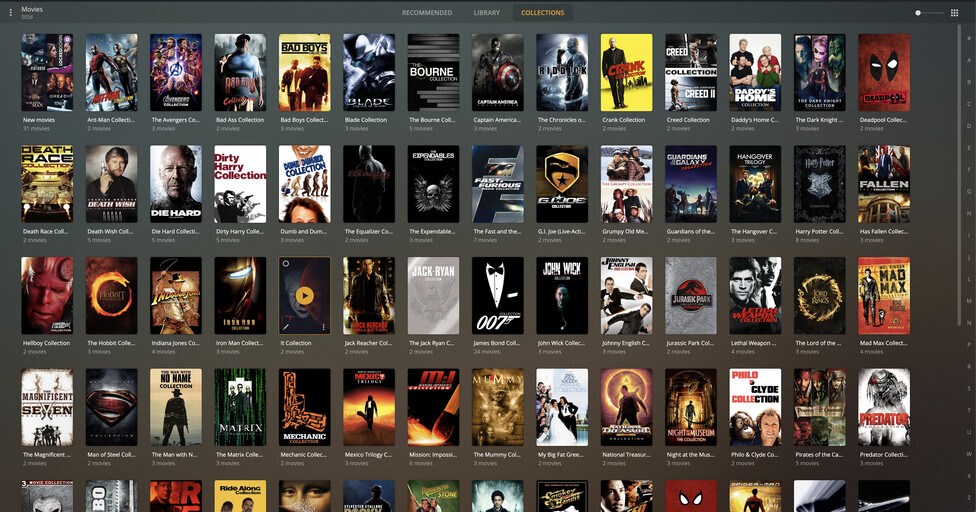
After building over a dozen MOVIE collections on my server, the “collections” tab stopped working on the computer I use as a server, and simply became a mirror of the “library” tab.
Collections still appear when I stream to fire stick or outside of home, but do not appear on the device I manage my library with.
As you can see, the “collections” now functions the same as “library”
Plex server Version 1.23.2.4656-85f0adf5b
Plex for Mac Version 1.31.1.2262-74fdc6b7 (this is the only place I see the error, on the computer; collections still visible on fire stick and mobile and other computers)
MacOS 10.15.7
I’m not using a browser; I’m using Plex for Mac to view it; if I open it with a browser (safari) it’s fine, if I use anything other than Plex for Mac on the computer that has the server it’s fine … it’s a weird thing on Plex for Mac.
I did just notice one other oddity; in the library tab, it says I have 2703 movies; but in the collections tab, it says I have 2678 movies, which I believe is the number of movies I had when this oddness started.
Could this be one view being sorted by title and the other not?
While sorted by title, Plex will show collections inline so the view has less items (assuming your library is configured to hide items that are part of a collection).
If that’s the discrepancy you’re seeing, it won’t be an actual issue.
correct… just pointing out it’s no symptom of that issue or separate issue but the standard behavior (indicator shows the number of visible items, not movies).
I’m having the same issue, Plex for Mac 1.33.0.2444-a220eae4. Just upgraded to server version 1.23.5.4841 on a Synology NAS, same behavior on the Plex for Mac client only, web browser works normally.
This only happens for the administrator user account, and only for one library under that account. The same library under two managed user accounts on the same app works normally. Another movie library works fine using the administrator account.