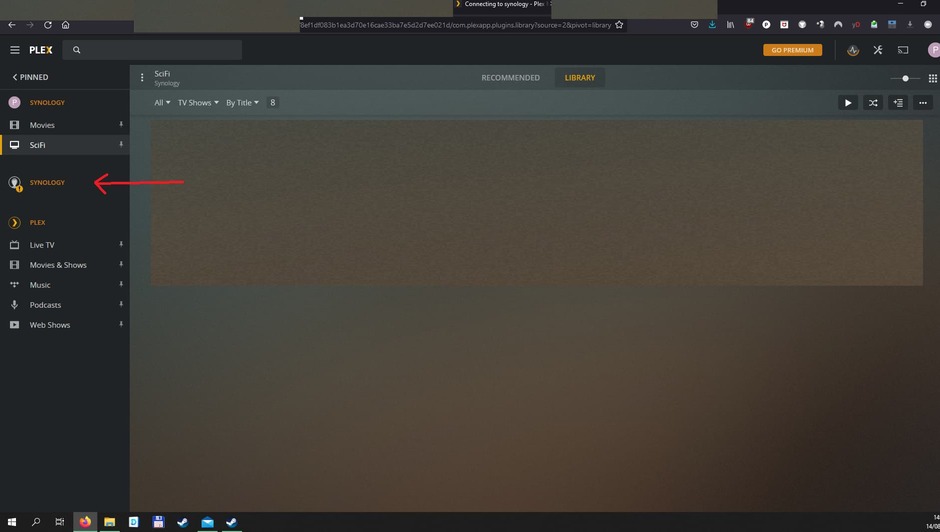
Server Version#: DSM 6.2.4.25556
Player Version#: 4.63.0
Hi,
I have been having connection issues with my NAS. When logging in it says that synology is not available and/or I am not authorized.
Anyone have an idea how to fix?
P.S. i am using VPN
Server Version#: DSM 6.2.4.25556
Player Version#: 4.63.0
Hi,
I have been having connection issues with my NAS. When logging in it says that synology is not available and/or I am not authorized.
Anyone have an idea how to fix?
P.S. i am using VPN
Do you have a screenshot of the error?
When you say “logging in it says synology is not available” is that the name of the PMS itself or are you talking about logging into the NAS directly?
Are you using the Synology VPN or something else?
Thanks Plex Ninja,
It solved my issue but I did it a little bit different to get a more clean library I installed plex media server again on my NAS. It solved most issues with a little bit extra work (having to rescan my whole library!)
Just one small issue left. How do I delete the “old” synology connection notification?
Trumpy is offline right now. It is his daily “Eyelid inspection” time. 
Plex/web
Settings - Authorized Devices - Server (dropdown)
Thanks, found it and it worked
I’ve seen a few times now where you guys have said don’t use Quickconnect, DDNS or a domain name for connecting to my synology.
I have my Plex server config point to use my synology.me DDNS going to a reverse proxy that points to my local instance. Everything appears to be working just fine. Is this something that I need to revisit?
If it works, then great. I tend to use the same thing myself.
If you start to have connection issues etc, see if you are able to resolve/reproduce the issue by going directly to the IP address first, before posting here - if you post with an issue and say you’re using QuickConnect, the first thing anyone will say is “don’t do that, use IP”.
Also when you use QC or DDNS, to the Plex server you’re coming in from the internet even if you are actually local, so Plex then treats you as a remote client, which may not be what you want. But like I said, if it works and there’s no issues, then I wouldn’t worry about it too much.
Following up —
IF it’s claimed and everything is proper — Use whatever you like.
If the server is not claimed – Use IP address or the Plex Claim Token claiming method.
This topic was automatically closed 90 days after the last reply. New replies are no longer allowed.