You’ve got a really bad source file. Either re-acquire it or re-encode it using Handbrake, FFMPEG, etc.
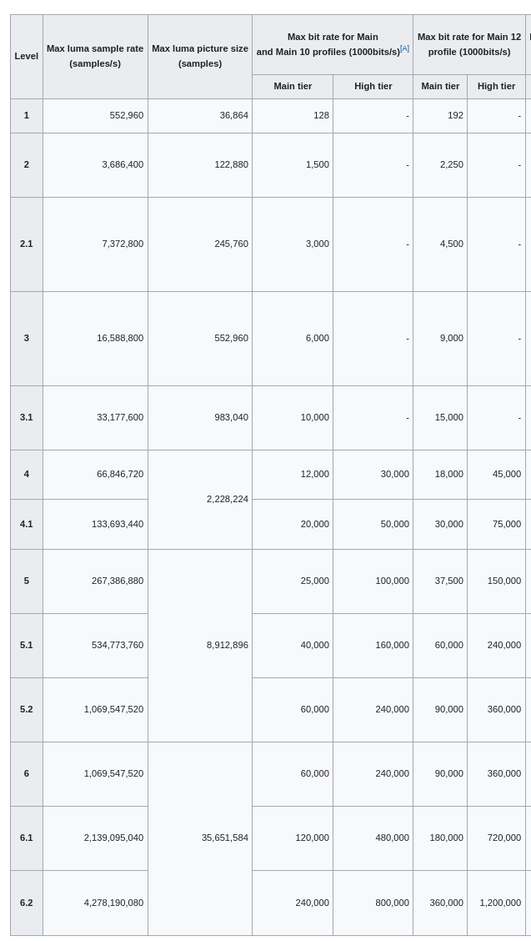
It should be Level 4.0 max. Level 6.2 is meant for 8K@120fps. 4K HDR rips are Level 5.1.
Level 6.2 probably exceeds the max level for your client. Encode it to a more reasonable level and it might direct play.
Enabling subtitles can cause a video transcode. This cause problems on low power CPUs such as the Celeron in the DS920+. On Linux systems, burning subtitles into the video stream is handled by the CPU, even when using hardware accelerated transcoding. The process is also single threaded and unable to take advantage of multiple cores. The Celeron will struggle to perform this task.
Monitor playback via Plex Dashboard. If enabling subtitles results in a video transcode, then the server will struggle to keep up.
It takes about 20-30 seconds to start playback when attempting HW transcoding. It will then play for about 3 seconds, then wait another 20-30 seconds.
Software transcoding works without issue. I was under the impression that HW transcoding should have a seamless failover to SW transcoding.
The client is an Android TV device running android TV version 9. The same issue happens on other clients as well (Web, etc)
Also RE source file level, understandable, hence why it’s transcoding. If I had to reencode every file with handbrake, I would not need to transcode and it defeats the purpose of transcoding, so I’d rather not use handbrake on all my files.
Wikipedia claims that Quick Sync only supports up to L5.1. That could explain hardware transcoding failures. I’m interested in what @ChuckPa says about the debug logs.
Share a sample file? I’m curious if it’s just badly labeled. Sometimes people set the Level MUCH higher than actually required. It’s also weird that it’s encoded with just 1 ref frame at that resolution/bitrate/framerate/Level.
Please turn off verbose logging (Settings → Server_Name → General). It is not needed and can cause the log files to wrap too quickly.
At least part of the problem is subtitle burning: Dec 19, 2021 10:25:47.548 [0x7f03c1b1cb38] DEBUG - [Transcode] MDE: E1 - Assassination Time: selected subtitle cannot be converted to a compatible format, burning into video stream
Edit: Matching 12:40 playback. Dec 19, 2021 12:40:10.376 [0x7f03c0998b38] DEBUG - [Transcode] MDE: E1 - Assassination Time: avoiding video remux due to burned subtitle stream
This post provides details on the process. Ignore the part about the video driver. It is not relevant here.
Unfortunately, ASS subtitles are a problem for many Plex clients, including Android/Android TV. Enabling them results in a video transcode. You can try changing Burn Subtitles from Automatic to Image Formats Only in the Plex client app, but you will probably lose formatting information in the process (positioning, colors, etc).
I don’t think Quick Sync is limited to the display resolution or HDMI/DP capabilities. Or at least I don’t think it tells us what Levels the chip can decode/encode of various codecs. Hrm. I assume H.264 is 4.x and H.265 is 5.x. Maybe the thing to do is to probe some hardware.
HDMI is uncompressed and insanely fast - each pixel needs many bits to represent color.
This is all about HW codec DECODE & ENCODE image processing.
After the final-encoded image departs the QSV ASIC, the GPU itself does the serialization to generate the HDMI signalling to put the pixels on the glass and YES, that’s insanely fast due to how the signalling works.
What I’m referring to is analogous to when someone has 4x 1 GbE ethernet cables and think they have 4GbE ethernet – but wonder why they are only getting 1 GbE speeds.
This is a “width of the pipe & speed of the pipe” problem
Specifying L6.2 for the pipe input requirements … the “pipe” says “Go away”
It’s probably all irrelevant while there are ASS subs involved.
I agree that file doesn’t make sense. L6.2! I’m hoping we get to see a sample. It’s like a speedometer that goes to 120 on an old car that can only do 70.
The web page can be a bit difficult to navigate. You want the CPU datasheet, Volume 1, Processor Graphics section. It shows which codecs are supported for decoding & encoding and any limits.
Below is a sample from the 10 Gen CPU document: PDF. The full document lists additional information such as API versions, block diagrams, etc.
Does this projector support ASS subtitles natively ?
If you want to force Software –
Settings - Server - Transcoder
Turn off all the HW acceleration
I think you’re far better served, for this 5 Mbps video input, to properly re-encode it so it runs within accepted standards for its class (H264/H265 - Level 4.0 which supports up to 20 Mbps)
Sharing the file would be as simple as posting a link for Direct Download. (http)