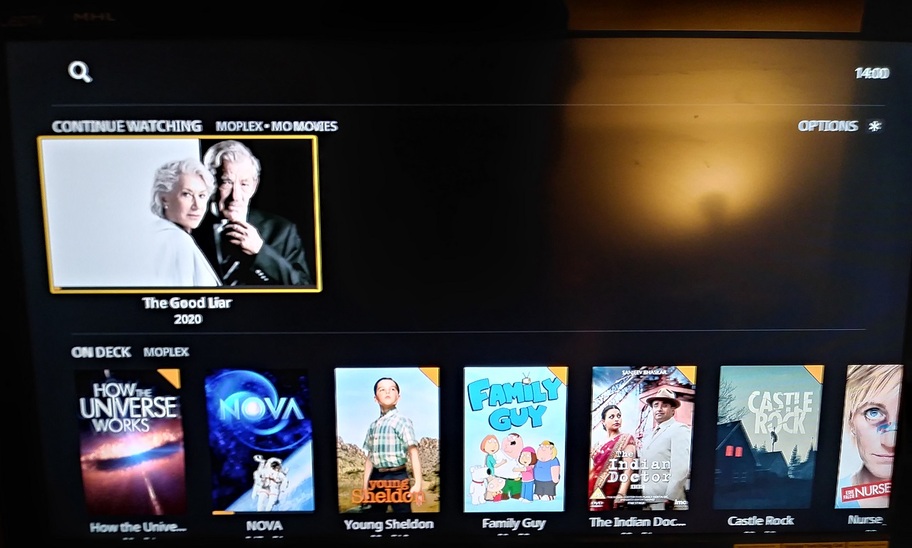
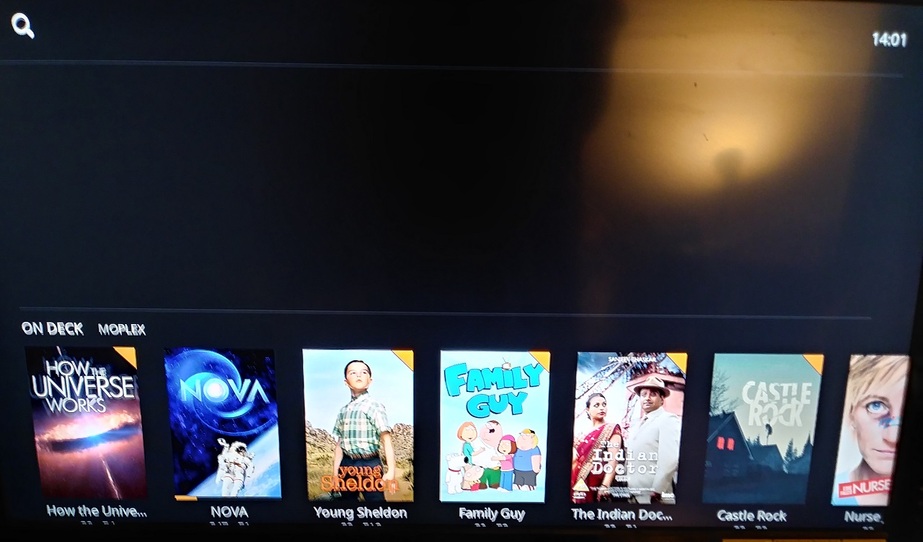
Server Version#: 1.18.5.2309
Player Version#: 6.4.10.6174-1475be6a9-Plex Preview
(and also the latest Public Version of the app)
When using Automatic Home Continue Watching and the field it occupies is dynamic. Comes and goes as required.
When using Manual Home Continue Watching appears when necessary, but the field it occupied (the GIANT Blank Space) never goes away unless you completely reload the app.
In a possibly unrelated incident:
Yesterday evening/EARLY this morning, my Roku suddenly came up in Portuguese and really blew my mind. Finding and changing that back to English is quite a challenge - if you don’t speak Portuguese. <---- Sorry. I didn’t explore the Plex App at that time, so it’s unknown if the Plex App was also speaking Portuguese.
I suspect the quick-fire Roku Updates may have been a player in this. After I regained English I cycled my sign-in and rebooted (everything) a few times - all appears normal. At This Time - apart from the Continue Watching Hub Bug that persists.
… and the reason I’d like to enable Manual Home - and The Continue Watching from ‘Movies’ ONLY - is that for 48 years I’ve been looking at the redundancy of Continue Watching and On Deck - and thought this may, finally, be a way to fix that…
I was able to get into the condition you describe. I was then able to correct it. To do so I:
Set home back to Manage Automatically and ensured I had no items in Continue Watching.
Uninstalled the Plex Preview app (I also uninstalled the non-preview Plex app as well as I wasn’t sure if they shared configuration).
Reinstalled the Plex Preview app, opened it, and relinked it to my account. I also set it to login automatically, but I doubt that has any bearing here.
With the home screen at its default (automatically managed) I watched a movie partially to ensure it showed up in Continue Watching (it did). I then marked it played to ensure it was removed from Continue Watching as was the space it was occupying (it was).
Set the the home screen to be manually managed by selecting the three dots to the left of Home and selecting Disable (Manually Manage).
Removed two hubs that I did not want on my home screen (Shows On Now and Sports On Now).
Watched a movie partially to ensure it showed up in Continue Watching (it did).
Went to the Recommended tab of my movie library and removed the Continue Watching hub from my home screen. I then added back Continue Watching from only my movie library.
On my home screen, moved the Continue Watching hub back to the top of the list.
At this point I am able to use the Continue Watching hub as expected again. Movies I watch partially cause it to appear. When the movie is marked played, marked unplayed, or watched to the end the hub and the space it occupied are removed.
In my case what got it into the bad state was a combination of the steps you outlined and doing a “Restore Default Home Screen.”