Akore
May 6, 2020, 3:14pm
1
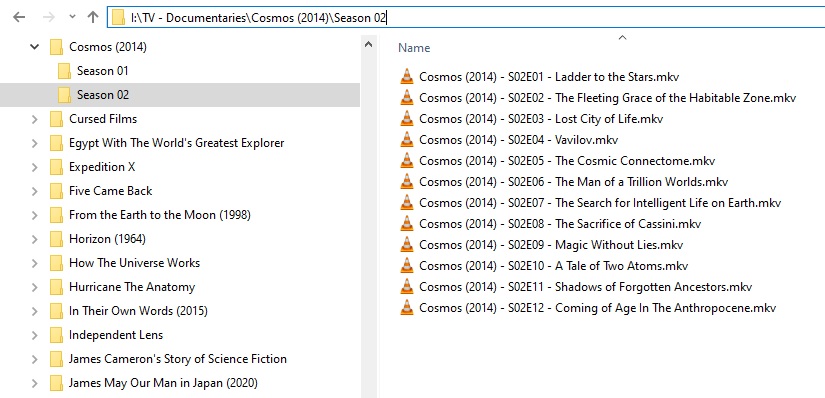
So I have both seasons, have a folder called Cosmos. Put both season into this folder in there own folder, Season 1 and Season 2, But in Plex it only shows the first season and then for the last for episodes it is show that there are two files for only these last four episodes, 10-13, and if I look at them they are indeed both season 1 and season 2, episodes 1-9 for season 2 do not show anywhere even if I move them to their own folder?
https://thetvdb.com/series/cosmos-a-spacetime-odyssey
Got mp4 files?:
With LMA in priority, Embedded Titles within MP4/M4V files are preferred - even over a perfect file name. Local Media Assets should - AT ALL TIMES - remain enabled (unless specifically instructed to turn it off).
Local Media Assets should be ‘Demoted’, to the bottom of the stack of active agents under ALL tabs in Shows and Movies, but should NOT be disabled.
Local Media Assets is needed for many things - it doesn’t need to be given Tip-Top-Priority (as Plex has so hatefully placed it as it’s …
After renaming/fiddling - Plex Dance the whole show if it refuses to cooperate:
The purpose of this is to remove all cached metadata and xml data for an item that Plex usually keeps. This helps when you want to “start from scratch” for particular item
move all files for the media item out of the directory your Library is looking at, so Plex will not “see” it anymore
scan the library library (to detect changes)
empty trash
clean bundles (in menu next to server name, when accessed under ‘More’)
double check naming schema and move files back
scan the library
Support articl…
If you continue to have problems:
Akore
May 6, 2020, 10:46pm
3
Thank you for the reply. Adding a leading “0” to the first 9 episodes fixed it!
Has to be “Episode 01” and not “Episode 1”