Depending on how you use your QNAP, if you have multiple users who sign into QTS itself, you can hide the PlexData share from them.
Normal QTS shared folder management takes care of that for you. If you grant them access in Shared Folders, they will be able to see it in FileStation.
Just wanted to say thanks Chuck! I let this error go for quite awhile because I wasn’t noticing any problems with PMS. Took reading the entire thread for it to fully sink in what was going on and how to fix it. Quite simple really. And I assume that now that I have a properly working PlexData share, when eventually upgrading to 1.20.2, it should still work fine(despite it not reporting an error by design)?
I remain ignorant as to why these server updates don’t also get pushed to QNAP itself, but I suspect that’s a can of worms for a whole separate thread.
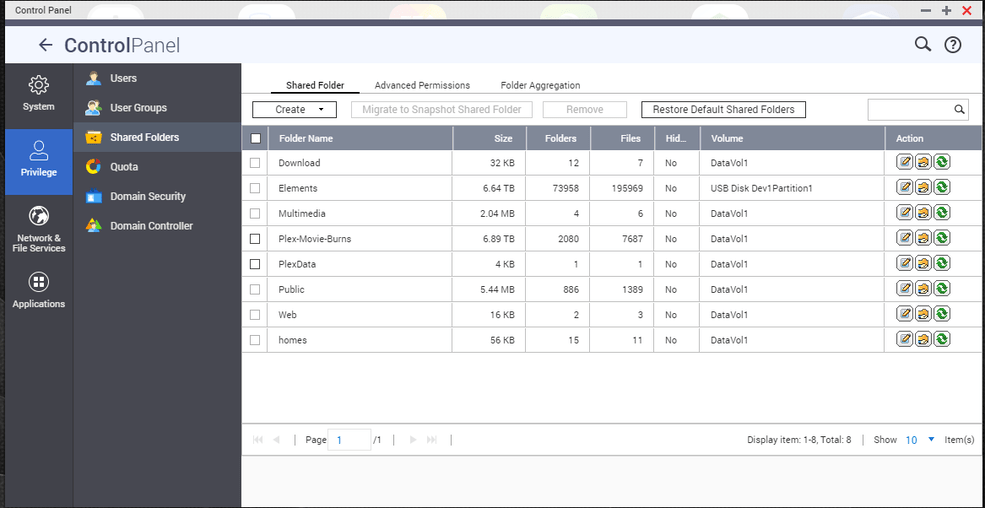
GO to control panel in your QNAP and select privileges then Shared Folders, see screenshots below. Click the box for the PlexData folder then hit the remove button on top DO NOT SELECT DELETE THE DATA, then click yes.
So I just did a manual update to PlexMediaServer-1.20.1.3252-a78fef9a9-x86_64 - for some reason it never updates automatically on my QNAP, I always need to install updates automatically. All other apps on my QNAP update themselves, just not Plex for some reason!
The install seems to have stuck at 80% with the errors noted upthread. It says it is up and running but still shows 80%. Clicking stop greys it out but doesn’t seem to stop it.
Because QNAP does not push them. @ChuckPa has been working with QNAP to start supporting the updates. It is QNAP though not Plex that is the issue for updates of Plex in the QNAP APP Center as I understand it.
QTS firmware / App Center showing 80% installation progress , even though installed, is a QTS notification problem. Refresh the display (F5 / Ctrl-F5) and it’s clear.
App Center being stuck at the old version is QNAP. When asked why they weren’t updating, I was given a reason (“Package Naming didn’t match”). I fixed that in 1.20.0. This can be confirmed by looking at notification. It now states “Plex Media Server” instead of “PlexMediaServer”.
PlexData share creation problems are QTS. I was again on the phone with them today. I will only say that I’m glad I opted to remove creating the share from 1.20.2. As of 1.20.2, PlexData is 100% optional and, if there is a collision with other use of a share coincidentally named “PlexData”, the feature can be completely disabled.
FYI, I just manually installed PlexMediaServer-1.20.1.3252-a78fef9a9-x86_64.qpkg and didn’t have a stuck installation problem, though I did get the PlexData share warning, hence I’m here. I just deleted the existing PlexData share from Control Panel->Shared Folders and recreated it with just the admin with r/w access and restarted Plex Server and it seems to be all ok now.
My system: QNAP TS-453Be with firmware 4.4.3.1400.
After upgrading Plex Media Server from 1.19.5.3112 to 1.20.1.3252 I noticed the “Could not create PlexData share” error and ended up in this thread after some brief googling. Followed the suggested fix of deleting the PlexData shared folder (I opted to “also delete the data”, though ControlPanel was showing a size of 0 with 0 folders and 0 files, so it probably didn’t matter), recreating the share on the default volume and restarting Plex Media Server. This resulted in no more errors being logged and a working PlexData share. Ironically I wasn’t even aware of the PlexData feature, but now that I am I appreciate being able to peek under the hood.
Thank you, @ChuckPa, for your dedication and support. I wasn’t aware of your work until I read this thread, but know that Plex was the no. 1 reason for me to buy this NAS and you just confirmed I made the right choice. Cheers!
Oh and just for the record, I never encountered any of the other issues mentioned in this thread as part of upgrading to 1.20.1. PMS was running fine even before I applied the fix.
I had the message “WARNING: Could not create PlexData share.” The share did seem to exist but was associated with no volume. After reading threads here, I deleted and reinstalled the last update. It created the share this in the one volume, I have have. No user had permission to use it so I added admin with read/write (mirrored the Plex share). There are no files in it. I guess I do have a question, what is the Plex Data share for? My content is already in a path? I am using a QNAP.
The PlexData share serves one purpose: GUI access to the area under .qpkg which would normally require shell (SSH) access.
After deleting and recreating the share again – PMS must be restarted.
Plex looks for it when it starts and updates it at every start attempt (whether successful or not). That’s the beauty of it. If PMS fails to start, you still have direct, File Station, access to the logs and databases to find out and remedy whatever happened all from the GUI.
As I’ve said elsewhere in the forum, as of 1.20.2, PMS will no longer attempt to create the share. If it doesn’t exist, it will skip. This makes the feature’s use 100% voluntary
The user(s) you want to have access should have RW permission to the share.
This will allow you to create the Logs.zip in those instances when PMS doesn’t start or if you want to make any customizations in the Preferences.xml via the QNAP Text Editor.
Remember, this is share is intended to be used by the admin for making backups, etc
here is what i have:
Plex 1.20.1
QNAP EXT TS-453Bmini
Version 4.4.3.1400 (2020/08/17)
i have a Folder called PLEX which is completly empty. I created there a Folder called PlexData and gave every UIser RW rights
Since Plex is looking for its media files in a Folder called Public i created there a Folder PlexData too having also RW rights for every user.
Then i stop Plex, start Plex and still receive the error: Could not create share…
What would be a next step to log or debug that issue?