@nikwh said:
I get "Windows cannot access the specified device, path or file. You may not have the appropriate permissions to access the item…
I tried to add permission, it is everything ok, it just doesnt works
Screenshot / log file ?
@nikwh said:
I get "Windows cannot access the specified device, path or file. You may not have the appropriate permissions to access the item…
I tried to add permission, it is everything ok, it just doesnt works
Screenshot / log file ?
Hi. Had a pop-up that a newer version of Plex was available when I started the app a couple of hours ago. Clicked the link and wound up on the download page of the main site. Duly downloaded ‘Plex-Media-Server-0.9.1502.1663-7efd046-en-US’ and clicked the file - got Setup Failed. Assumed that was because the other version was still running, so closed app and retried. Same error. Checked for leftover fragments and deleted them, restarted laptop (Dell i7 8GB) and retried. Still getting same error 0x80070005. Latest log attached. Help please!!
@doublecheck02 said:
Hi. Had a pop-up that a newer version of Plex was available when I started the app a couple of hours ago. Clicked the link and wound up on the download page of the main site. Duly downloaded ‘Plex-Media-Server-0.9.1502.1663-7efd046-en-US’ and clicked the file - got Setup Failed. Assumed that was because the other version was still running, so closed app and retried. Same error. Checked for leftover fragments and deleted them, restarted laptop (Dell i7 8GB) and retried. Still getting same error 0x80070005. Latest log attached. Help please!!
There is an issue relating to VC++ 2015 and the issue has been mainly seen on systems that are not up to date with Service Packs and WIndows Updates. What windows version / service pack level you are running on?
If it is windows 7, you need to make sure you have SP1.
The error from the log you supplied
[09D4:1188][2016-02-03T20:47:03]i301: Applying execute package: vcredist_repair, action: Install, path: C:\ProgramData\Package Cache\17B381D3ADB22F00E4AB47CBD91CE0A5B1CCBC70\vcredist_x86.exe, arguments: '"C:\ProgramData\Package Cache\17B381D3ADB22F00E4AB47CBD91CE0A5B1CCBC70\vcredist_x86.exe" /repair /quiet /norestart'

[09D4:1188][2016-02-03T20:47:16]e000: Error 0x80070005: Process returned error: 0x5
[09D4:1188][2016-02-03T20:47:16]e000: Error 0x80070005: Failed to execute EXE package.
[2100:1EFC][2016-02-03T20:47:16]e000: Error 0x80070005: Failed to configure per-machine EXE package.
[2100:1EFC][2016-02-03T20:47:16]i319: Applied execute package: vcredist_repair, result: 0x80070005, restart: None

[2100:1EFC][2016-02-03T20:47:16]e000: Error 0x80070005: Failed to execute EXE package.
[09D4:1188][2016-02-03T20:47:16]i351: Removing cached package: vcredist_repair, from path: C:\ProgramData\Package Cache\17B381D3ADB22F00E4AB47CBD91CE0A5B1CCBC70\
Error 0x5 is Access Denied
Could you make sure C:\ProgramData\Package Cache does have write/read permissions to the current user
Also could you repeat the upgrade
Shut Down Plex Media server (System Tary Plex icon / Exit)
check windows task manager process view that all plex processes have terminated
Download a fresh copy of Plex Media Server 0.9.15.2 from plex.tv/downloads
Run it and select Repair
If problem persists, take a screenshot of the error screen and find the log files and attach
Look for log files named
Plex Media Server_yyyymmddhhmmss_0_pms.log
Plex Media Server_yyyymmddhhmmss.log
and files with vcredist in the filename
All these are in C:\Users\Stuart\AppData\Local\Temp\
For your info there are a number of forum topics relating to these issues
http://forums.plex.tv/discussion/205192/rewinding-failed-update-to-pms-0-9-15-2-on-windows-7
http://forums.plex.tv/discussion/199738/plex-media-server-0-9-1500-1621-installer-fails-to-install-vcredist/p1
Hi, i was reading the latest posts and seem to have the same issue, I’ve updated PMS last night and since then I cannot open it, unistall it, or fresh install. Before coming here i’ve tryed to delete the registry, Local appdata and other plex files (i.e. https://support.plex.tv/hc/en-us/articles/201941078-Uninstall-Plex-Media-Server). However the unistall didn’t work and I can’t install a nem one because of some permission error. I’ve tried to check the ProgramData/Package Cache permissions as listed above and nothing seemed to work. Couldn’t find any log to attach eighter.
@Andrerm said:
Hi, i was reading the latest posts and seem to have the same issue, I’ve updated PMS last night and since then I cannot open it, unistall it, or fresh install. Before coming here i’ve tryed to delete the registry, Local appdata and other plex files (i.e. https://support.plex.tv/hc/en-us/articles/201941078-Uninstall-Plex-Media-Server). However the unistall didn’t work and I can’t install a nem one because of some permission error. I’ve tried to check the ProgramData/Package Cache permissions as listed above and nothing seemed to work. Couldn’t find any log to attach eighter.
Forgot to mention that I’ve ran CCleaner on it and deleted everything it found related to Plex.
@Andrerm said:
@Andrerm said:
Hi, i was reading the latest posts and seem to have the same issue, I’ve updated PMS last night and since then I cannot open it, unistall it, or fresh install. Before coming here i’ve tryed to delete the registry, Local appdata and other plex files (i.e. https://support.plex.tv/hc/en-us/articles/201941078-Uninstall-Plex-Media-Server). However the unistall didn’t work and I can’t install a nem one because of some permission error. I’ve tried to check the ProgramData/Package Cache permissions as listed above and nothing seemed to work. Couldn’t find any log to attach eighter.Forgot to mention that I’ve ran CCleaner on it and deleted everything it found related to Plex.
I am not sure what file the access / permissions error is for. Is it for C:\Users\WazX\Downloads\Plex-Media-Server-0.0.1502.1663-7efd046-en-US.exe ?
So did CCleaner also remove all *.log log files in C:\Users\Stuart\AppData\Local\Temp\ ? There must be log files there as you have already attached one of them earlier. Anyway as you have run CCCleaner we have to start afresh with a new install. When did you use CCleaner ? After the failure for which you attached a log here or before
And what does this mean I've tried to check the ProgramData/Package Cache permissions as listed above and nothing seemed to work.
What do permissions show as ? For Users it should show as Read & Execute, List folder contents, Read. For Administrators all permissions should be ticked.
Is the user you are running in an administrator account?
Which Windows version ? and Service Pack level?
Have you run Windows Update and is system up to date?
@sa2000 said:
@doublecheck02 said:
Hi. Had a pop-up that a newer version of Plex was available when I started the app a couple of hours ago. Clicked the link and wound up on the download page of the main site. Duly downloaded ‘Plex-Media-Server-0.9.1502.1663-7efd046-en-US’ and clicked the file - got Setup Failed. Assumed that was because the other version was still running, so closed app and retried. Same error. Checked for leftover fragments and deleted them, restarted laptop (Dell i7 8GB) and retried. Still getting same error 0x80070005. Latest log attached. Help please!!There is an issue relating to VC++ 2015 and the issue has been mainly seen on systems that are not up to date with Service Packs and WIndows Updates. What windows version / service pack level you are running on?
If it is windows 7, you need to make sure you have SP1.The error from the log you supplied
[09D4:1188][2016-02-03T20:47:03]i301: Applying execute package: vcredist_repair, action: Install, path: C:\ProgramData\Package Cache\17B381D3ADB22F00E4AB47CBD91CE0A5B1CCBC70\vcredist_x86.exe, arguments: '"C:\ProgramData\Package Cache\17B381D3ADB22F00E4AB47CBD91CE0A5B1CCBC70\vcredist_x86.exe" /repair /quiet /norestart'

[09D4:1188][2016-02-03T20:47:16]e000: Error 0x80070005: Process returned error: 0x5
[09D4:1188][2016-02-03T20:47:16]e000: Error 0x80070005: Failed to execute EXE package.
[2100:1EFC][2016-02-03T20:47:16]e000: Error 0x80070005: Failed to configure per-machine EXE package.
[2100:1EFC][2016-02-03T20:47:16]i319: Applied execute package: vcredist_repair, result: 0x80070005, restart: None

[2100:1EFC][2016-02-03T20:47:16]e000: Error 0x80070005: Failed to execute EXE package.
[09D4:1188][2016-02-03T20:47:16]i351: Removing cached package: vcredist_repair, from path: C:\ProgramData\Package Cache\17B381D3ADB22F00E4AB47CBD91CE0A5B1CCBC70\
Error 0x5 is
Access DeniedCould you make sure
C:\ProgramData\Package Cachedoes have write/read permissions to the current userAlso could you repeat the upgrade
Shut Down Plex Media server (System Tary Plex icon / Exit)
check windows task manager process view that all plex processes have terminated
Download a fresh copy of Plex Media Server 0.9.15.2 from plex.tv/downloads
Run it and select Repair
If problem persists, take a screenshot of the error screen and find the log files and attach
Look for log files named
Plex Media Server_yyyymmddhhmmss_0_pms.log
Plex Media Server_yyyymmddhhmmss.log
and files with vcredist in the filename
All these are inC:\Users\Stuart\AppData\Local\Temp\For your info there are a number of forum topics relating to these issues
http://forums.plex.tv/discussion/205192/rewinding-failed-update-to-pms-0-9-15-2-on-windows-7
http://forums.plex.tv/discussion/199738/plex-media-server-0-9-1500-1621-installer-fails-to-install-vcredist/p1
OK. Thanks for your help. I ran Windows Update and don’t get any hits. AFAIK my Windows 8.1 system is fully up to date. On your various comments…
Could you make sure C:\ProgramData\Package Cache does have write/read permissions to the current user
## That folder had read but not write permissions. I added write permission
Also could you repeat the upgrade ## done - failed as before
Shut Down Plex Media server (System Tary Plex icon / Exit) ## not necessary - update failure removed original installation
check windows task manager process view that all plex processes have terminated ## nothing tunning
Download a fresh copy of Plex Media Server 0.9.15.2 from plex.tv/downloads ## done
Run it and select Repair ## done - but the only only option was ‘install’
If problem persists, take a screenshot of the error screen and find the log files and attach ## done
Look for log files named
Plex Media Server_yyyymmddhhmmss_0_pms.log
Plex Media Server_yyyymmddhhmmss.log
and files with vcredist in the filename
All these are in C:\Users\Stuart\AppData\Local\Temp\

## all done - see zip file attached
The update still failed, and all I have remaining in the C:\Program Files (x86)\Plex folder are several small .PYC files. Plex is no longer installed.
Will look at the logs later today but you did not give me answers to :
What do permissions show as ? For Users it should show as Read & Execute, List folder contents, Read. For Administrators all permissions should be ticked.
Is the user you are running in an administrator account?
I am having the same issues as doublecheck02. I as well went through all the recommendations and I am getting the same error as in his screen shot .
OS: W12 R2 Standard

I have attached the logs.
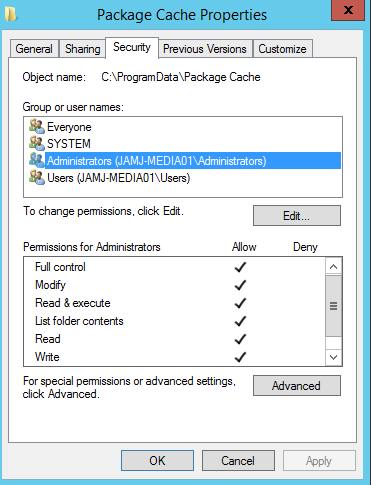
Also checked my permissions per sa2000 message and they are as they need to be.
Has anyone tried to install the older version of Plex to at least get it up and running again or has this new version messed that up?
@plex@jamjwhite.com said:
Has anyone tried to install the older version of Plex to at least get it up and running again or has this new version messed that up?
I tried it and that fails as well. Looks like I am just dead in the water until this gets worked out.

@plex@jamjwhite.com said:
I am having the same issues as doublecheck02. I as well went through all the recommendations and I am getting the same error as in his screen shot .OS: W12 R2 Standard
Also checked my permissions per sa2000 message and they are as they need to be.
This might not be the new problem to do with VC++ 2015 and dependencies on some pre-requisite KB patches - see https://forums.plex.tv/discussion/comment/1106797/#Comment_1106797 and https://support.plex.tv/hc/en-us/articles/200375666-Plex-Media-Server-Requirements
It might be the old issue to do with Windows Firewall Service being stopped. There are these errors
ExecFirewallExceptions:  Installing firewall exception2 Plex Media Server (C:\Program Files (x86)\Plex\Plex Media Server\Plex Media Server.exe)
ExecFirewallExceptions:  Error 0x800706d9: failed trying to find existing app

ExecFirewallExceptions:  Installing firewall exception2 Plex Scripting Host (C:\Program Files (x86)\Plex\Plex Media Server\PlexScriptHost.exe)
ExecFirewallExceptions:  Error 0x800706d9: failed trying to find existing app

ExecFirewallExceptions:  Installing firewall exception2 Plex DLNA Server (C:\Program Files (x86)\Plex\Plex Media Server\PlexDlnaServer.exe)
MSI (s) (14:5C) [10:50:44:263]: Executing op: ActionStart(Name=CreateShortcuts,Description=Creating shortcuts,Template=Shortcut: [1])
ExecFirewallExceptions:  Error 0x800706d9: failed trying to find existing app
but i understand that such errors are supposed to get ignored and not cause a problem and i understand that they only would arise if teh windows firewall service is stopped as opposed to the windows firewall being stopped.
could you double check the status of the windows firewall. Is the service stopped. If it is could you enable and rerun the install.
You may and may not encounter the VC++ 2015 issue after that. We have to see
OK I defaulted the /packagecache folder to full control for everyone, and checked that Windows Firewall is running. Then retried installation. Same error. Dead in the water. 
Will need fresh logs with the setup running with the firewall running
I had a quick look at @doublecheck02’s log and the vcredist log dd_vcredist_x86_20160204015510.log.
The vcredist is failing (access denied) when trying to apply the KB2999226 patch:
'"C:\WINDOWS\SysNative\wusa.exe" "C:\ProgramData\Package Cache\3ACBF3890FC9C8A6F3D2155ECF106028E5F55164\packages\Patch\x64\Windows8.1-KB2999226-x64.msu" /quiet /norestart'
[20BC:26D4][2016-02-04T01:55:23]e000: Error 0xc0000005: Failed to execute MSU package.
[2964:1E9C][2016-02-04T01:55:23]e000: Error 0xc0000005: Failed to configure per-machine MSU package.
[2964:1E9C][2016-02-04T01:55:23]i319: Applied execute package: Windows81_x64, result: 0xc0000005, restart: None
[2964:1E9C][2016-02-04T01:55:23]e000: Error 0xc0000005: Failed to execute MSU package.
You can try installing KB2999226 directly after downloading it from here https://support.microsoft.com/en-us/kb/2999226 (Microsoft may have updated this version to deal with prerequisites better)
If it still won’t install, you could collect some data that may help us:
Edit: I changed the next paragraph to suggest using wmic instead of systeminfo since it is more reliable.
wmic qfe list | findstr 2999226.
wusa /uninstall /kb:2999226, or use the Programs and Features -> Installed Updates Dialog to uninstall it.wusa and get a log. You need to specify the entire path of the msu file and the log file. So you need to type something like this wusa c:\Users\williami\Downloads\Windows8.1-KB2999226-x64.msu /log:c:\users\williami\downloads\kb2999226-install-log.evt.William thanks for the info on this. I actually just looked at my setup logs for the server and there is a failure of the install of the KB2999226 patch in the event logs.
Here is the error in the event log.
Windows update could not be installed because of error 2149842948 “” (Command line: ““C:\Windows\SysNative\wusa.exe” “C:\ProgramData\Package Cache\3ACBF3890FC9C8A6F3D2155ECF106028E5F55164\packages\Patch\x64\Windows8.1-KB2999226-x64.msu” /quiet /norestart”)
I have tried to install it manually as well and I get the same error. I did as you requested in your last post to do the logging and have attached the logs to my reply here. Just as an FYI I had to add .txt to the file name as the forum would not allow me to post .evt or .dpx files.
I am about to just restore my VM and not do the update.
@plex@jamjwhite.com said:
William thanks for the info on this. I actually just looked at my setup logs for the server and there is a failure of the install of the KB2999226 patch in the event logs.Here is the error in the event log.
Windows update could not be installed because of error 2149842948 “” (Command line: ““C:\Windows\SysNative\wusa.exe” “C:\ProgramData\Package Cache\3ACBF3890FC9C8A6F3D2155ECF106028E5F55164\packages\Patch\x64\Windows8.1-KB2999226-x64.msu” /quiet /norestart”)I have tried to install it manually as well and I get the same error. I did as you requested in your last post to do the logging and have attached the logs to my reply here. Just as an FYI I had to add .txt to the file name as the forum would not allow me to post .evt or .dpx files.
I am about to just restore my VM and not do the update.
Whilst waiting for Williami - do you have the prerequsite for KB2999226 installed ? On windows server 2012 R2 it is KB2919355 which links to
Windows Server 2012 R2 Update
Hello Everyone,
I just wanted to let you know I surrendered to the problem and just created a new VM and reinstalled the older version of Plex. I will try the upgrade at a later time or once Plex is able to figure out what is breaking this update. I might be willing to try this weekend to upgrade just will wait and see. I can always take a snapshot of the VM and that way I can roll back which I didn’t do last time because the Plex upgrades are normally flawless.
@plex@jamjwhite.com said:
Hello Everyone,
I just wanted to let you know I surrendered to the problem and just created a new VM and reinstalled the older version of Plex. I will try the upgrade at a later time or once Plex is able to figure out what is breaking this update. I might be willing to try this weekend to upgrade just will wait and see. I can always take a snapshot of the VM and that way I can roll back which I didn’t do last time because the Plex upgrades are normally flawless.
Well I don’t blame you. It has not been easy to try and work out why it is failing in your case.
Did you manage to check if you had the pre-requisite for KB2999226 installed
(KB2919355 : Windows Server 2012 R2 Update)
This might show it
wmic qfe list full | findstr 2919355
This microsoft page does say a hotfix may result in error The update is not applicable to your computer if the pre-requisite (eg KB2919355) is not installed Windows Update issues troubleshooting - Windows Client | Microsoft Learn
@plex@jamjwhite.com thanks for the log, I had a look there weren’t any new error descriptions to point out what the problem could be
Glad you are back to a working system.
To be clear, it is now purely a windows administration problem, the problem to solve is why we cannot get KB2999226 installed on some windows installations. I’ll keep researching why it sometimes fails and will post here as soon as I know why.

