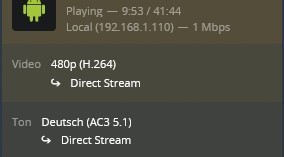
I have the following problem: my TV doesn’t play several videos at all. In this case the tv just loads and loads the video but doesn’t start playing and even if the tv starts playing a video the quality is very low. I don’t get why because server and tv are in the same network (lan) and I have tried several settings. I would be very glad for any kind of help - what information do you need therefore?
For a start you could take a look at the “now playing” section of your server’s dashboard while attempting to play one of those videos. This should show a number of details about the stream:
is Plex treating the stream as local, remote or indirect?
It is a non-transcoded local stream
… and I just recognized that the resolution (so the quality strictly speaking) playing up this particular file is all right, it’s the highest possible one but my tv shows black stripes left and right wen playing files with this resolution.
… And then there are still some files which aren’t played back at all (as described) or in lower resolution than stored (same playback status)
The black bars are probably due to the video being encoded in 4:3 while your TV has a 16:9 or wider aspect ratio. While some users are overly eager to get rid of them, enthusiasts cannot imagine distorting the image or cut parts away to make it use the full screen estate
Can you show the same screenshot from one of the videos that doesn’t play at all? Does it even show on the Now Playing dashboard?
It looks like there’s an issue with the hw-transcoding.
Plex tries to transcode those videos using a GPU but fails to load the libra drivers.
As for the decreased quality files, Plex is adjusting the stream to some quality restrictions. According to your logs this isn’t a video quality restriction from the client but based on available bandwidth