If at all possible is their any way to fix my original account so I can immediatly recreate it?
I had to create a second email just so I could post this.
I have purchased my first higher tier NAS and have given Plex a try for the first time. I’ve had all kinds of issues. Got all the port forwarding figured out, but I had to restart the QNAP NAS due to an unrelated issue. That screwed everything. After restart, would no longer could find my NAS no matter what I did. Decided to try deleting my account and uninstalling Plex server from my QNAP to fix whatever happened. In my attempt to hit the “reset” button on all this, I have made things worse as I can not create an account with my actual email.
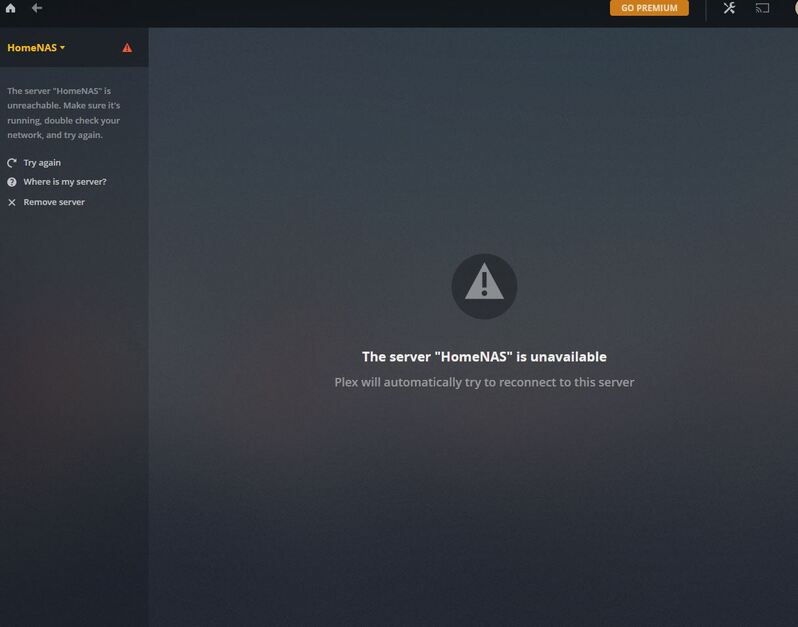
To make matters worse, with the current email I am now getting this when I try to login to Plex Media Server with the 2nd email.
A problem has been detected with a core component of Plex Media Server.
“Unavailable” happens when the tokens are expired and/or it’s not signed into your account.
If the account was deleted, it will get kicked out and lay there in limbo.
First method:
Open a different browser (e.g. FireFox if you normally use Chrome)
Open an incognito window to the IP address of the server.
If it loads Plex/Web, It’s alive. If not, we will need find out why
Assuming it is alive, you’ll need to remove the old PlexOnlineToken (security) because the password has changed.
I followed suggestion #1 from you list above. Signed into my QNAP from Firefox (i usually use Chrome), selected the Plex Server app, still seeing the same thing.
The red hazard symbol is exactly what I am seeing next to my NAS.
I am using the Plex Server (host) app that is in my QNAP NAS. It opens up a separate tab in Firefox.
On the positive side, for some reason it found the server randomly after restarting it.
Now trying to get the remote access working again. I had it working before but for some reason now it keeps disconnecting.
My NAS is assigned a static IP address from my EERO router. The inbound port is set to 32400 and the outbound port is set to 50000. Worked before, but currently it connects and then disconnects after afew seconds.
Check the port forwarding rules in the router and make sure there isn’t anything stray from Plex (a UPNP assignment. Clear out anything that isn’t what you want.
Once you’re down to the one port, manually assigned, it will find it at the next scan. (plex.tv is a bit slow some times).
I’ll bookmark this page and try tomorrow. Getting late. It’s already 10x better off than it was which is all I was really hoping for at the time being.