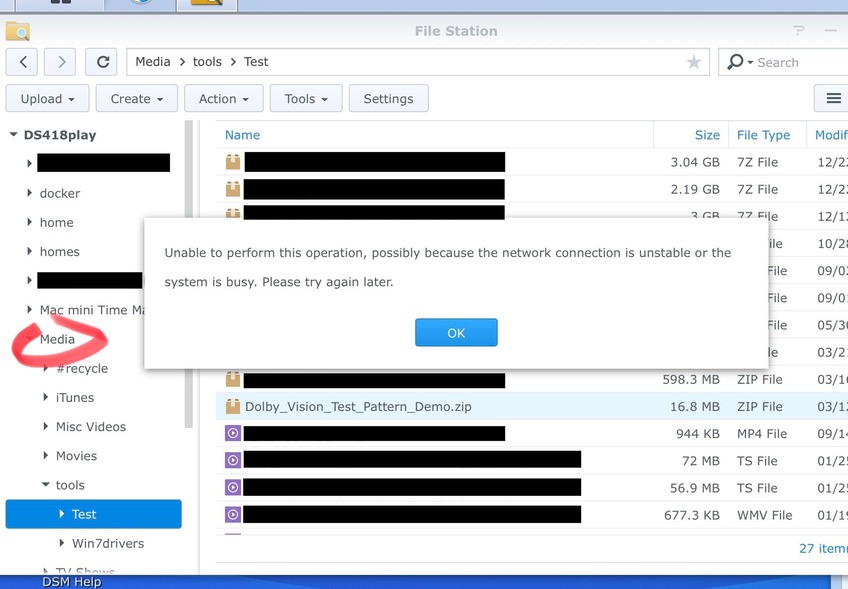
I just went through some troubleshooting with Synology customer support and want to report the issue here as it possibly involved Plex.
When I tried to extract a .zip or .7z file placed anywhere within a shared folder named [Media] in File Station, I was getting this error message “Unable to perform operation, possibly because the network connection is unstable or the system is busy. Please try again later.”
I typically log into DSM with administrative permissions, and I double checked all my write permissions. If I copied the file to a different shared folder, there was no problem extracting it. Even if I renamed [Media] to [Media1], there was no problem using File Station’s extract feature. The problem was happening only when the shared folder was named “Media”. Previously, I had no issues extracting files in my [Media] shared folder until recently.
After some discussion with Synology, they concluded the issue was due to a file named “Media” placed in the / root directory which was causing conflicts. They contend that Plex placed this file there.
I ssh’ed into my Synology, and sure enough in my / root path I found two files, “Media” and “Server”, which were zero byte files owned by root. As soon as I renamed or deleted these files, zip extraction in File Station started working again.
tl;dr
Did a recent Plex installation package write two files “Media” and “Server” in the root directory of my Synology that caused conflicts with my identically named [Media] shared folder?
Unfortunately I have no other detail to provide right now.
I had two files, named “Media” and “Server” in the root location /. They were zero bytes and had no execution permission.
The problem with zip file extraction was solved once the “Media” file in / was renamed. By now I’ve deleted both “Media” and “Server” files. I’ll definitely watch to see if they reappear.
I’m on DSM 6.2.x and had Plex in /volume1/Plex for the last two years without any problems until recently.
This is the first time anything like this has been raised. DSM 6.2 scripting (the package itself which installs and launches PMS) has not changed since DSM 7 beta.
I will do what I can to keep an eye open for this but without any further info, even as minimal as a screenshot, it’s going to be extremely difficult.
I wish Synology were more forthcoming but they have always been secretive / protective.
What screen shots would be helpful? I collected a number of them from the DSM web UI which I could supply if those are useful. But I don’t have any screen shots of my ssh session with the files at the root level. I wish I had thought to capture them before deleting the files.
I install and run Plex through manually installation in Package Center. As I mentioned, it lives in /volume1/Plex. I’m not running any Plex plug-ins. For one day in September, I experimented with Plex in docker but I’m not using that.
Here’s the log from /var/log/messages during extraction:
2021-12-24T08:34:16-06:00 DS418play synoscgi_SYNO.FileStation.Extract_2_start[30407]: wfman.cpp:242 Failed to lstat /Media/tools/Test/Dolby_Vision_Test_Pattern_Demo.zip, reason=Not a directory
2021-12-24T08:34:16-06:00 DS418play synoscgi_SYNO.FileStation.Extract_2_start[30407]: SYNO.FileStation.Extract.cpp:1774 Failed to check path, /Media/tools/Test/Dolby_Vision_Test_Pattern_Demo.zip
You can see it’s trying for a file in root /Media/….
Below is a directory listing of my current root /:
total 80
drwxr-xr-x  26 root root  4096 Dec 25 16:01 .
drwxr-xr-x  26 root root  4096 Dec 25 16:01 ..
lrwxrwxrwx   1 root root     7 Mar 29  2021 bin -> usr/bin
drwxr-xr-x   3 root root  4096 Sep 18 06:36 boot
drwxr-xr-x   7 root root     0 Dec 24 18:21 config
drwxr-xr-x  13 root root 19040 Dec 24 18:22 dev
drwxr-xr-x  48 root root  4096 Dec 26 00:13 etc
drwxr-xr-x  43 root root  4096 Sep 18 06:37 etc.defaults
drwxr-xr-x   2 root root  4096 Mar  4  2021 initrd
lrwxrwxrwx   1 root root     7 Mar 29  2021 lib -> usr/lib
lrwxrwxrwx   1 root root     9 Mar 29  2021 lib32 -> usr/lib32
lrwxrwxrwx   1 root root     7 Mar 29  2021 lib64 -> usr/lib
drwxr-xr-x   2 root root  4096 Jul 25  2020 .log.junior
drwx------   2 root root  4096 Mar  4  2021 lost+found
drwxr-xr-x   2 root root  4096 Mar  4  2021 mnt
drwxr-xr-x   3 root root  4096 Mar 29  2021 .old_patch_info
drwx--x--x   3 root root  4096 Mar 29  2021 opt
dr-xr-xr-x 342 root root     0 Dec 25 02:44 proc
-rw-------   1 root root  1024 Jul 25  2020 .rnd
drwx------   4 root root  4096 Dec  7 00:24 root
drwxr-xr-x  40 root root  2180 Dec 26 08:22 run
lrwxrwxrwx   1 root root     8 Mar 29  2021 sbin -> usr/sbin
drwxr-xr-x   4 root root  4096 Sep 18 06:36 .syno
dr-xr-xr-x  12 root root     0 Dec 24 18:20 sys
drwxr-xr-x   2 root root  4096 Jul 25  2020 .system_info
drwxrwxrwt  19 root root  2320 Dec 26 08:49 tmp
drwxr-xr-x   2 root root  4096 Sep 18 06:36 tmpRoot
drwxr-xr-x  11 root root  4096 Mar  4  2021 usr
drwxr-xr-x  17 root root  4096 Dec 24 18:21 var
drwxr-xr-x  13 root root  4096 Mar 29  2021 var.defaults
drwxr-xr-x   1 root root   694 Dec 26 00:13 volume1
drwxr-xr-x   4 root root  4096 Dec 24 18:21 volumeUSB1
There used to be files in the root / before I deleted them, something like this (I’m recreating this as best as I can remember):
-rw-rw-rw-   [can’t recall] root root  0 [very recent mod date] Media
-rw-rw-rw-   [can’t recall] root root  0 [very recent mod date] Server
I did reach out to Synology to ask how they came to the conclusion that Plex put the files there. I’ll let you know if I hear back. Although, I have to say, I can’t think of anything else on my system that names “Media” “Server” in this style (with capitalization) - besides my own Media shared folder which has existed since I owned the Synology.
Yes, the issue was that during the extraction command, File Station was reaching for the file in /Media/tools/… instead of in /volume1/Media/tools/…
Somehow, this problem was only happening when a file existed in the root directory as /Media. The contention from Synology was Plex somehow put this here along with /Server. Again, I don’t know yet why they think it was PMS.
I just recreated the issue by going into the Syno via ssh, doing sudo touch /Media, and now extract is broken for all compression/uncompression inside the Media shared folder when using File Station.
Plex put the file here but you were the one extracting the ZIP?
If I may be as diplomatic as I can possibly be, Just how stupid do they think we are?
Blaming Plex for a user’s file getting into their hidden / protected part of the file system is one of their more idiotic and unfounded claims I’ve seen in a LONG time.
I think you case makes it pretty clear just how hostile Synology has become toward Plex. That’s very unfortunate.
They begged us to have Plex for their DSM 7 launch and we busted our tails to make it happen only to now be trash-talked by support staff to our user.
Thank you for bringing this up to me. I’m going to escalate this to our management.
Thank you for the ZIP file.
It’s slightly malformed in that it contains a leading / which WOULD put the file in their / directory.
I have two words – " DSM BUG"
“Extract here” should have added the extra control to the extraction to guarantee it extracted “here” and not somewhere else (which is what happened).
ALL linux operating systems will behave the same way with this ZIP file.
If they can’t handle that situation, they don’t belong in the NAS business
Whatever the issue is, I’m glad it’s now more transparent. Thanks for your feedback.
It’s still a mystery what those zero length files /Media and /Server were on my system, or when and how they got there, but at least I know what the issue is with File Station (yes this is a bug - it shouldn’t get confused so easily).
If there’s another DSM user who can check their root / file listing, that would be helpful.
chuck@ds418:/$ ls
bin     dev  etc.defaults  lib    lib64       mnt   root  sbin  tmp  var           volume1
config  etc  initrd        lib32  lost+found  proc  run   sys   usr  var.defaults  volume2
chuck@ds418:/$
DS1815+, DSM 6.2
chuck@moesern:/$ cd /
chuck@moesern:/$ ls
bin     dev  etc.defaults  lib    lib64       mnt   proc  run   sys  tmpRoot  var           volume1
config  etc  initrd        lib32  lost+found  Plex  root  sbin  tmp  usr      var.defaults
chuck@moesern:/$ uname -a
Linux moesern 3.10.105 #25556 SMP Sat Aug 28 02:15:59 CST 2021 x86_64 GNU/Linux synology_avoton_1815+
chuck@moesern:/$
Please keep in mind, my systems are development systems and a lot messier than what you’ll see in production.
If you look at the DSM 6.2 /volume1, you’ll find my Plex share where the server data resides
chuck@moesern's password:
Could not chdir to home directory /var/services/homes/chuck: No such file or directory
chuck@moesern:/$ cd /
chuck@moesern:/$ ls
bin     dev  etc.defaults  lib    lib64       mnt   proc  run   sys  tmpRoot  var           volume1
config  etc  initrd        lib32  lost+found  Plex  root  sbin  tmp  usr      var.defaults
chuck@moesern:/$ uname -a
Linux moesern 3.10.105 #25556 SMP Sat Aug 28 02:15:59 CST 2021 x86_64 GNU/Linux synology_avoton_1815+
chuck@moesern:/$ cd /volume1
chuck@moesern:/volume1$ ls
@appstore     aquota.user  @eaDir  Plex  software                @SynoFinder-log  test  vmssd
aquota.group  @database    iso     @S2S  @SynoFinder-etc-volume  synoquota.db     @tmp
chuck@moesern:/volume1$  cd /Plex
chuck@moesern:/Plex$ ls -la
total 12
drwxr-xr-x  3 root root  4096 Oct 30 18:57 .
drwxr-xr-x 24 root root  4096 Dec 26 12:08 ..
drwxr-xr-x  3 plex users 4096 Oct 30 18:57 Library
chuck@moesern:/Plex$ du -ms .
1	.
chuck@moesern:/Plex$
This “/Plex” is a remnant of my development. It’s not representative of production.