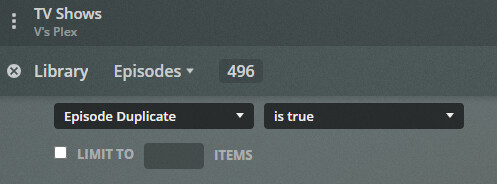
I’ve noticed lately that when looking at the items in the library from the main screens, it no longer shows me when I have more than one file in that title (for example HD, 720p, 1080p, etc). It used to show me the number in the corner, but now I can’t tell unless I either Get Info, or click on the
"Recently added in " which then opens up a larger screen and still shows properly.
Is there a setting I can change to put this back the way it was? Or is it broken and will be fixed?
It is a recent change to Plex Web. For movies, the badge is still displayed at the library level, but not on the details page. On the details page, look for “Versions” above video/audio/subtitles information. Should be similar for TV shows.
Thanks for the quick response…that’s disappointing. Hopefully they can provide an option to put it back on the home page too. For people trying to manage disk space that’s an incredibly useful tool. It’s especially annoying for TV shows since there are so many you can’t be expected to go into every show, then every season, then every episode to look at the details page. We need to be able to see quickly for each individual episode, and the only way I can see to do that now is by the “Recently added in…” option.
Hopefully they can give us the option to re-enable this incredibly useful feature.
Still, it’s a shame we have to jump through these hoops when we didn’t used to. I don’t understand why they would do through the effort to make it LESS user friendly.;
To be honest, It’s not something the average user needs, in fact it was only visible on the web. Or at least I have only seen it when using the web. When I play media I’m using a player of some kind
But really do you need to see that a title has more than one copy all the time, or just when you are managing your library?
Personally I like seeing it all the time. Very regularly I will have multiple copies for a short period of time, then want to clean up the extras shortly after after watching it, but I may still want to keep a copy. So for me the easier it is to see and be reminded that there are multiple copies, the better. Personally I don’t understand why they would want to remove this function. Were people complaining it was too busy or wasn’t pretty or something? If that’s the case why not just make it a toggle-able option instead of ripping out a feature that some users like? Just doesn’t make sense to me.
Yes, Why was this removed, Now you have to be in a DETAILED expert view, and SIFT through tons of episodes to see and find these Duplicates when it was a simple blue badge on the corner of the tv-show poster and episode frame-grab.
Instead of a server side option in a dialog box setting, this was removed and now just as written above in posts makes it MUCH HARDER to manage space, They must not have any budget to keep them from having to clean and manage space like the rest of us.
Just like a a dictatorship, no actual thought in a lot of actions that cause MORE problems for END users that dont have ENDLESS BUDGET MONEY to throw away at disk space. NO THANKS PLEX. FAIL again.
This ‘Average User’ and his ‘Average Friends and Family’ (numbering in the collective MILLIONS - and can’t set a Remote Quality by themselves) need it when there’s an alternate Version to be selected - and the badge indicating such is MIA.
I’ll know there’s another version - 'cause I created it - but Friends and Family will not.
Should we watch the 1945 ‘Pre-Release’ Version that has 3 more minutes - or should we watch the Theatrical Release in 1946 with the re-shot scenes in some areas and 3 less minutes?
How will Plex know?
More importantly, how will We Know there is a Version to select?
Easy.
We won’t.
I guess we just have to put our trust in Plex to do what’s right for us.
(that’s why I edited the description - 'cause I do not trust Plex - and My People STILL won’t see it)
BTW:
Very recently Plex has something in common with The Big Sleep (1946). The plot line is so confusing - I’m not sure I remember Who Done It. It’s a collection of great scenes, one after another, that tells a story so comPlex it’s hard to figure out.
Plex expect multiple versions to be the same video at different encoding rates for video or sound. Not multiple editions. Yes Plex still needs better handling of multiple editions and still recommends you split them into different items in your library.
But it’s ok you can still be a jerk about it instead of up voting the post @flow linked.
@flow Thanks for pointing out that feature request … I tend to split versions and put them in collections myself but now that there is a built in “version” function it’d be nice if it was a little more flexible so titles could stay together without having to use collections.
Though, multiple collections have oddities about visibility for which I think this feature request is useful to vote up, but also mentioned there is a new feature (which again wasn’t really well “announced”) of Smart Collections. Maybe that’ll help with that visibility issue.
I’m saving the very last one to cure World Hunger/World Peace/Other Noble Cause, but the other 4 are tied up in Feature Requests that don’t have a snowball’s chance either.
I sometimes keep multiple resolutions of the same movie and I used the little badge to quickly check if I have more resolutions than necessary (particularly with 4K content I tend to keep a 1080p version with it). At least if I could sort by number of versions then at least I’d know which ones to go into… now I have to try and keep track of it…
ahhhhhhhhhhhhh this is soooo frustrating! Why can’t we just have an option to show or not show the badge? I mean who complained about the bloody badge?!
It’s a real shame that duplicate numbers on titles is now hidden - this is very useful information for server management.
If they wanted to remove the duplicates icon for users that’s fine and I totally understand the desire to have a more clean and polished UI however for server management it’s veeeeeery helpful when quickly browsing for things to fix instead of purposely digging deep into those filters.
I don’t want to have to dig into menus every time I want to do something. Plex seems obsessed with hiding everything deeper and deeper.
I still remember when they decided to hide the edit library button into 3 layers of context menus - WHY?!
Such a pain in the butt having to find stuff these days.
Is this part new by the way? I’d like to recommend a change if so, to not hide things behind menus or clicks and instead have it out in the open as it needs to be.
Came to the forums to open a new topic, thinking there is something wrong with my server, but I see this is a general ‘issue’ which is intended.
Dumbing things down because most users don’t see need it is wrong. The number badges on the episodes really helped me to delete unwanted versions and free up space.
While I can sort-of understand the reasoning behind hiding this information (some people may have thought it was confusing) - there should be a simple checkbox to turn the display back on for people who know what they are doing. I record shows over the air, but will often replace those with versions from other sources a day or two later without commercials. Being able to see at a glance which recent shows have multiple versions so that I can delete the recorded version was really useful.