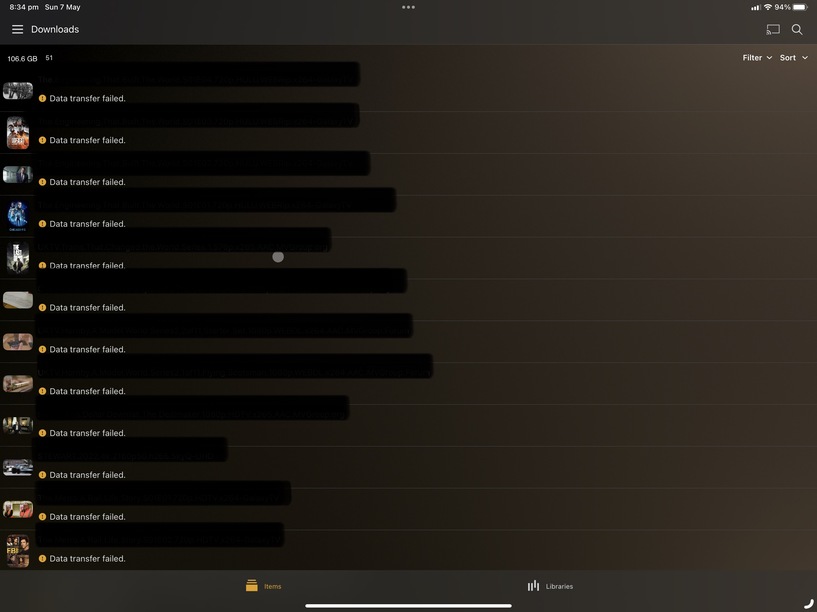
In the PMS logs:
- Turn off IPv6 if you don’t need it and it’s enabled. It’s a PMS bug .
It’s harmless and shouldn’t even be printed.
I have it turned off.
Downloading to the ipad is clean.
8, 2023 17:02:01.935 [140283466713912] DEBUG - Request: [192.168.0.13:43276 (Subnet)] GET /statistics/bandwidth?timespan=6 (9 live) #2a7e TLS GZIP Signed-in Token (ChuckPA) (Chrome)
May 08, 2023 17:02:01.938 [140283736800056] DEBUG - Completed: [192.168.0.13:43276] 200 GET /statistics/bandwidth?timespan=6 (9 live) #2a7e TLS GZIP 2ms 1469 bytes (pipelined: 31)
May 08, 2023 17:02:02.943 [140283468823352] DEBUG - Request: [192.168.0.13:43276 (Subnet)] GET /statistics/bandwidth?timespan=6 (9 live) #2a80 TLS GZIP Signed-in Token (ChuckPA) (Chrome)
May 08, 2023 17:02:02.946 [140283736800056] DEBUG - Completed: [192.168.0.13:43276] 200 GET /statistics/bandwidth?timespan=6 (9 live) #2a80 TLS GZIP 2ms 1476 bytes (pipelined: 32)
May 08, 2023 17:02:03.844 [140283462495032] DEBUG - Request: [192.168.0.13:43276 (Subnet)] GET /statistics/resources?timespan=6 (9 live) #2a81 TLS GZIP Signed-in Token (ChuckPA) (Chrome)
May 08, 2023 17:02:03.846 [140283734690616] DEBUG - Completed: [192.168.0.13:43276] 200 GET /statistics/resources?timespan=6 (9 live) #2a81 TLS GZIP 1ms 822 bytes (pipelined: 33)
May 08, 2023 17:02:03.946 [140283468823352] DEBUG - Request: [192.168.0.13:43276 (Subnet)] GET /statistics/bandwidth?timespan=6 (9 live) #2a82 TLS GZIP Signed-in Token (ChuckPA) (Chrome)
May 08, 2023 17:02:03.948 [140283734690616] DEBUG - Completed: [192.168.0.13:43276] 200 GET /statistics/bandwidth?timespan=6 (9 live) #2a82 TLS GZIP 2ms 1381 bytes (pipelined: 34)
May 08, 2023 17:02:04.956 [140283462495032] DEBUG - Request: [192.168.0.13:43276 (Subnet)] GET /statistics/bandwidth?timespan=6 (9 live) #2a83 TLS GZIP Signed-in Token (ChuckPA) (Chrome)
May 08, 2023 17:02:04.959 [140283736800056] DEBUG - Completed: [192.168.0.13:43276] 200 GET /statistics/bandwidth?timespan=6 (9 live) #2a83 TLS GZIP 2ms 1383 bytes (pipelined: 35)
May 08, 2023 17:02:05.962 [140283690195768] DEBUG - Request: [192.168.0.13:43276 (Subnet)] GET /statistics/bandwidth?timespan=6 (9 live) #2a84 TLS GZIP Signed-in Token (ChuckPA) (Chrome)
May 08, 2023 17:02:05.964 [140283734690616] DEBUG - Completed: [192.168.0.13:43276] 200 GET /statistics/bandwidth?timespan=6 (9 live) #2a84 TLS GZIP 2ms 1394 bytes (pipelined: 36)
May 08, 2023 17:02:06.963 [140283690195768] DEBUG - Request: [192.168.0.13:43276 (Subnet)] GET /statistics/bandwidth?timespan=6 (8 live) #2a85 TLS GZIP Signed-in Token (ChuckPA) (Chrome)
May 08, 2023 17:02:06.965 [140283734690616] DEBUG - Completed: [192.168.0.13:43276] 200 GET /statistics/bandwidth?timespan=6 (8 live) #2a85 TLS GZIP 2ms 1405 bytes (pipelined: 37)
May 08, 2023 17:02:07.965 [140283690195768] DEBUG - Request: [192.168.0.13:43276 (Subnet)] GET /statistics/bandwidth?timespan=6 (8 live) #2a87 TLS GZIP Signed-in Token (ChuckPA) (Chrome)
May 08, 2023 17:02:07.967 [140283734690616] DEBUG - Completed: [192.168.0.13:43276] 200 GET /statistics/bandwidth?timespan=6 (8 live) #2a87 TLS GZIP 2ms 1409 bytes (pipelined: 38)
May 08, 2023 17:02:08.843 [140283466713912] DEBUG - Request: [192.168.0.13:43276 (Subnet)] GET /statistics/resources?timespan=6 (8 live) #2a88 TLS GZIP Signed-in Token (ChuckPA) (Chrome)
May 08, 2023 17:02:08.845 [140283734690616] DEBUG - Completed: [192.168.0.13:43276] 200 GET /statistics/resources?timespan=6 (8 live) #2a88 TLS GZIP 1ms 826 bytes (pipelined: 39)
May 08, 2023 17:02:08.965 [140283690195768] DEBUG - Request: [192.168.0.13:43276 (Subnet)] GET /statistics/bandwidth?timespan=6 (8 live) #2a89 TLS GZIP Signed-in Token (ChuckPA) (Chrome)
May 08, 2023 17:02:08.968 [140283736800056] DEBUG - Completed: [192.168.0.13:43276] 200 GET /statistics/bandwidth?timespan=6 (8 live) #2a89 TLS GZIP 2ms 1422 bytes (pipelined: 40)
May 08, 2023 17:02:09.972 [140283466713912] DEBUG - Request: [192.168.0.13:43276 (Subnet)] GET /statistics/bandwidth?timespan=6 (8 live) #2a8a TLS GZIP Signed-in Token (ChuckPA) (Chrome)
May 08, 2023 17:02:09.975 [140283734690616] DEBUG - Completed: [192.168.0.13:43276] 200 GET /statistics/bandwidth?timespan=6 (8 live) #2a8a TLS GZIP 2ms 1422 bytes (pipelined: 41)
May 08, 2023 17:02:10.981 [140283468823352] DEBUG - Request: [192.168.0.13:43276 (Subnet)] GET /statistics/bandwidth?timespan=6 (8 live) #2a8b TLS GZIP Signed-in Token (ChuckPA) (Chrome)
May 08, 2023 17:02:10.984 [140283736800056] DEBUG - Completed: [192.168.0.13:43276] 200 GET /statistics/bandwidth?timespan=6 (8 live) #2a8b TLS GZIP 2ms 1432 bytes (pipelined: 42)
May 08, 2023 17:02:11.986 [140283462495032] DEBUG - Request: [192.168.0.13:43276 (Subnet)] GET /statistics/bandwidth?timespan=6 (7 live) #2a8c TLS GZIP Signed-in Token (ChuckPA) (Chrome)
May 08, 2023 17:02:11.989 [140283734690616] DEBUG - Completed: [192.168.0.13:43276] 200 GET /statistics/bandwidth?timespan=6 (7 live) #2a8c TLS GZIP 2ms 1441 bytes (pipelined: 43)
May 08, 2023 17:02:12.991 [140283690195768] DEBUG - Request: [192.168.0.13:43276 (Subnet)] GET /statistics/bandwidth?timespan=6 (7 live) #2a8e TLS GZIP Signed-in Token (ChuckPA) (Chrome)
May 08, 2023 17:02:12.994 [140283736800056] DEBUG - Completed: [192.168.0.13:43276] 200 GET /statistics/bandwidth?timespan=6 (7 live) #2a8e TLS GZIP 2ms 1445 bytes (pipelined: 44)
May 08, 2023 17:02:13.852 [140283466713912] DEBUG - Request: [192.168.0.13:43276 (Subnet)] GET /statistics/resources?timespan=6 (7 live) #2a8f TLS GZIP Signed-in Token (ChuckPA) (Chrome)
May 08, 2023 17:02:13.854 [140283734690616] DEBUG - Completed: [192.168.0.13:43276] 200 GET /statistics/resources?timespan=6 (7 live) #2a8f TLS GZIP 1ms 834 bytes (pipelined: 45)
May 08, 2023 17:02:13.997 [140283466713912] DEBUG - Request: [192.168.0.13:43276 (Subnet)] GET /statistics/bandwidth?timespan=6 (7 live) #2a90 TLS GZIP Signed-in Token (ChuckPA) (Chrome)
May 08, 2023 17:02:14.000 [140283736800056] DEBUG - Completed: [192.168.0.13:43276] 200 GET /statistics/bandwidth?timespan=6 (7 live) #2a90 TLS GZIP 2ms 1463 bytes (pipelined: 46)
May 08, 2023 17:02:15.003 [140283468823352] DEBUG - Request: [192.168.0.13:43276 (Subnet)] GET /statistics/bandwidth?timespan=6 (7 live) #2a91 TLS GZIP Signed-in Token (ChuckPA) (Chrome)
May 08, 2023 17:02:15.006 [140283736800056] DEBUG - Completed: [192.168.0.13:43276] 200 GET /statistics/bandwidth?timespan=6 (7 live) #2a91 TLS GZIP 3ms 1469 bytes (pipelined: 47)
It took me 30 minutes but I was successfully able to download a 90 minute 1080p movie and immediately play it.
My iPad (2017) is 500 Mbps-capable
The wifi is WiFi 6 capable.
The connection to the server is 2.5 Gbps
I took screenshots and sent logs to the app team showing them the weaknesses as compared to Plex/web
When I turn IPv6 back on, from my desktop, you see.
May 08, 2023 17:22:01.871 [140283736800056] WARN - [CERT] TLS connection from [::ffff:192.168.0.13]:38200 came in with unrecognized plex.direct SNI name '192-168-0-20.d9637707bcfc4c14a65794726cd0a089.plex.direct'; using installed plex.direct cert
May 08, 2023 17:22:01.875 [140283734690616] DEBUG - CERT: incomplete TLS handshake from [::ffff:192.168.0.13]:38200: sslv3 alert certificate unknown (SSL routines)
It’s stupid noise and yes, I’ve asked them to fix it because it doesn’t belong in the first place.
 PMKLogging.m:14 | Download failed: Data transfer failed (The certificate for this server is invalid. You might be connecting to a server that is pretending to be “101.176.28.191” which could put your confidential information at risk.).