Download Option not showing

This was sent to Billing.
I do not have the option to Download movies. I have a LIFETIME pass and have for many years. I have spent over 4 hrs in your forums, youtube, and web pages looking for a reason why I don’t have this option available. The only thing I can come up with is that I was not granted this privilege on my account. I am logged onto MY Account and the Systems are all updated. I do not have this option on 1 DESKTOP, 1 LAPTOP (both Windows 10), 1 Tablet ((Samsung Galaxy Tab S7+ (SM-T970)), or my Samsung Phone S21+. I could see if it was one or two items, but not everything I own. If it’s not something on your side, please give me the directions to correct the issues on ALL my items.
The Reply:
Although we don’t offer general support, troubleshooting, or investigation via email, we would be delighted to assist you with your specific issue through our support forums (located at https://forums.plex.tv/). Our dedicated support forums (accessible at https://forums.plex.tv/) are here to assist you with these inquiries. This platform enables both our esteemed Plex Technical Support Team and our supportive community members to delve deep into the issues you encounter. We kindly ask that you share the particulars of your concern there, as this will allow us to provide you with the best possible assistance. Additionally, we warmly invite you to explore our comprehensive support site at https://support.plex.tv/articles/ for a wealth of informative resources.
This is what I get when I use the links sent : (https://forums.plex.tv/)

Oops! That page doesn’t exist or is private.

Bottom Line. What is wrong and HOW DO I FIX IT!?

The Reply:
Hi Jamie,

This is what I get when I go to the link you sent.

I have spent over 4 hrs trying to get this issue fixed. There IS A BETTER WAY FOR HELP SUPPORT – IT’S CALLED HELP SUPPORT! That when YOU, THE COMPANY PROVIDE SUPPORT FOR YOUR PRODUCT!

Reviewing article after article is NOT SUPPORT! IT’s pushing the problems off on someone else to try and figure out what is wrong with YOUR PRODUCT! I wasted 4 hrs of my life doing that already.

I sent this request to the BILLING DEPARTMENT because, in one of your 100000000000 articles, people have wrote on, stated that “IF YOU ARE NOT A PAID PLEX PASS USER, THAN YOU WILL NOT SEE THE DOWNLOAD OPTION. As you can see, I AM a Lifetime paid user. So, would you, THE BILLING DEPARTMENT INSURE that my account has FULL RIGHTS TO INCLUDE DOWNLOADING MOVIES???

The link that you sent goes nowhere. And to get HELP SUPPORT from posting an article simply relies on a PAID USER TO LOG IN AND MAYBE SEE MY POSTING. Then, IF they have experienced this problem, provide information on what THEY did and IF it corrected the issue. Again, THIS IS NOT HELP SUPPORT.

Trying to reach or submit a help ticket, will, it would be easier to crack the IRS codebook.

As you can tell, I am not happy with being pushed off to nowhere land again and PLEX AVOIDING OR PROVIDING SUPPORT ON THEIR PRODUCT!

Here is a thought, How about you forward this email to your TECH TEAM and ME? Then, your TECH HELP SUPPORT TEAM has the information they need to HELP me fix this issue. Sound Good? I think so too.

Thank you for forwarding this HELP TICKET TO TECH SUPPORT!

Bottom Line. What is wrong and HOW DO I FIX IT!?

What are you trying to download? Your media from your server, media from a friend’s server or Plex content?

If it’s a friend’s server you have to be granted permission.

If it’s Plex content that isn’t available for download

The Web browser doesn’t allow downloads but your phone and tablets should be working.

If you want downloads on the computer you have to use the Plex for Windows/Mac app

If it’s your content from your own library, refresh the metadata and see if the option appears

Info on Downloads can be found on the support site here https://support.plex.tv/articles/categories/features/mobile-sync/

What are you trying to download and which Plex app are you trying to download with?

Hi Jay,
I am trying to download some of the movies I have bought online, free content, or ANYTHING that I could watch offline. I did find if I go directly to Amazon Prime Videos I could download from there. I have found this to be true on some other sites. I have to go directly to their home page and download videos from there.
It does not matter what sites (Amazon, Netflix, freebee, Tubi, etc) I do not have the option to download anything from Plex.
This option is not showing up on ANY device I have. Laptop, Desktop, Tablet, Phone, or my PLEX server running on my Synology NAS.
I have tried going to Plex through my server (NAS), using Windows (Microsoft Edge), and logging in from ALL my devices using the app. The option to download is not there.
I have only one account. My account is a Lifetime Pass account.
The only thing in all the articles I have read or YouTube videos is, "If you don’t have a PAID Subscription you will not see the option to download videos. This is why I sent my first request to BILLING to check my account to ensure all the “switches were turned ON” for my account. I can’t think of another reason that ALL my devices are NOT SHOWING THE OPTION TO DOWNLOAD. I could see if my issue was with just one device, but it is not.

Would you please tell me where to look to see where YOU have the option to download a video so I can look at the SAME THING? Tell me what provider and what movie and I will try to see if it works. I tried to do screenshots but they will not load.

Thank you,

David

We do not sell content. Our free content that has advertisements cannot be downloaded as that is not part of the contracts with those partners which provide that content. which can be played inside Plex.

Other content like from amazon which we only link to their apps. We can not play them in Plex or have access to download from their services as we have no legal right to. and probably could not play them in Plex do the the DRM that is likely in the files.

I’m not sure what articles or youtube videos you have seen.

Our downloads features is for your Plex Media Server as described in the Downloads Overview article link you can access in our support docs (Accessible from link in my previous post but here is a direct link https://support.plex.tv/articles/downloads-overview/). Meaning your video/audio files that you added to your Plex Media Server so you can transfer them to your mobile device for offline viewing. Also this following link to our Plex Pass marketing page on main website which states Plex Pass is for the media server https://www.plex.tv/plex-pass/

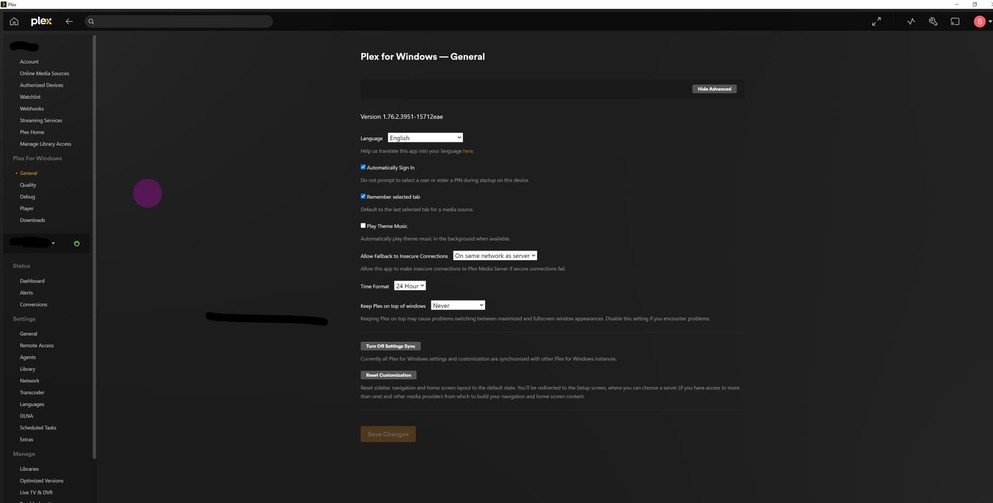
Downloads from server is only available in three apps. iOS, Android Mobile and Plex for Mac/Windows/Linux. below image is from Android mobile where the downloads can be found by clicking on the down arrow on details page for media on the server or from the overflow menu/long pressing on the poster in other screens.

Screenshot_20230815-100125

So, the bottom line is you can only download the media you have UPLOADED to the server. via ripping the dvd’s. So all the pictures of people downloading movies using the download tab are from movies they uploaded off a CD/DVD. In your picture you showed the movie Blue Brother, is that a movie you UPLOADED onto YOUR server?
I have several movies that I have copied and put in the PLEX MOVIES folder. Yet most of them don’t show up on my dashboard. I have (as I am doing again right now) rescanning my library and the movies are not showing up. I am using version 1.32.5.7349. It shows this to be the most current update.
I just RIPPED the series, “Hogans Heros” in an MKV format. These movies DID load into the Plex Library. As you can see from the list of movies I have on the NAS there are many more, yet they are not in my Plex library.
In trying to figure this issue out, I made a movie folder called RIPPED MOVIES. I deleted the folder and added everything into the “Movie” folder. The problem now is I can’t find a way to remove it from my dashboard pic 1.

Pic 2 is a list of folders on my NAS.

Pic 3 is a list of the movies on the NAS. As you will see only the Hogans Heros and "Down Periscope show in the library.


cope are in my library.

PIC 4 movies showing


in library

PIC 5 is what my current library looks like.

Pic 6 shows the current version I have on my server.

Reason number one for failure to getting recognized (or misrecognized) is file naming and folder organization.
You should

Slowly move your mouse pointer over the name of this library. Now move one item higher or lower, then return over it. You should now see a vertical ellipsis appear to the right. Click on the ellipsis and “Unpin” the library from your sidebar.

You are using “upload” incorrectly" My server simply knows where the files are. But yes the movie Blues Brothers is a file I have.

@OttoKerner already mentioned above but you need to separate youjr TV shows as movies and name the files correctly as per the link they provided.

Ninja - thanks! That worked for removing the “RIPPED” folder. I went to move Hogan’s Heros to the TV Show folder and all the HOGAN’S files were there too.
I used the MAKEMKV to rip the Hogan’s Heros DVDs.
I will try to convert the movies I have already ripped with the program and see if that works.
Do you know the best program to rip Bluerays? What about movies in BDMV format? I have a few movies in this format. I got ONE to rip to MKV, but the rest will not. :frowning:
Is MKV a better format to use than MP4? I am using Handbrake to convert -TS formats to MP4. Will PLEX recognize movies in MP4?

Thanks

For most things mkv vs. mp4 doesn’t matter that much. Mp4’s are easier to embed metadata in the properties if you want but mkv’s are easier to tag embedded subtitles

Mix and match them as you see fit and if you ever change your mind there are plenty of programs to convert to either very quickly.

If you’re not looking to shrink your files you can just use a program like this and convert it in a few seconds instead of reencoding it with handbrake

These are not for ripping DVD’s, they are just converters

(for mkv to mp4)

https://mkvtoolnix.download/downloads.html

(converts to either mkv or mp4)

(for .ts to mp4)

Makemkv should be able to handle these. After all the bdmv format is what it will read from blu-ray discs.