DTS HD-MA Audio Question (SamsungTV & Nvidia Shield Plex Apps)

Hello All,

I have Plex Media Server set up on my Nvidia Shield and I use the Plex App on Samsung TVs (2022) and Nvidia Shields (2019).

When watching on the Plex app on Nvidia Shield - MKV movies with TrueHD audio play perfectly and the display on my Denon AVC-X4700H indicates this (THD) on the display.

I noticed MKV movies with DTS HD-MA audio plays (via the Nvidia Plex App) but the Denon display doesn’t indicate this - it just shows DDsurround.

Another movie with DTS Stereo audio fails to give corresponding display on the Denon, again simply shows DDStereo (DD is the Dolby Logo?)

Therefore I have these questions:

  1. Why is TrueHD content indicated as such on the Denon display but DTS HD-MA and DTS Stereo content not?

The same test content on the Samsung TV Plex app:

The digital audio settings on the TV is “Pass-Thru” and different audio formats are indicated on the Denon display, depending on content.

I enable Playback Information to test each movie/file and at the bottom it reports the audio is being converted to AAC… something about DTS Flag=False.

  1. If the digital audio on the TV is set to Pass-Thru, why is it being transcoded to AAC and not simply passed to the Denon to decode the audio?

  2. What do I need to do to have the audio to play directly without conversion and have the corresponding format shown on the Denon?

Thanks for any help and and advice!

Andrew.
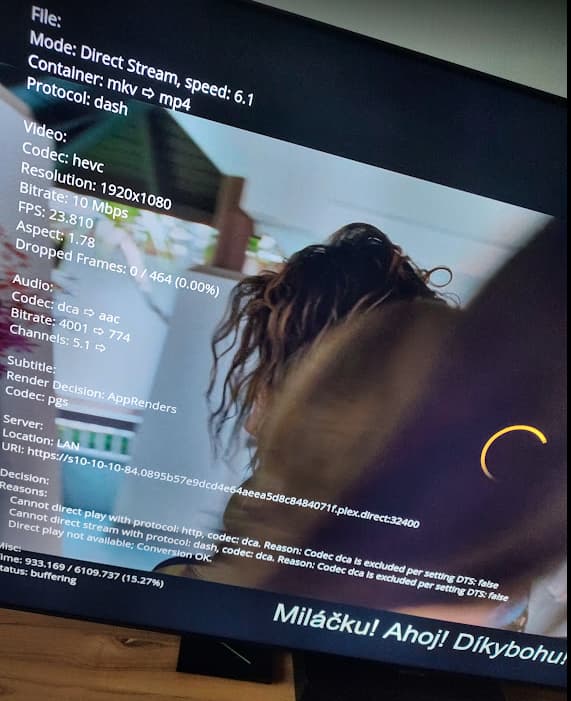
DTS HD-MA Content
TrueHD Content

Connect the Nvidia Shield Pro directly to the Denon receiver.

In the Plex app on the Shield, set Passthrough = HDMI.

In the Nvidia Shield audio settings: a) disable Dolby Processing; b) leave supported audio formats at the default Auto setting, do not enable/disable specific formats.

Nvidia Shield Pro ← HDMI → Denon receiver ← HDMI-ARC/eARC → Samsung TV


Plex SmartTV app on Samsung

  • Samsung TVs do not support DTS or TrueHD audio.
  • When using the Plex app on the Samsung TV, both formats will be transcoded by Plex Media Server to a supported format.

Nvidia Shield connected to Samsung TV
  • Samsung TVs block passthrough of DTS audio for devices connected to their HDMI inputs. Therefore, if the Shield is connected to the TV, DTS audio will be converted to a supported format.
  • Samsung TVs support passthrough of TrueHD audio for devices connected to their HDMI inputs. TrueHD should passthrough to the Denon receiver.
  • CAVEAT: HDMI-eARC required for both TV and receiver. HDMI-ARC does not support passthrough for lossless audio such as TrueHD and DTS-HD.

Hi mate,

Oh wow, that’s a lot of really helpful information - Thank you!

I will follow each step and reply with hopefully good news.

Thanks again for your time and your detailed response.

Andrew.

I followed your advice and now each audio format is displayed properly on the Denon Amp.

I had the Shield connected to the TV media box thing via HDMI, and HMDI eARC from TV to Denon Receiver, so I have missed out on the proper audio format due to the limitations you mentioned - I am beyond amazed at the difference in the sound quality, it’s fantastic!

And because the Shield is connected directly to the Denon it even displays ‘Shield’ when it’s on and ‘TV Sound’ when watching apps on the TV, which it didn’t do before, and the ‘Info’ button on the Denon Remote now shows the info on the TV screen and I can scroll up/down to choose the various outputs (DTS HD Master, ~+DTS Virtual:X and so on).

It’s unbelievable that I only learned of all these features today, thanks to you!

I am delighted! :o)

Andrew.

1 Like

Hello,

Further to this I have a follow-up question, if I may, please?

As per the previous advice, movies etc with DTS soundtrack are now indicated properly on the Denon.

I have some DVD-A discs issued in 2005, (Bowie: David Live (1974) and Stage (1978)).
Both have DTS 5.1 and PCM Stereo audio.
I used MakeMKV to extract both the DTS and LPCM content. I then used MKVToolNix to strip off the MPEG Video, VOBsub and Chapters parts, leaving just the DTS audio part (and again later, with same source file to leave just the LPCM Stereo part).

The resulting DTS audio was then saved as .mka - I tested and it works perfectly and sounds amazing on my Logitech Z906 speaker system on my PC using the Plex Windows App, MediaInfo confirms this is a DTS audio stream in a Matroska container, the DTS Decode LED also on the Z906 also confirms this.

The issue I have is when I added this content to a new Music section on my Plex Media Server, it plays and I hear it, but the DTS Decode LED on the Z906 does not light up, and I can clearly hear it’s not the same as when playing the same file directly on VLC (when it sounds great and the DTS LED is lit).

The same thing happens when I test on the TV/Denon, it doesn’t sound anything like it should and the Denon indicated Stereo.

To be sure, I played a few clips from movies with known DTS audio and that is indicated properly and sounds great.

And strangely, under Plex Activity it shows as Direct Play.

May I kindly ask if anyone has any idea why this is happening?

Thank you for any help/advice.

Andrew.

Not sure how Plex handles DTS audio in MKA files.

I can tell you the Plex Android TV app does not handle multi-channel FLAC audio files well. Last I tested (see this post), it played the left and right channels and dropped the rest. This post is the last update from Plex I’ve seen on the subject (he was an employee at the time). AFAIK nothing has changed.

There is also a current thread about two songs playing at the same time on Android TV devices.

2 Likes

Hi mate,
Thanks for this reply, I read the links you mentioned and gained some really helpful information.

It’s a shame Plex can’t just play multi-channel music so all my Audio/Video library is in one place, but I found a solution…

I installed VLC on my NVShield, set it to Pass-Thru, then tested various DTS Audio files and all played perfectly with the correct format being indicated on the Denon amp.

Thanks for your advice, it’s much appreciated!

Andrew.

Yes I also have the same problem playing music on the Plex app on the NVShield, two songs play at once if you change track, the first one doesn’t stop.
I therefore use the Plex app on the SamsungTV for music playback.

I must say I am rather disappointed, no PlexAmp for the Shield, I tried sideloading the APK but that start up then closes immediately - maybe an older version will work - will try that.
I have to mess around using VLC for certain music content that is multichannel Hi Res, why can’t Plex just pass thru the audio that is decoded by my Denon amp?

And today I have another issue…
I noticed nothing plays properly on the Plex PC App, just tries to load but never starts, I tested from Android app, that says content can’t be played, the Plex web interface Home page shows: No content available
Check your network connection and verify that any media servers are online, but Movies play with audio only…
I cleared cache on PMS and App on the NVShield, rebooted, still the same.

In the Settings of the Plex App on the Shield I see the PMS is missing!?
image

Any idea what gone wrong? I tested and everything play OK on the Plex app the Shield, but every other device is acting weird, and the fact the setting page don’t show the PMS icon is also odd!?

Thanks for any help or advice,

Andrew.

Several other threads mention the same thing.

I’ve never seen a reason why it happens or how to fix it (I don’t run PMS on my Shield, so I’ve never had to deal with it myself).

Hopefully someone will answer your other thread.

Issue has been resolved as per thread https://forums.plex.tv/t/2-songs-playing-at-the-same-time/853065

1 Like

This topic was automatically closed 90 days after the last reply. New replies are no longer allowed.
