DTS-HD not coming through as 7.1

Hello. I’m using Plex on a 2019 Shield TV Pro and coming across issues with 7.1 DTS-HD not playing correctly. The Shield is connected directly to my Denon AVR-X3600H (7.1.2 setup) and I have HDMI Passthrough turned on. However, it seems like the receiver is only seeing PCM audio coming in at 5.1. It appears to be converting this to 5.1.2 and taking advantage of my front Dolby Atmos speakers. Why isn’t the receiver seeing the source as 7.1 and playing on my rear speakers? In the attached images you can see Plex is supposedly sending the 7.1 DTS-HD signal but it isn’t being received that way.


Thanks in advance for any help!

Server Version#: 1.22.3.4523
Player Version#:

Plex client version on the Shield? https://app.plex.tv/desktop/#!/settings/devices/android

Check the Shield audio settings:
Device Preferences → Display & Sound → Advanced Sound Settings → Available Formats
Choose Auto.

Is dts 5.1 (non-HD) passed as dts or PCM?

What about Dolby Digital (AC3) and TrueHD?

Thanks for the link, I thought I’d have to wait until I got home to check my version on the Shield. It’s 8.17.1.25326

I have Available Formats set as auto currently.

I’ll check a DTS 5.1 source when I get home later.

Can you restart the Plex app on your Shield and try playing that again? Get me the android log. I’d like to see what your AVR reports back to the Shield as supported codecs.

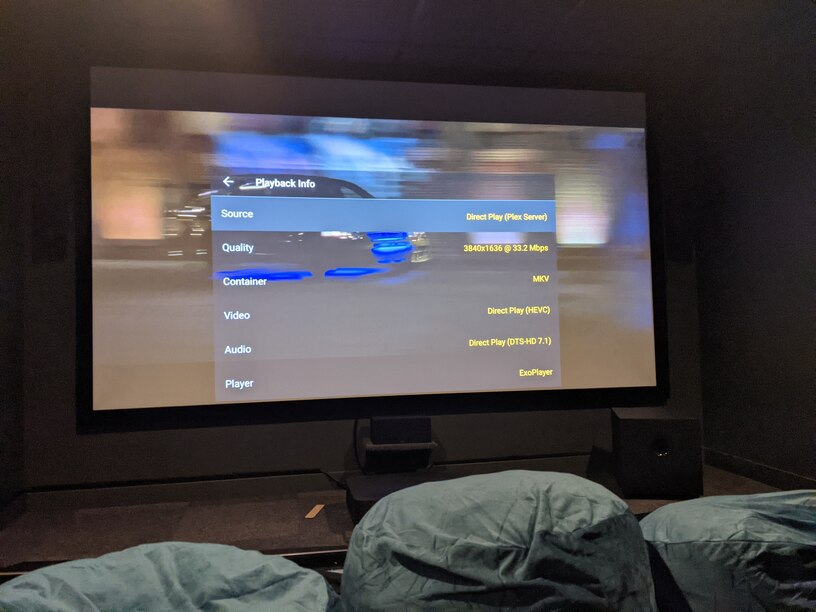
If plex is showing direct plsy, but reciver is getting pcm, then definitely an issue between shield and AVR, not plex.

Shield will decode the direct played dts and send pcm.

I’m no Denon expert, but if I remember correctly, there are some settings/config on the AVR that will cause the pcm.

This topic was automatically closed 90 days after the last reply. New replies are no longer allowed.
