@anon18523487
North Chicago Suburbs
XMLTV for guide
Still successful as it was back in November 2021.
YES, the “team” tag is in the XML file.
That third bullet also prevents recording doubleheaders I’ve just annoyingly found out…
I just can’t with this anymore. I’ve got to delete my workaround “All MLB Events” task to record a double header by recording the first game and extending it 5 hours or whatever (since I can’t extend easily), but I want to end it where another item starts so I can record that if it goes long.
What time is that? 10pm?

It’s 10pm until I scroll the guide, now its 9:30pm…

But if I click on that 9:30 item what time does it say it is? 8:30…

It took over a year to fix Watch from Start and in that time, recording a team broke, and since that time more regressions have appeared. Just look elsewhere if you need any of this functionality. By the time this is fixed it will all be more broken.
“Still successful” meaning the functionality still works for you? If so, what PMS version are you running?
“Still successful” = all selected team episodes scheduled and recorded as expected.
PMS version = All beta and general releases since before the original post for this issue (before Nov 2021).
Server is on a Synology NAS, so it’s a Linux based PMS.
As noted, I do NOT use the Plex Guide, I use XMLTV. The team info is embedded into the guide and Plex handles it as expected.
To test this, I loaded PMS 1.26.1.5772 on my Mac Laptop and loaded the Plex Guide (Chicago). Found USFL Birmingham Stallions on NBC Saturday as well as Fox on Sunday the 29th. Clicked “Record” and “record all Stallions episodes”. Schedule shows nothing to record, despite having chosen it from a search of the guide.
I deleted the DVR and recreated it using the XMLTV file that populates my NAS PMS. Waited for the refresh, looked at the schedule and there are now two recordings listed. Saturday on NBC and Sunday the 29th on Fox.
Since I have been doing this for football in this same manner, I have confidence that what it is in the schedule would get recorded if I left the laptop open at those times.
Edit : I just upgraded the laptop to 1.26.2.5797 , deleted the recording schedule, chose a different USFL team to record and that team now shows up in the schedule.
I’m done! Good bye Plex; I’m moving on to a better option (even though I’m a Plex lifetime subscriber). Such a poor method of tech “support”!
Hi,
This still appears to be an issue. I have tried to record the Seattle Mariners and the DVR says no upcoming airings. I started seeing this last year during College Basketball Season and still has not been able to be fixed.
At present you can only set it to a top level such as all MLB, NFL, NBA etc. Trying to filter on the team doesn’t match. Problem with how the EPG is formatted with a date in the description.
This problem has been going on for quite some time with no indication that it would be resolved. It’s unfortunate: I have a Plex Pass and was considering moving to Plex as my DVR solution, but there’s no way I’d do that with what seems like total indifference to solving issues from the Plex dev team. I’ll stick with my current solution, which requires an annual subscription but it works!
Yes, Live TV/DVR is inflexible and unreliable and fixing the constant regressions in new versions is just not a priority. The result is a system that you’re never happy with.
Use your own XMLTV guide instead of the Plex provided one and you might notice your problems go away.
@sixxnet then they should be upfront and transparent about certain features not working with the out-of-the-box epgs they provide. It’s one thing to not be able to offer certain things because of data source limitations but it’s another to not make it known that there are limitations and/or having the functionality cease to work with no notice, especially for a paid product…i feel like that’s the real frustration most of us are having.
Upgraded to Version 1.27.0.5897 and the issues still seems to exist. No upcoming events is still showing for any team that I try and follow.
Version 1.27.1.5916 does not include a fix.
Upgraded to Version 1.27.2.5929 and this error still persist. This feature was great and now having to record each game individually is extremely annoying. We are nearly at 8 months since this was first reported and no fix, or hint of fix has happened.
@anon18523487 do we have any updates?
Sorry, I do not have any updates.
I can confirm that @jbreen60030 workaround of an xmltv sourced epg working as intended. I modified a python script he pointed to to get and parse the guide and have had this working for a few weeks at this point, so @anon18523487 that would point to the issue being stock-epg related, if that helps
I just wanted to add some testing I’ve been doing on this topic. I’ve created a new docker container from scratch and set up to record all “New York Giants” games and it still doesn’t work (next game Aug 11).

I have removed and recreated it many times.

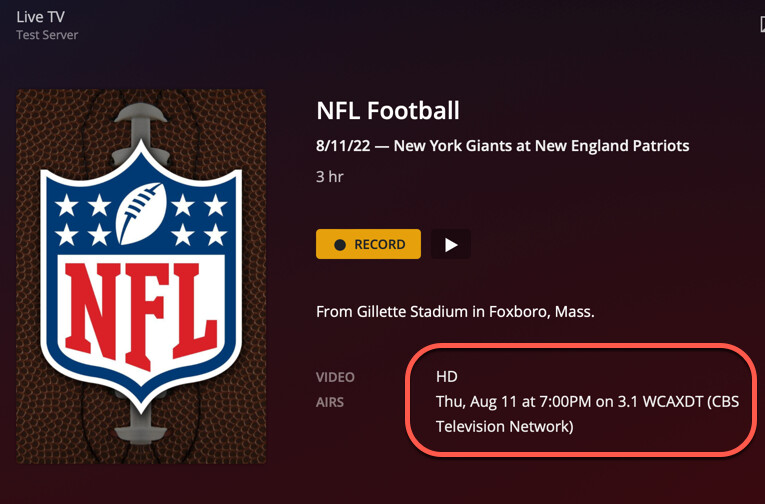
This would lead me to believe that this should be relatively easy to recreate with the only variable being guide data. My zip code is 05403 (using OTA).
It would be great to get this resolved before the real season starts.
This is absolutely a Plex provided EPG problem. If you switch to your own custom XMLTV everything is working as should.
