I just DM’d you fresh logs. I have been watching this thread since I had the same issue as others and deleting those files worked (thank you @pbartkus!!!). I figured the next time I have the issue, I would send my logs.
I woke up this morning to my plex server not being found at all. I logged onto my server and restarted Plex but still nothing. I then downloaded the latest version and ran the install. Plex started and the server was now found, but no DVR. This is when I gathered the logs.
Now I just deleted the TV files again and am rebooting. Fingers crossed.
After rebooting, Plex was running again and my tuner card was listed again. I refreshed the DVR content and came back an hour or so later. The Plex server wasn’t found again. I rebooted (did not alter any files) and Plex is running, but DVR is gone again. I’ll send the new logs to you, @BigWheel.
EDIT: Can probably disregard this. I was eventually able to re-add it after deleting DVR and rebooting the Shield a couple times…
Any idea how to do this fix if your Plex Server is running on an Nvidia Shield Pro 2019?
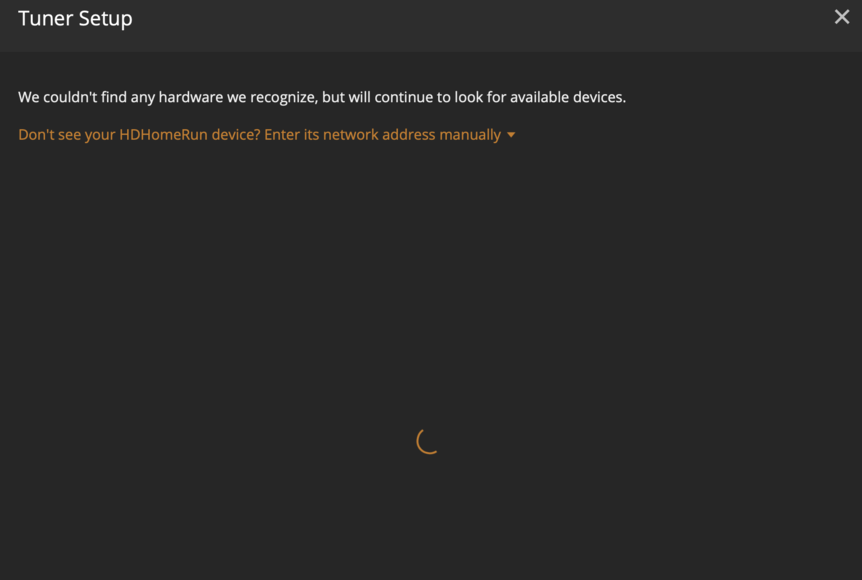
My HDHomeRun DUAL had been working for months. Now it has disappeared, and Plex refuses to detect it or let me manually add it by IP. I can tune all of the channels on this tuner just fine in Windows,and using the HDHomerun / Channels app on my Shield.
I tried the “Delete DVR” item in my PMS settings, followed by reconfiguing & rescanning channels. Still, my HDHomerun DUAL cannot be added.

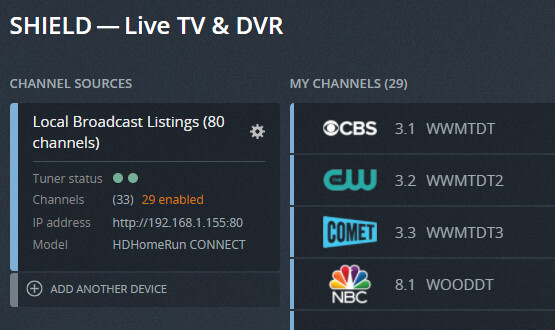
EDIT: Here’s the info @Bigwheel had requested of others earlier in this thread:
PMS Version 1.23.6.4881
<MediaContainer size="2">

<Device parentID="7" key="2" uuid="device://tv.plex.grabbers.hdhomerun/1042D392" uri="http://192.168.1.155:80" protocol="livetv" status="alive" state="enabled" lastSeenAt="1627587731" canTranscode="0" deviceAuth="xxx" deviceId="1042D392" make="Silicondust" model="HDHomeRun CONNECT" modelNumber="HDHR4-2US" source="0" sources="0,1" thumb="/:/resources/dvr/device-hdhomerun-connect-560.png" title="Local Broadcast Listings (80 channels)" tuners="2">

<Setting id="transcodeDuringRecord" label="Convert video while recording" summary="[Experimental] This can save disk space and improve compatibility. Converting requires a fast CPU." type="int" default="0" value="0" hidden="0" advanced="0" group="" enumValues="0:Off|2:Transcode"/>

</Device>

<Device key="1" uuid="device://tv.plex.grabbers.tunerservice/dvb%23hdhr%231036A700" uri="http://192.168.1.153:80" protocol="livetv" status="dead" state="enabled" lastSeenAt="1627567983" make="Silicondust" model="HDHomeRun DUAL" modelNumber="HDHR3-US" source="0" sources="0,1" thumb="/:/resources/dvr/device-hdhomerun-dual-560.png" tuners="2"> </Device>

</MediaContainer>
ok thank you
Looks like the IP in your settings file is not correct. The tuner may have grabbed a new IP in DHCP, possibly due to a reboot or power interruption. Is it possible to update the file? I haven’t used the Nvidia Shield (But I’ve heard only good things), so I’m not much help in this situation.
I rebooted the Shield again, and was able to re-add and reconfigure it…
I keep needing to go through this process of deleting the tv.plex.. files and then readding my tuner. I’ve had to do it about 4 times now. I need to constantly check my Plex to make sure it is still getting TV so we don’t miss shows. I bought a new HDHomerun and still had this issue. It would be great if we could get a permanent fix.
I’m glad to hear you are having the same issue with a new tuner. I Thought that could be the problem. Maybe the more they see this they will fix it.
How do I get logs to submit for the next time it happens?
You really need to consider that it is a system problem or something you are doing that is causing the files to become corrupted.
It has happened to me about every 4 days or so I think. Same steps posted above work to get the DVR working again, but still just temporary.
I recall when I first purchased a Plex Pass I enabled hardware acceleration and started using the DVR system which I really liked. However I had this exact problem with the DVR -I just didn’t investigate it at all. I ended up just deleting the DVR and continued with another PVR service. So this problem isn’t really new for my system. So I’m not sure how the files are being corrupted based on anything I’ve set or done to the system.
Could the problem be related to:
Hardware acceleration?
DVR attempting to record a degraded signal?
Other transcoding (scheduled Handbrake task) occurring during scheduled DVR recording?
I haven’t heard feedback from my logs so I don’t think they were useful.
CPU: i7-4770
Tuner: Hauppauge HVR-1800
No dedicated GPU.
I’ll start with the HVR-1800 is not an officially supported tuner for Plex. The age of the card means Hauppauge isn’t particularly interested in updating the drivers every time Windows makes changes that interfere with operation. There isn’t really a Goldilocks solution, USB adapters also have driver issues leaving HDHomeruns as the least problematic. Still need a stable network, ethernet etc.
Your computer is around 8 years old so the likely hood of an intermittent issue with the Hard Drive, Power Supply, Ram and even CPU is pretty good but very difficult to track down. If you have a UPS, leave your computer on 24/7 then I would monitor the logs and stop the Handbrake tasks to see if the problem goes away.
Thanks for the feedback. I understand the tuner isn’t officially supported and there are many tuners out there for users to have. It all works fine with NextPVR though so I don’t think there’s a problem with my tuner (at least not the hardware). I find it a tough pill to swallow that there’s something wrong with my system which would only manifest in this one specific problem. Still, I’ll see if disabling my Handbrake task helps. I will also stop scheduling recordings in case recording a channel with an interrupted signal may be the cause.
I see posts where people are saying they deleted and re-added the DVR multiple times or refreshed the Guide several times in a row resulting in corrupt epg files so maybe Plex is scrambling the files in the process because it isn’t handling the activity well.
NextPVR is probably the best pairing with that tuner card. Just pointing out that if Plex doesn’t officially support the card then there is minimal support to you.
Just to add another user experiencing the same issue.
I found the DVR had disappeared a few months ago. I couldn’t add it until I found this thread with the workaround to delete the tv.plex*.* files. That would work for a time and then after a couple of weeks same thing.
The problem has slightly improved in that it now allows me to refresh the guide without deleting these files. The symptoms are that the iPhone Plex app DVR Schedule will only show historic data and the Guide will give me a button to Retry without showing any guide data. This is occurring every three to four days now.
I am using TBS 6284 DVBT/T2 Tuner A and Version 1.24.1.4931 on a Windows 10 dedicated HTPC.
I know it isn’t a supported tuner, but I see from higher up the thread that other users with supported tuners are also getting this problem. This would suggest to me a software problem of some nature.
Would love Plex DVR to be fully functional (like waking up the PC ahead of scheduled recordings) but losing the EPG so frequently is becoming an annoyance.
The last I tried was to delete the DVR, delete the tv.plex*.* files and then readd the DVR. I’m tempted to completely delete Plex from my HTPC and do a fresh install, but that would be extremely time consuming setting up all the recordings again and media libraries.
I haven’t found this issue on any other threads. Is it a minority problem among Plex DVR users or do people just live with it?
I have the same issue as @bryanbar - My tuner is not available in the list when searching for new tuners, if I add it by IP address manually, it finds it and sets up the guide but stops at the guide screen saying ‘The device is in use with an existing DVR’. I’ve stopped Plex deleted the tv.plex files and restarted Plex and that has not helped. Also completed deleted the cache, which also did not help.
I get the feeling there is somewhere in the database referencing the tuner, but something is preventing it from showing up in the GUI. If we could just delete that line in the database then surely it would all be good?
Also I’ve just realised that despite by DVR not showing up to manage in the DVR settings, it is continuing to record TV shows in the background. So somehow I need to remove it so I can re-add it and see it again. I have no guide, ability to set anything, it’s as if I’ve never set one up, except I have and it’s running in the background.
I seem to be having the same issue as everyone here. Noticed my DVR guide was stuck at 0%. I deleted the DVR, turned off the server, and deleted the tv.plex.providers.epg files from the databases folder. Tried to re-add the DVR but Plex can’t find it and the console lists no issues as it thinks the DVR is there and functional. Also, the .epg files show up again when I try to re-add the DVR even though it’s not listed. Are there any other files I should be deleting before I try to add it again?

Sounds like corruption in the main db, repair or replace with one of the backups. Repair a Corrupted Database | Plex Support

