I have one HDHomerun Extend, but it has the ability to stream 2 channels at once, i.e. it has a Tuner A and Tuner B. For example, two separate streaming sticks in the house can watch separate shows simultaneously.
It doesn’t seem like Plex dvr realizes this. For example, if I schedule recording of 2 different shows with the same start time, it will only record the show with the higher priority setting.
Any help? Is there a way to make Plex take advantage of the 2nd built in tuner?
Are you using Plex when the recordings are being set for? Meaning If you set to record FOX @ 8pm and NBC @8pm tonight but are watching ABC @ 8pm it won’t record one of the scheduled shows.
Hmm, odd I started with an Extend and didn’t have this issue until one of my children at college was watching live TV when 2 recordings were scheduled. I ended up adding a HDHomeRun Quatro to my Plex to give me 6 tuners so I wouldn’t have any issues like that again.
I have an HDHR Extend that I use with Plex, and I can record two shows at the same time. (I just kicked off two recordings concurrently to make sure a problem had not been recently introduced.)
In Plex Web, when you go to Settings -> LiveTV & DVR, do you see it reporting two tuners and are both available? (Assuming you are not currently recording.) Here is my display from that screen with two recordings in progress:
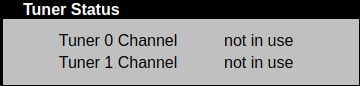
Also, if you go to the web interface for your HDHR Extend, under “Tuner Status” does it also show two tuners with the expected number of tuners in use? (Again, mine but this time with no recordings in progress.)
It is possible to have one or both tuners in use from “outside” of Plex, such as with the HDHR client. If this happens and Plex tries to grab a tuner already in use, then it will fail…
Could you post debug level logs from just after it tries to start recording of two shows concurrently, and only one records?
In the DVR settings, do you have “Allow partial airings” checked and “Remove commercials” not checked?
WIthout the allow partial airings if there is a previous recording overlap then the tuner is considered in use. In the recordings calendar view, you should be able to hover over the error icon to see why it failed.