@pl_5309 @sa2000 thanks for pointing that out, but this disappoints me a little:
The list of supported tuners shows only one, which I can actually buy on A****. So it sounds strange for me to insist on using one of these.
The community-supported tuners IMHO rely either on the DVB API (on Linux) or Sat2IP protocols, so they should not differ from the one I use…
I have just skimmed this thread and noticed this spurious detection of end time - We have seen this before and I suspect it is to do with the actual stream content from some TV stations where time markers are probably corrupt or invalid
To follow this up would need to capture the channel stream at the time - assuming it is reproducible
We now have a number of server hidden settings that allow us to do that - adding a channel stream capture and retaining all the transcoder session files until the server is restarted.,
If problem is still there - early detection of end of airing - noticeable in the log by a log line like this buildLiveM3U8: ended due to segment xxxxx.xxxxpast end time yyyy-mm-dd hh:mm:ss.000000000 +0000 logged prematurely
If It is reproducible and still happening - when using the latest beta of Plex Media Server, I will give you the server settings to add to Preferences.xml
@sa2000 thank you for providing a next step in this issue.
Please let me know, how I can get & install the latest beta with the needed configuration adjustments and I’ll be happy to try to reproduce the issue.
I only skimmed the above - i only saw that spurious end of recording termination in log extracts from @hokierulz - Are you having the same issue ? early detection of end time?
@sa2000 the logs @hokierulz analysed were mine 
Ah - thank you for the clarification
The beta has just become public - so it is the current release 1.32.1.6999-91e1e2e2c and I see you are already running on this version on your linux server
Make sure you run with Debug Logging enabled on the server
To enable channel stream capture and retention of the transcoder sessions files, add the following settings to the Preferences.xml file - make sure the server is shutdown when editing the file and making the changes
Please locate the Preferences.xml for Plex Media Server - see https://support.plex.tv/articles/202915258-where-is-the-plex-media-server-data-directory-located/
The diagnostic settings to add in the Preferences.xml file are:
TranscoderPersistSessionDirs set value to be 1
TranscoderInputTracing set value to be 1
TranscoderPruneBuffer set value to be 0
TranscoderLivePruneBuffer set value to be 0
With these values, the transcoder temp files would not get purged and also there would be a DVR TV channel stream capture file.
Launch Plex Media Server with these settings in place
Test out the DVR to make sure that it does actually work and tune channels using Plex Media Server
Then start to record on a channel that you know reproduces the issue - (spurious early end time detection) - note down the channel number / name (and to help me find the channel internal ID - also give me post code and lineup name used in DVR Setup). Note down the start time to make it easier to check out the logs
When the problem arises with early end of recording, copy out the transcoder sessions directories and zip the copy
capture the server logs
upload to external location as the transcoder sessions directories zip could be very large and let me have a link to download the zips
At the end of the test remove the server settings or flip the values (1 to 0 and 0 to 1)
so to disable the diagnostics, shut down the server and then edit the Preferences,xml to delete these or set these values
TranscoderPersistSessionDirs set value to be 0
TranscoderInputTracing set value to be 0
TranscoderPruneBuffer set value to be 1
TranscoderLivePruneBuffer set value to be 1
Note that the transcode sessions directories may be large and so do not leave these diagnostic settings enabled for long period of time
I would be interested to know how widespread this issue is and if it is specific to some broadcast channels - cc @Olli as user who had this issue before - it is Germany again - so may be specific German channels
1 Like
@sa2000 here we are:
Plex Media Server Logs_2023-05-09_13-57-36.zip (3.7 MB)
transcode sessions:
the show to be recorded was
Two and a Half Men (2003)/Season 08/Two and a Half Men (2003) - S08E12 - Der Mann ohne Freunde.ts
it started at 13:55, recording started 13:52 (local time) and stopped with the past-end-issue at 13:52:14.712
channel was 305 name PRO7GRH
However, I don’t think it is channel specific. I see the issue on all channels, but it is more regular on some…
unfortunately I don’t understand what you mean by “post code and lineup name used in DVR Setup”
I think the channel identifier can be taken from the XML of the failed recording:
<MediaContainer size="1" allowSync="1" identifier="com.plexapp.plugins.library" librarySectionID="6" librarySectionTitle="Serien" librarySectionUUID="abc69255-165b-4345-8d19-1bccb2f7bba7" mediaTagPrefix="/system/bundle/media/flags/" mediaTagVersion="1682413660">
<Video ratingKey="3350" key="/library/metadata/3350" parentRatingKey="3349" grandparentRatingKey="3196" guid="plex://episode/5fc6f456c21207002f89e2d0" parentGuid="plex://season/5fc6af7fb360df002ddfedf9" grandparentGuid="plex://show/5fc6af7fb360df002ddfedf9" type="episode" title="Der Mann ohne Freunde" titleSort="Mann ohne Freunde" grandparentKey="/library/metadata/3196" parentKey="/library/metadata/3349" librarySectionTitle="Serien" librarySectionID="6" librarySectionKey="/library/sections/6" grandparentTitle="Two and a Half Men" parentTitle="Season 8" contentRating="12" summary="Charlie trennt sich von seiner Freundin und verfällt vor Einsamkeit dem Alkohol. Alans Ex-Frau Judy rät ihm, sich Hilfe zu suchen und eine Therapie zu machen. Seine behandelnde Ärztin macht Charlie bewusst, dass er keine Freunde hat." index="12" parentIndex="8" year="2010" thumb="/library/metadata/3350/thumb/1683633136" art="/library/metadata/3350/art/1683633136" parentThumb="/library/metadata/3349/thumb/1683633135" grandparentThumb="/library/metadata/3196/thumb/1682512199" grandparentArt="/library/metadata/3196/art/1682512199" duration="10298" originallyAvailableAt="2010-12-13" addedAt="1683633134" updatedAt="1683633136" oneShot="1">
<Media id="4557" duration="10298" bitrate="730" width="720" height="576" aspectRatio="1.78" audioChannels="2" audioCodec="ac3" videoCodec="mpeg2video" videoResolution="576" container="mpegts" videoFrameRate="PAL" channelIdentifier="5fc76e33e06f4d002d64116e-5fc705f9a62668002dcefdab" mediaGrabBeginsAt="1683633300" mediaGrabDevice="device://tv.plex.grabbers.tunerservice/dvb%23v4l%23%2fsys%2fdevices%2fpci0000%3a00%2f0000%3a00%3a14.0%2fusb1%2f1-1%2f1-1%3a1.0%3a100504024551" mediaGrabPartialRecording="1" mediaGrabPartialRecordingReason="Aufnahme wurde abgebrochen" mediaGrabStatus="complete" origin="dvr" videoProfile="main">
<Part accessible="1" exists="1" id="4580" key="/library/parts/4580/1683633134/file.ts" duration="10298" file="/media/christoph/tv_shows/Two and a Half Men (2003)/Season 08/Two and a Half Men (2003) - S08E12 - Der Mann ohne Freunde.ts" size="939060" container="mpegts" packetLength="188" videoProfile="main">
<Stream id="11558" streamType="1" codec="mpeg2video" index="0" bitrate="154" anamorphic="1" bitDepth="8" chromaLocation="left" chromaSubsampling="4:2:0" codedHeight="576" codedWidth="720" colorRange="tv" frameRate="25.000" height="576" level="8" pixelAspectRatio="64:45" profile="main" refFrames="1" scanType="interlaced" streamIdentifier="256" width="720" displayTitle="480i (MPEG2VIDEO)" extendedDisplayTitle="480i (MPEG2VIDEO)"> </Stream>
<Stream id="11559" streamType="2" selected="1" codec="ac3" index="1" channels="2" bitrate="384" language="Deutsch" languageTag="de" languageCode="deu" audioChannelLayout="stereo" cleanEffects="1" samplingRate="48000" streamIdentifier="257" displayTitle="Deutsch (AC3 Stereo)" extendedDisplayTitle="Deutsch (AC3 Stereo)"> </Stream>
<Stream id="11560" streamType="2" codec="mp2" index="2" channels="2" bitrate="192" language="Deutsch" languageTag="de" languageCode="deu" audioChannelLayout="stereo" cleanEffects="1" samplingRate="48000" streamIdentifier="258" displayTitle="Deutsch (MP2 Stereo)" extendedDisplayTitle="Deutsch (MP2 Stereo)"> </Stream>
<Stream id="11561" streamType="3" codec="dvb_teletext" index="3" streamIdentifier="259" displayTitle="Unbekannt (DVB_TELETEXT)" extendedDisplayTitle="Unbekannt (DVB_TELETEXT)"> </Stream>
</Part>
</Media>
<Genre id="5" filter="genre=5" tag="Sitcom"/>
<Genre id="6" filter="genre=6" tag="Unterhaltung"/>
<Channel id="10" filter="channel=10" tag="305 PRO7GRH (ProSieben)"/>
<Field locked="1" name="thumb"/>
<Field locked="1" name="art"/>
<Extras size="0"> </Extras>
<Related> </Related>
</Video>
</MediaContainer>
1 Like
I’m having the same issue on Windows 10. It started about a week ago on Thursday the 4th, but I just captured logs for a recording that failed after 2s earlier this evening. Server logs are attached.
Plex Media Server Logs_2023-05-10_21-20-25.zip (4.4 MB)
- Server Version - 1.32.1.6999, though I updated from an earlier patch version a couple days ago
- OS Version, Server or Workstation. Did you load a GUI. - Windows 10
- Client being used for testing and version - this happens with DVR, so no client per se. But I’m playing back on Roku and PlexWeb
- CPU - Intel(R) Core™ i7-5820K CPU @ 3.30GHz 3.30 GHz
- Location of transcoder folder - D:\Plex\Transcoder\
- Are you running Plex native, docker, snap, VM. - native
- Storage, internal, external, NAS - Transcoder directory is a local hard drive, final storage is a Synology NAS
- Country (Different broadcast standards) - US, zip 22315, GMT-4
Today May 10, 2023 at 21:00 Plex was supposed to record Chicago Fire - E20 - Never, Ever Make a Mistake, on NBC4 (channel 4.1). I see that episode in my library with a length of only 2 seconds. File on disk is only 1.25 MB. At the same time, Celebrity Wheel of Fortune was supposed to record on ABC (channel 7.1), but wound up stopping after only 6 seconds. That file on disk is 3.5 MB.
Plex recorded Chicago Med - E20 - The Winds of Change Are Starting to Blow, on NBC4, starting at 20:00, the hour prior, seemingly without any issues (I haven’t watched to confirm, but the episode length is 59m and the file size looks right for that length). Chicago PD is currently recording on NBC4, and is 7 minutes in (though I don’t have logs for that). I suspect this will finish recording OK.
On previous days, Plex recorded a show at 20:00 fine, failed to record a show at 21:00 (with only a few seconds recorded), and then recorded another show at 22:00 fine, all on the same channel (FBI, FBI: International, and FBI: Most Wanted on Tuesday the 9th on NBC 4.1). On a different day, Plex recorded a show at 21:00 fine and then another one at 22:00 fine - again, on the same channel (S.W.A.T. and Fire Country on Friday the 5th on CBS 9.1).
I deleted the contents of the Codecs directory per a post above, and on the next day with scheduled recordings (May 11), the same thing happened. Show at 20:00 recorded fine (Law & Order on NBC), but the next show at 21:00 (Law & Order: SVU, also on NBC) recorded for only a few seconds before it stopped. Two shows at 22:00 (on NBC and CBS) are currently in process of recording, and they’ve made it longer than a few seconds.
Happy to provide more details if needed.
The lineup name appears at the top of the DVR Settings screen
When you setup the DVR you go through a sequence of entering a country and a post code and then select a lineup name from a dropdown
I have downloaded all the files and will be starting to look at it
@sa2000 my post code is 60598 in Germany and I use the linup “Giga TV” which matches the most of my available channels (about 50%) (I also tried others…)
Thanks - just found it
Thank you for the diagnostics - Look good.
I have passed it to the development team.
2 Likes
I tried modifying the middle recording (at 21:00) to extend an extra 60 minutes after normal ending time, and it still failed after just a couple seconds.
I started looking at the diagnostics. It did not look the same as the issue that @chris299 has. Is the drive a local drive or network ?
Could you try the latest beta which fixed some boost issues - version 1.32.2.7088-319128df8
Try recording into a new test library - the logs I looked at before showed Plex Media Server may have thought the episode already existed in the library.
What advanced settings do you have for DVR Settings / Recording settings - for partial recordings / new & repeats?
I would like to see the logs of the problem from the new beta and if you can confirm if the issue arises also on a new test library or just when adding to the existing library
I installed 1.32.2.7088, created a new library, and recorded 3 shows I had never recorded before:
- Let’s Make a Deal, at 10am-11am
- The Price is Right, at 11am-12pm
- WUSA News, at 12pm-1230pm
All were recorded on CBS (channel 9.1). All were recorded with default settings (allow partial airings, prefer HD, detect and mark commercials). My regular recordings are a mix of new-only and new-and-repeats (I’ve had problems in the past where new airings weren’t recorded), and some I have set to extend the recording by 60 minutes after the normal end (typically the shows which air on Sunday nights, to account for NFL games going over). These 3 particular shows were set to single episode, so no option for new/repeat.
As seen before, the middle show (Price is Right) only recorded a few seconds (13 in this case) before the recording stopped. Both the first show and the third show recorded the appropriate length (59 and 29 minutes, respectively). Logs are attached.
That was a very good test. The log shows the transcoder got an error writing to a file on the M:\ drive.
You did not say what the M:\ drive is. Is it an internal HDD / SDD ? Is it a mapped drive ? Is it using SMB1 if network mapped drive? Is it DrivePool setup? Symlink ?
This was the error for the 2nd recording
May 18, 2023 11:00:20.775 [21756] ERROR - [Req#9d8c/Transcode/f5afc727-af2e-48ac-9a60-a873f6564613/8b77425f-1958-4a5f-a2c4-1a4c20f3375d] av_interleaved_write_frame(): Invalid argument
May 18, 2023 11:00:20.775 [21756] ERROR - [Req#9d8e/Transcode/f5afc727-af2e-48ac-9a60-a873f6564613/8b77425f-1958-4a5f-a2c4-1a4c20f3375d] Error writing trailer of M:\Test\.grab\703ad3e8670d4b78955b6e194611e3dec952dbe6-fdd61eef7d6af2e5768e7de6f052911da4d06c55\The Price Is Right (1972) - S51E165 - The Price Is Right.ts: Invalid argument
May 18, 2023 11:00:20.776 [21756] ERROR - [Req#9d91/Transcode/f5afc727-af2e-48ac-9a60-a873f6564613/8b77425f-1958-4a5f-a2c4-1a4c20f3375d] Error closing file M:\Test\.grab\703ad3e8670d4b78955b6e194611e3dec952dbe6-fdd61eef7d6af2e5768e7de6f052911da4d06c55\The Price Is Right (1972) - S51E165 - The Price Is Right.ts: Invalid argument
May 18, 2023 11:00:20.785 [11736] DEBUG - Jobs: 'C:\Program Files (x86)\Plex\Plex Media Server\Plex Transcoder.exe' exit code for process 22080 is 1 (failure)
All the 3 recordings were going to the same drive - and two were ok. Still would like to know what the M: drive is.
Also could you save the windows event logs (system and application) and send me zip of the two evtx files by Private Message. To do that open Event Viewer and select Windows Logs and then each of Application and System and for each, do Save All Events to evtx file and then zip
We should stick to this approach for getting the diagnostics - into a temporary test library. I will let you know what next to try once I have a look at the event logs and also get details about the M: Drive
Thanks
The M: drive is a mapped network drive (Synology NAS), just using the normal “Map network drive” shortcut from right-click context menu in Windows. Not SMB, but not sure what protocol it uses. I’ve been recording to this drive for several years.
I’ll PM the event logs shortly.
Thanks
I needed to check if we were running out of local TCP dynamic port numbers - but we were not. The event log is not showing any of this happening
So the failure we are trying to investigate is this set of transcoder errors
May 18, 2023 11:00:20.775 [21756] ERROR - [Req#9d8c/Transcode/f5afc727-af2e-48ac-9a60-a873f6564613/8b77425f-1958-4a5f-a2c4-1a4c20f3375d] av_interleaved_write_frame(): Invalid argument
May 18, 2023 11:00:20.775 [21756] ERROR - [Req#9d8e/Transcode/f5afc727-af2e-48ac-9a60-a873f6564613/8b77425f-1958-4a5f-a2c4-1a4c20f3375d] Error writing trailer of M:\Test\.grab\703ad3e8670d4b78955b6e194611e3dec952dbe6-fdd61eef7d6af2e5768e7de6f052911da4d06c55\The Price Is Right (1972) - S51E165 - The Price Is Right.ts: Invalid argument
May 18, 2023 11:00:20.776 [21756] ERROR - [Req#9d91/Transcode/f5afc727-af2e-48ac-9a60-a873f6564613/8b77425f-1958-4a5f-a2c4-1a4c20f3375d] Error closing file M:\Test\.grab\703ad3e8670d4b78955b6e194611e3dec952dbe6-fdd61eef7d6af2e5768e7de6f052911da4d06c55\The Price Is Right (1972) - S51E165 - The Price Is Right.ts: Invalid argument
May 18, 2023 11:00:20.785 [11736] DEBUG - Jobs: 'C:\Program Files (x86)\Plex\Plex Media Server\Plex Transcoder.exe' exit code for process 22080 is 1 (failure)
Nothing in the event log round that time
The next thing to check out is going through this support article and see if MalwareBytes Premium is in use and blocking out the transcoder actions
Windows: Transcoder failures during playback, live TV, or DVR recording | Plex Support
Further to the above - may be unrelated but connection to network drives seem to be failing at around same time in last few days - was this scheduled reboots of NAS ? or some network card issue ?
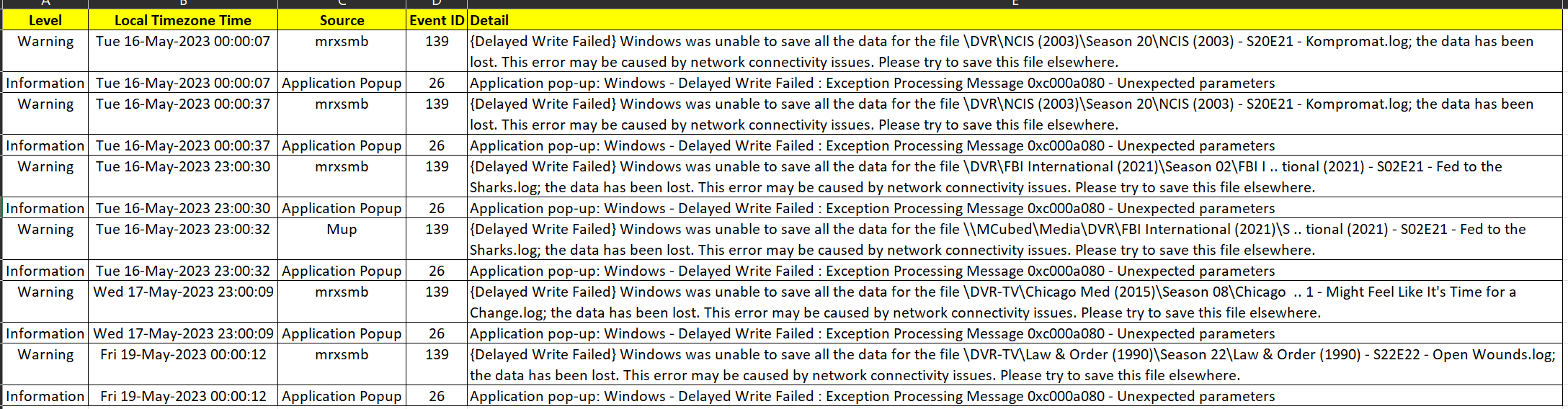
and also may be unrelated - tons of logged errors relating to a PCI card
A corrected hardware error has occurred.

Component: PCI Express Root Port
Error Source: Advanced Error Reporting (PCI Express)

Primary Bus:Device:Function: 0x0:0x1:0x1
Secondary Bus:Device:Function: 0x0:0x0:0x0
Primary Device Name:PCI\VEN_8086&DEV_2F03&SUBSYS_00008086&REV_02
Secondary Device Name:
and with regards to the transcoder errors - if it is not the issue seen before with MalwareBytes Premium - we can see if I get more info from getting Procmon capture at the time of the transcoder errors for a new controlled test with logs and a test library [Note: procmon PML capture files are massive but they zip very well]
I don’t use MalwareBytes, premium or otherwise.
I suppose it could be a network issue, but it’s not a scheduled reboot. In many cases I’m playing back something previously recorded at the same time and I don’t notice any interruptions. And it does save a file, it’s just really small.
I’ll into this some more; I’ve had some random BSODs that I thought were related to my video card. I’ll try and dig a bit more.
One other test I ran Thursday evening was to record the first show of three (Law & Order on NBC 4.1) for an extra 60 minutes, cancel the recording of the second show (Law & Order: SVU), and leave the third show as is (Law & Order: Organized Crime). The first show recorded 2 hours as expected, and the third show recorded only a few seconds. I downloaded logs today, and they are attached.
Plex Media Server Logs_2023-05-22_09-38-13.zip (5.3 MB)
It seems it’s not related to a specific time, and with the shows I recorded ad hoc on Thursday morning it seems it can be reproduced on demand.
I can definitely run Procmon; let me know if there are any particular settings or whatnot you need.
