Thanks, they were in Internal non-user accessable. I selected Internal Storage, user accessable and can access the DB files now.

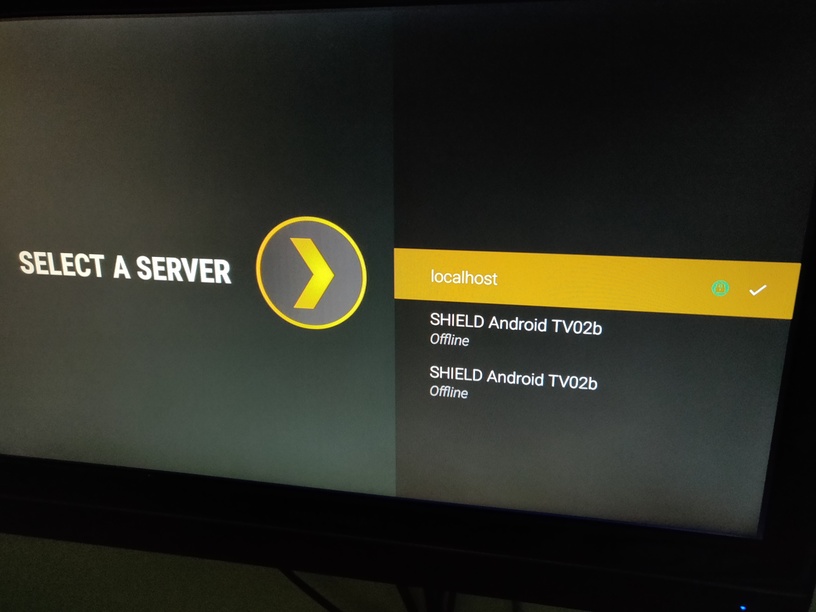
It said something about an unclaimed local Host so I click ok. I cannot get logs files because it wants me to set up the localhost.
login to Plex Web https://plex.tv/web or https://app.plex.tv/desktop
Select Settings / Authorized Devices / Filter for Server
and remove old entries
That is unexpected. Could you locate the Plex Media Server\Logs directory on internal storage and copy it out, zip and attach the zip
Thanks
This is the information I have on the server instances
SHIELD Android TV02 last seen 14 November 2018
SHIELD Android TV02b created 14 November, last seen 3 Dec 2018 at 21:57
SHIELD Android TV02b created 3 December 2018 at 22:24 Last Seen 5 December at 15;27
localhost created 5 December 2018 at 15:55:59 - Last seen 5 Dec 2018 at 16:43:28
Do you remember the steps you followed and at what time?
Could you enable network logging on the shield app in settings and then in browser go to
http://192.168.1.198:32500/logging
copy the displayed text into a text file and attach
Attached below
I get a 404 error on http://192.168.1.198:32500/logging
If I remember correctly, the following is what I did for the 4 server updates you listed:
I have auto update disabled on my nShield. When I see a pending server update, I check their are no DVR recordings in progress or soon to be recording. I then update the pending update. the first 3 times I had the Program Guide stuck in initializing so I would uninstall all Plex Server updates,. Then update the Plex server. I would then have to re-setup my liabilities and programs to be recorded.
The last one (localhost) it said something about localhost so I click OK.
Thanks.
Logs.zip (4.8 MB)
I added back the libraries lost when the PMS went off line last time. I then started to add shows the DVR was to record. Then the DVR UI went non responsive. You can see why in the below screen shot. Also attached is the zip of the logs on the internal storage after this happened.
Logs.zip (4.2 MB)


I am away for few days -will pick up later this week
Have you selected at any point any of the options for moving the Plex app data? See
https://support.plex.tv/articles/moving-server-data-storage-location-on-nvidia-shield/
Let’s try the following
- go through the server re install if it is asking for that
- is the shield Plex app setting locate the setting for enabling network logging and enable it
- on Plex web go to settings / server / general and edit the friendly name to a new name and save the changes
- wait a couple of minutes and then download the server logs
- use a browser to access the network logging on the client app : through url for the shield IP address and
:32500/logging - select all displayed text and copy into a text file and save
Then
-
go through the steps for moving the data - selecting user accessible internal storage ( I am assuming you are not using external storage for this at the moment )
-
at the end restart the server - through shield Plex app setting
-
then collect logs again from server and the client app through the url
Next I would suggest enabling network access to the storage - see shield setting option for storage
There should be Plex Server related folders within the android directory on internal storage which you should be able to access now through the network access credentials
If you can check the size of the Plex Server data directory and it is not massive at this stage, copy it out to PC abd zip the copy and upload the zip to Dropbox or similar service and send me link by private message
Yes, I have moved the internal data to internal data (user accessable) before and is what I used when I previously uploaded these logs. These logs were back to non user assessable after each incident of the issue.
You are correct in that I only used internal storage, not the storage on my USB drive.
I was previously unable to get the network logs using the URL but now I can by enabling them in the Plex app setting as you instructed.
I will private message you where you can download the zip files of the logs but first I want to verify the logs you want.
- Start with the logs on internal storage (not user accessable).
- Enable network logging using shield Plex app setting.
- Change the Plex server name using Plex web.
- Save copy of the logs from the URL.
- Move internal storage to internal storage (user accessable).
- Stop then restart the Plex server using the Shields Plex app.
- Save the logs again from the URL.
- Save the logs from internal storage.
I am also having the problem with the guide sitting at “initializing” and never populating. Occasionally, rebooting the server will cause it to start working. If that fails, I go to ~/Library/Application Support/Plex Media Server/Plug-in Support/Databases and delete the 3 files that start with tv.plex - this causes it to rebuild the DB from scratch as far as I can tell. While this does work, I sadly find myself having to do this at least once a week.
It’s obvious from this forum that I’m not the only one with the problem, and it happens on multiple platforms - Shield, Mac server (in my case), etc.
Do you have the enhanced guide option selected ? That could slow down the process significantly
You can provide screenshots and server logs when the problem arises
See
https://support.plex.tv/articles/201643703-reporting-issues-with-plex-media-server/
https://support.plex.tv/articles/200250417-plex-media-server-log-files/
Thanks - I had the enhanced guide turned off already. Next time this happens, I will screenshot it and post a log.
This morning the guide is stuck at “Refreshing guide data (0%) - Initializing” again. Here is the server log as requested.
Thanks for the logs. Appears to be that the database file is being locked out. Cannot tell by what. Do you access the database files directly? Do you have some backup software that may be running ?
The files in question are the following
/Users/mls14/Library/Application Support/Plex Media Server/Plug-in Support/Databases/tv.plex.providers.epg.onconnect-3a240b02-904a-40d2-ad9c-e1c86ddc9bf5.db
/Users/mls14/Library/Application Support/Plex Media Server/Plug-in Support/Databases/tv.plex.providers.epg.onconnect-3a240b02-904a-40d2-ad9c-e1c86ddc9bf5.db-shm
/Users/mls14/Library/Application Support/Plex Media Server/Plug-in Support/Databases/tv.plex.providers.epg.onconnect-3a240b02-904a-40d2-ad9c-e1c86ddc9bf5.db-wal
Log Extract
Jan 18, 2019 10:00:56.351 [0x700000947000] DEBUG - EPG[onconnect]: starting incremental refresh for lineup lineup://tv.plex.providers.epg.onconnect/USA-DC54977-X#Comcast%20-%20Digital
Jan 18, 2019 10:00:56.477 [0x700000947000] DEBUG - Running migrations. (EPG 1)
Jan 18, 2019 10:01:01.576 [0x700000947000] WARN - Waited one whole second for a busy database.
Jan 18, 2019 10:01:05.015 [0x700000947000] WARN - Waited one whole second for a busy database.
Jan 18, 2019 10:01:08.033 [0x700000947000] WARN - Waited one whole second for a busy database.
Jan 18, 2019 10:01:10.470 [0x700000947000] WARN - Waited one whole second for a busy database.
Jan 18, 2019 10:01:12.908 [0x700000947000] WARN - Waited one whole second for a busy database.
Jan 18, 2019 10:01:15.317 [0x700000947000] WARN - Waited one whole second for a busy database.
Jan 18, 2019 10:01:17.756 [0x700000947000] WARN - Waited one whole second for a busy database.
Jan 18, 2019 10:01:20.274 [0x700000947000] WARN - Waited one whole second for a busy database.
Jan 18, 2019 10:01:22.797 [0x700000947000] WARN - Waited one whole second for a busy database.
Jan 18, 2019 10:01:25.320 [0x700000947000] WARN - Waited one whole second for a busy database.
Jan 18, 2019 10:01:27.819 [0x700000947000] WARN - Waited one whole second for a busy database.
Jan 18, 2019 10:01:30.288 [0x700000947000] WARN - Waited one whole second for a busy database.
Jan 18, 2019 10:01:32.774 [0x700000947000] WARN - Waited one whole second for a busy database.
Jan 18, 2019 10:01:35.315 [0x700000947000] WARN - Waited one whole second for a busy database.
Jan 18, 2019 10:01:37.740 [0x700000947000] WARN - Waited one whole second for a busy database.
Jan 18, 2019 10:01:40.220 [0x700000947000] WARN - Waited one whole second for a busy database.
Jan 18, 2019 10:01:42.722 [0x700000947000] WARN - Waited one whole second for a busy database.
Jan 18, 2019 10:01:45.183 [0x700000947000] WARN - Waited one whole second for a busy database.
Jan 18, 2019 10:01:47.670 [0x700000947000] WARN - Waited one whole second for a busy database.
Jan 18, 2019 10:01:50.187 [0x700000947000] WARN - Waited one whole second for a busy database.
Jan 18, 2019 10:01:52.723 [0x700000947000] WARN - Waited one whole second for a busy database.
Jan 18, 2019 10:01:55.181 [0x700000947000] WARN - Waited one whole second for a busy database.

Jan 18, 2019 10:01:56.581 [0x700000947000] ERROR - Thread: Uncaught exception running async task which was spawned by thread 0x70000073b000: sqlite3_statement_backend::loadOne: database is locked
There appears to be a bug, in that once the EPG database lockout exception is hit, then the following automatic refresh 4 hours later does not run. I will follow this up - but we need to establish what is locking the database file
We need to find out what is locking out the database files. Could you check third party software you may have eg for security or auto backups.
and could you look into using MacOS command lsof in terminal to get list of open files and what processes have the file open next time this happens. You would need to catch it during a refresh that is actually stuck as shown in the above extract.
Thanks! I ran the lsof command today - it was stuck on “initializing” again. There was a lot there, but I pulled out all the lines that included “tv.plex” using BBEdit and pasted them into a text document which I’m attaching here. In case it doesn’t show here, the PID of the process holding the files open is 461 in every case. PID 461 on my system is Plex Media Server: Plex Media Server 0.1 1:12.70 34 4 461
plextvopenfiles.txt (4.7 KB)
Thanks you - could you pull down the server logs zip please - i need to correlate with the lsof. What time was it run?
if token logging still enabled - you can send me the logs zip by private message
could i also have the 3 db files - zipped - but do that after you shutdown Plex Media Server
And also please see if there are disk performance issues / errors that may be affecting the access to the db file.
Thanks for the copy of the EPG database files. I have passed the link on to our development team,
It is not clear why the Guide db file is being locked. Have not seen it elsewhere
have you looked into the system / disk drive performance ?
~/Library/Application Support/Plex Media Server/Plug-in Support/Databases
Is it on internal drive ? Any issues with performance on the drive ? Any errors?
