DVR VBox support... allegedly

Plex Team,

I was very pleased to see the announcement of support for VBox… but I can’t make it work!

My PMS doesn’t detect the VBox, log shows repeated cycles of trying to find something and concluding it can’t - example below.

If I enter the VBox’s IP address, Plex reports “there was a problem adding the device”. There is nothing in the Plex Tuner log or server log at all for that action.

VBox and Plex are on the same network and (/23) subnet. VBox is set to expose a channel list via UPnP.

What do I need to do, to get Plex to talk with the VBox?

Plex tuner log for one of the auto-detection cycles:

Sep 26, 2018 21:39:10.706 [0x7f3376ffd700] INFO - [I] web_service_t::process_device_discovery
Sep 26, 2018 21:39:10.706 [0x7f3376ffd700] INFO - [I] device_reactor_t::get_device_list ()
Sep 26, 2018 21:39:10.706 [0x7f3376ffd700] INFO - [I] dvb_device_factory_t::get_device_list ()
Sep 26, 2018 21:39:12.713 [0x7f3376ffd700] INFO - [I] SAT2IP - discover_satip_servers(): no servers found
Sep 26, 2018 21:39:13.121 [0x7f3376ffd700] INFO - [I] v4l::DeviceGetList_impl. getting v4l device list
Sep 26, 2018 21:39:13.125 [0x7f3376ffd700] INFO - [I] onetv_factory::DeviceGetListEx >>
Sep 26, 2018 21:39:13.126 [0x7f3376ffd700] INFO - [I] onetv_factory::DeviceGetListEx. Found device 7531:2
Sep 26, 2018 21:39:13.126 [0x7f3376ffd700] INFO - [I] onetv_factory::DeviceGetListEx. Found device 3599:2
Sep 26, 2018 21:39:13.126 [0x7f3376ffd700] INFO - [I] onetv_factory::DeviceGetListEx. Found device 3599:3
Sep 26, 2018 21:39:13.126 [0x7f3376ffd700] INFO - [I] onetv_factory::DeviceGetListEx. Found device 7531:1

What announcement?

The Vbox tuners act very similarly to how the HDHR tuners work. They don’t go through Plex Tuner Service, since PMS can communicate directly with the tuner itself. The manual IP entry is only for HDHR devices.

If your PMS isn’t finding the device, can you send me a PMS log with it trying to detect it? It should be attempting to discover it via SSDP.

EDIT: can you double check that you’re on firmware XTI_VJ.2.59.102? That’s the version that our QA device is running, and it’s functioning correctly with PMS.

Sure, thanks. Which log files do you need? I put a section from the tuner log in the forum post, which appears to show a discovery attempt (that section repeats many times during the process). Main PMS log didn’t seem to have anything, but I can look again.

Believe that’s the firmware version on the Vbox, major is definitely 2.59, will check the minor digits this evening.

My VBox is a 3442.

VBox FW: XTI_VJ.2.59 (there are no minor digits shown, but it is the latest file from VBox’s website for the 34xx series; I re-downloaded it to make sure)
Plex: 1.13.8.5395 on Ubuntu 16.04.5 LTS.

PMS log during a discovery attempt:

Sep 27, 2018 19:38:06.921 [0x7f5ed97fb700] DEBUG - NetworkServiceBrowser: Parsing SSDP schema for http://192.168.11.2:8080/upnp
Sep 27, 2018 19:38:06.921 [0x7f5ed97fb700] DEBUG - HTTP requesting GET http://192.168.11.2:8080/upnp
Sep 27, 2018 19:38:06.925 [0x7f5ed97fb700] DEBUG - HTTP 404 response from GET http://192.168.11.2:8080/upnp
Sep 27, 2018 19:38:06.925 [0x7f5ed97fb700] DEBUG - NetworkServiceBrowser: found 0 SSDP devices via http://192.168.11.2:8080/upnp
Sep 27, 2018 19:38:07.479 [0x7f5ed97fb700] DEBUG - NetworkServiceBrowser: Parsing SSDP schema for http://192.168.10.36:49153/description1.xml
Sep 27, 2018 19:38:07.479 [0x7f5ed97fb700] DEBUG - HTTP requesting GET http://192.168.10.36:49153/description1.xml
Sep 27, 2018 19:38:07.481 [0x7f5ed97fb700] DEBUG - HTTP 401 response from GET http://192.168.10.36:49153/description1.xml
Sep 27, 2018 19:38:07.481 [0x7f5ed97fb700] DEBUG - NetworkServiceBrowser: found 0 SSDP devices via http://192.168.10.36:49153/description1.xml
Sep 27, 2018 19:38:07.481 [0x7f5ed97fb700] DEBUG - NetworkServiceBrowser: Parsing SSDP schema for http://192.168.10.36:49153/description1.xml
<and repeat...>

Note that IP 10.36 is not the VBox, that’s at 10.222.

Tuner log during a discovery attempt:

Sep 26, 2018 21:38:15.760 [0x7f337d4ae700] INFO - [I] SAT2IP - discover_satip_servers(): n
o servers found
Sep 26, 2018 21:38:16.164 [0x7f337d4ae700] INFO - [I] v4l::DeviceGetList_impl. getting v4l
 device list
Sep 26, 2018 21:38:16.166 [0x7f337d4ae700] INFO - [I] onetv_factory::DeviceGetListEx >>
Sep 26, 2018 21:38:16.167 [0x7f337d4ae700] INFO - [I] onetv_factory::DeviceGetListEx. Foun
d device 7531:2
Sep 26, 2018 21:38:16.167 [0x7f337d4ae700] INFO - [I] onetv_factory::DeviceGetListEx. Foun
d device 3599:2
Sep 26, 2018 21:38:16.167 [0x7f337d4ae700] INFO - [I] onetv_factory::DeviceGetListEx. Foun
d device 3599:3
Sep 26, 2018 21:38:16.167 [0x7f337d4ae700] INFO - [I] onetv_factory::DeviceGetListEx. Foun
d device 7531:1
Sep 26, 2018 21:38:18.332 [0x7f337e4b0700] INFO - [I] web_service_t::process_device_discov
ery
Sep 26, 2018 21:38:18.332 [0x7f337e4b0700] INFO - [I] device_reactor_t::get_device_list ()
Sep 26, 2018 21:38:18.332 [0x7f337e4b0700] INFO - [I] dvb_device_factory_t::get_device_lis
t ()
<and repeat...>
1 Like

I have got only this in my tuner log:

ep 28, 2018 10:29:05.975 [13352] INFO - [I] web_service_t::process_device_discovery
Sep 28, 2018 10:29:05.975 [13352] INFO - [I] device_reactor_t::get_device_list ()
Sep 28, 2018 10:29:05.976 [13352] INFO - [I] dvb_device_factory_t::get_device_list ()
Sep 28, 2018 10:29:08.029 [13352] INFO - [I] SAT2IP - discover_satip_servers(): no servers found
Sep 28, 2018 10:29:08.437 [5084] WARN - [E] enum_create(): Class not found, CreateClassEnumerator returned S_FALSE
Sep 28, 2018 10:29:08.437 [5084] INFO - [I] DeviceGetListEx_impl: pDL->Count:0
Sep 28, 2018 10:29:08.438 [13352] DEBUG - [I] file_tuner::get_stream_file. File C:\Program Files (x86)\Plex\Plex Media Server\Resources\Tuner\Private\devices\dvb\file\drv_file.ini does not exist
Sep 28, 2018 10:29:10.481 [13356] INFO - [I] web_service_t::process_device_discovery
Sep 28, 2018 10:29:10.481 [13356] INFO - [I] device_reactor_t::get_device_list ()
Sep 28, 2018 10:29:10.482 [13356] INFO - [I] dvb_device_factory_t::get_device_list ()
Sep 28, 2018 10:29:12.506 [13356] INFO - [I] SAT2IP - discover_satip_servers(): no servers found
Sep 28, 2018 10:29:12.907 [0752] WARN - [E] enum_create(): Class not found, CreateClassEnumerator returned S_FALSE
Sep 28, 2018 10:29:12.907 [0752] INFO - [I] DeviceGetListEx_impl: pDL->Count:0
Sep 28, 2018 10:29:12.907 [13356] DEBUG - [I] file_tuner::get_stream_file. File C:\Program Files (x86)\Plex\Plex Media Server\Resources\Tuner\Private\devices\dvb\file\drv_file.ini does not exist
Sep 28, 2018 10:29:14.965 [13356] INFO - [I] web_service_t::process_device_discovery
Sep 28, 2018 10:29:14.965 [13356] INFO - [I] device_reactor_t::get_device_list ()
Sep 28, 2018 10:29:14.965 [13356] INFO - [I] dvb_device_factory_t::get_device_list ()
Sep 28, 2018 10:29:17.012 [13356] INFO - [I] SAT2IP - discover_satip_servers(): no servers found
Sep 28, 2018 10:29:17.428 [4872] WARN - [E] enum_create(): Class not found, CreateClassEnumerator returned S_FALSE
Sep 28, 2018 10:29:17.429 [4872] INFO - [I] DeviceGetListEx_impl: pDL->Count:0
Sep 28, 2018 10:29:17.429 [13356] DEBUG - [I] file_tuner::get_stream_file. File C:\Program Files (x86)\Plex\Plex Media Server\Resources\Tuner\Private\devices\dvb\file\drv_file.ini does not exist
Sep 28, 2018 10:29:19.487 [13352] INFO - [I] web_service_t::process_device_discovery
Sep 28, 2018 10:29:19.487 [13352] INFO - [I] device_reactor_t::get_device_list ()
Sep 28, 2018 10:29:19.488 [13352] INFO - [I] dvb_device_factory_t::get_device_list ()
Sep 28, 2018 10:29:21.507 [13352] INFO - [I] SAT2IP - discover_satip_servers(): no servers found
Sep 28, 2018 10:29:21.921 [0560] WARN - [E] enum_create(): Class not found, CreateClassEnumerator returned S_FALSE
Sep 28, 2018 10:29:21.922 [0560] INFO - [I] DeviceGetListEx_impl: pDL->Count:0
Sep 28, 2018 10:29:21.924 [13352] DEBUG - [I] file_tuner::get_stream_file. File C:\Program Files (x86)\Plex\Plex Media Server\Resources\Tuner\Private\devices\dvb\file\drv_file.ini does not exist

And I got this from my PMS log:

Sep 28, 2018 10:29:01.459 [0372] DEBUG - Request: [127.0.0.1:59951 (Loopback)] POST /media/grabbers/devices/discover (6 live) GZIP Signed-in Token (qbertbg)
Sep 28, 2018 10:29:01.459 [0372] DEBUG - DVR:Device: Discovering and refreshing all devices.
Sep 28, 2018 10:29:01.460 [0372] DEBUG - DVR:Grabber: HDHomerun discovered 0 compatible devices.
Sep 28, 2018 10:29:01.460 [0372] DEBUG - HTTP requesting POST http://127.0.0.1:32600/devices/discover
Sep 28, 2018 10:29:03.930 [0372] DEBUG - HTTP 200 response from POST http://127.0.0.1:32600/devices/discover
Sep 28, 2018 10:29:03.931 [12992] DEBUG - Completed: [127.0.0.1:59951] 200 POST /media/grabbers/devices/discover (6 live) GZIP 2471ms 397 bytes (pipelined: 13)
Sep 28, 2018 10:29:05.972 [12992] DEBUG - Auth: authenticated user 1 as qbertbg
Sep 28, 2018 10:29:05.972 [7260] DEBUG - Request: [127.0.0.1:59951 (Loopback)] POST /media/grabbers/devices/discover (6 live) GZIP Signed-in Token (qbertbg)
Sep 28, 2018 10:29:05.973 [7260] DEBUG - DVR:Device: Discovering and refreshing all devices.
Sep 28, 2018 10:29:05.973 [7260] DEBUG - DVR:Grabber: HDHomerun discovered 0 compatible devices.
Sep 28, 2018 10:29:05.974 [7260] DEBUG - HTTP requesting POST http://127.0.0.1:32600/devices/discover
Sep 28, 2018 10:29:08.438 [7260] DEBUG - HTTP 200 response from POST http://127.0.0.1:32600/devices/discover
Sep 28, 2018 10:29:08.439 [12988] DEBUG - Completed: [127.0.0.1:59951] 200 POST /media/grabbers/devices/discover (6 live) GZIP 2467ms 397 bytes (pipelined: 14)
Sep 28, 2018 10:29:10.468 [12988] DEBUG - Auth: authenticated user 1 as qbertbg
Sep 28, 2018 10:29:10.468 [0372] DEBUG - Request: [127.0.0.1:59951 (Loopback)] POST /media/grabbers/devices/discover (6 live) GZIP Signed-in Token (qbertbg)
Sep 28, 2018 10:29:10.469 [0372] DEBUG - DVR:Device: Discovering and refreshing all devices.
Sep 28, 2018 10:29:10.469 [0372] DEBUG - DVR:Grabber: HDHomerun discovered 0 compatible devices.
Sep 28, 2018 10:29:10.470 [0372] DEBUG - HTTP requesting POST http://127.0.0.1:32600/devices/discover
Sep 28, 2018 10:29:12.908 [0372] DEBUG - HTTP 200 response from POST http://127.0.0.1:32600/devices/discover
Sep 28, 2018 10:29:12.909 [12992] DEBUG - Completed: [127.0.0.1:59951] 200 POST /media/grabbers/devices/discover (6 live) GZIP 2440ms 397 bytes (pipelined: 15)
Sep 28, 2018 10:29:14.951 [12992] DEBUG - Auth: authenticated user 1 as qbertbg
Sep 28, 2018 10:29:14.952 [7260] DEBUG - Request: [127.0.0.1:59951 (Loopback)] POST /media/grabbers/devices/discover (6 live) GZIP Signed-in Token (qbertbg)
Sep 28, 2018 10:29:14.953 [7260] DEBUG - DVR:Device: Discovering and refreshing all devices.
Sep 28, 2018 10:29:14.953 [7260] DEBUG - DVR:Grabber: HDHomerun discovered 0 compatible devices.
Sep 28, 2018 10:29:14.954 [7260] DEBUG - HTTP requesting POST http://127.0.0.1:32600/devices/discover
Sep 28, 2018 10:29:17.430 [7260] DEBUG - HTTP 200 response from POST http://127.0.0.1:32600/devices/discover
Sep 28, 2018 10:29:17.431 [12988] DEBUG - Completed: [127.0.0.1:59951] 200 POST /media/grabbers/devices/discover (6 live) GZIP 2479ms 397 bytes (pipelined: 16)
Sep 28, 2018 10:29:19.482 [12988] DEBUG - Auth: authenticated user 1 as qbertbg
Sep 28, 2018 10:29:19.483 [0372] DEBUG - Request: [127.0.0.1:59951 (Loopback)] POST /media/grabbers/devices/discover (6 live) GZIP Signed-in Token (qbertbg)
Sep 28, 2018 10:29:19.484 [0372] DEBUG - DVR:Device: Discovering and refreshing all devices.
Sep 28, 2018 10:29:19.484 [0372] DEBUG - DVR:Grabber: HDHomerun discovered 0 compatible devices.
Sep 28, 2018 10:29:19.485 [0372] DEBUG - HTTP requesting POST http://127.0.0.1:32600/devices/discover
Sep 28, 2018 10:29:21.925 [0372] DEBUG - HTTP 200 response from POST http://127.0.0.1:32600/devices/discover
Sep 28, 2018 10:29:21.927 [12988] DEBUG - Completed: [127.0.0.1:59951] 200 POST /media/grabbers/devices/discover (7 live) GZIP 2443ms 397 bytes (pipelined: 17)
Sep 28, 2018 10:29:23.941 [10300] DEBUG - NetworkServiceBrowser: SSDP departed after not being seen for 28.483336 seconds: 192.168.1.9 (KD-55A1)
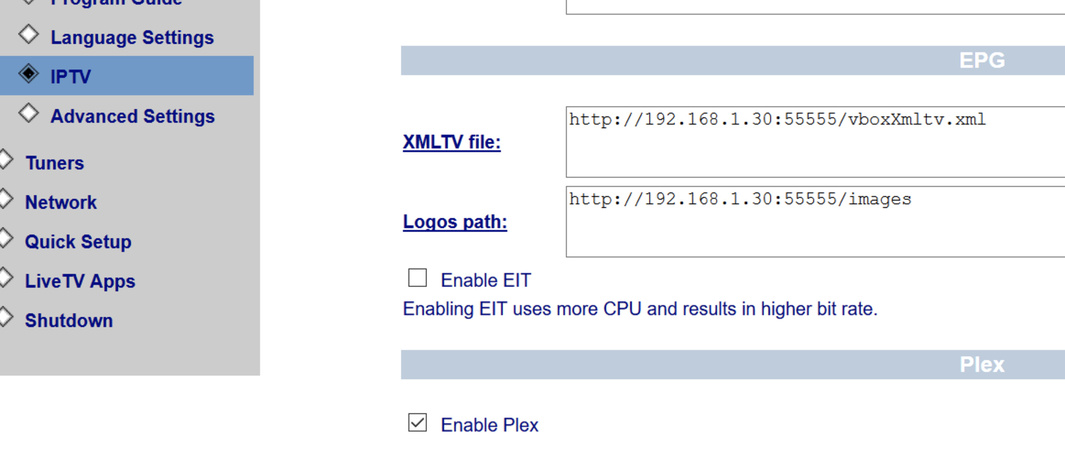

You might already know and have followed these steps but I found this on the VBox forum and it was added by one of their admins…

Hi,

Plex is currently available with the following VBox models:
XTi 3442 DVB T2
XTi 3452 DVB C
XTi 3332 DVB S2

What you need to do:

  1. Download Plex Beta version
  2. Send VBox support (support@vboxcomm.com) a request to get VBox Beta version supporting Plex
  3. After you have installed both, go to VBox back end, under “Streaming” go to “IPTV”, check the “Enable Plex” check box and submit.
    VBox will restart and you are good to go.

Regards,
VBox support team

Thanks Jibidibo, that’s interesting. I didn’t see anything on a quick search of VBox’s forum earlier this week, so maybe that’s new and they forgot to get their published firmware and website instructions in step with their PR! I’ve emailed VBox support to ask what’s going on, will update when I hear from them.

Sorry for the delay. We’ve been in contact with vBox as well over the last day. While vBox announced Plex support on the 13th, it appears that they have not yet made the Plex enabled build available. We’re attempting to get an update from them now.

thank you for the update

So we have to wait for that update right?

Yes, unfortunately. I haven’t seen any email from them on the topic today. If I don’t have something for you guys by Monday, I’ll pester them more.

Thanks timwoj. VBox appear to have slipped up here, PR running ahead of release! I’ve had nothing back yet in reply to my email to them.

Finally got something from them early this morning; a Google Drive link to a firmware image. Unfortunately, my VBox tells me it’s corrupt and can’t be installed!

I’ve tried the download with both Firefox and Chrome, same result. If you fancy trying it, it’s here: https://drive.google.com/file/d/15R7heev5UpJVWDWZPki0za6Yx0mw1Mgd/view?usp=sharing

I’ve gone back to VBox with the problem; waiting to hear again… it seems that speed of reply is not their thing!

I am OK with this file - I updated my Vbox software.
Now I have Enable Plex thick In Streaming Menu - but still my PMS doesn’t see the Vbox device.
Does anything else Vbox said?

I Zippit and upload it to drop box - try it from here:

That’s all I’ve had from them so far.

I’m completely stuck. I’ve tried different browsers for both the download and the VBox upload, even downloaded via the Drive app on my mobile, no joy at all. Unfortunately your version of the file gives me the same ‘corrupt’ error when the VBox tries to apply the new software.

Probably it is not compatible with your VBox.
It works for me but still doesn’t work with Plex Server.

Hi did the same and enabled under IPTV.
Then I restarted VBOX under shutdown.
After a while PLEX showed a message in the top that a new device Vbox communication was found and if I would read more about it. I clicked yes but nothing came up. BUT - now it all works fine, well a few bugs, but ok. Go to PVR setup in plex and it will work.
Thanks for your info, it was helpfull.
PS I have also hdhomerun running…