Hey Chuck (appreciate the efforts you and @dane22 are making covering up for others mess
I’ve done both from same internal network, and directly on my QNAP NAS
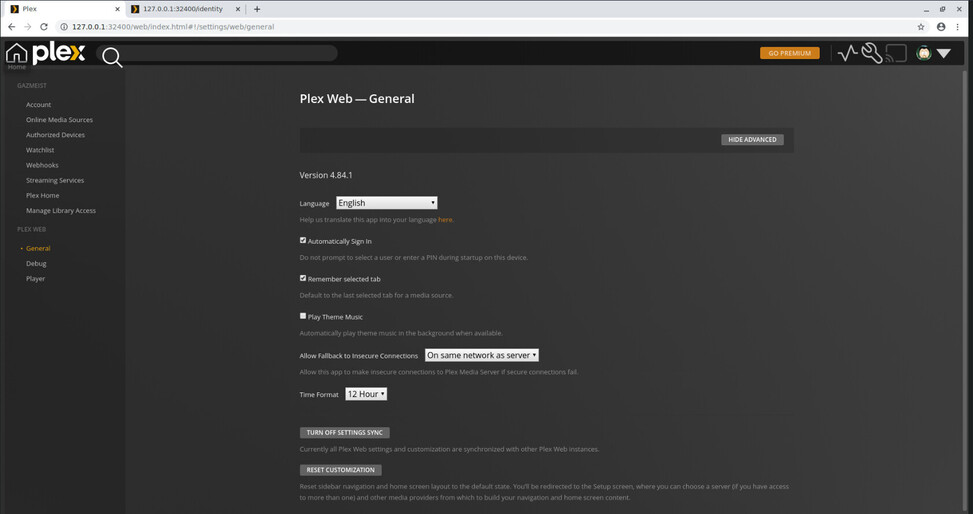
I’ve even now removed Friends and Plex Home setups so it’s as clean as possible - and for whatever reason I don’t get a claim option, I can no longer see the server even though I’m literally on it, and the server /identity still comes up as claimed=‘0’
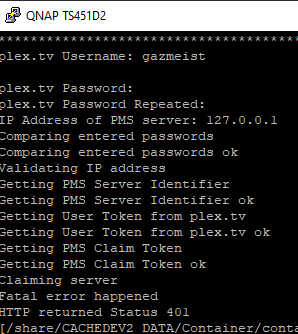
I’ve signed out and back in a number of times - can’t seem to get it to reclaim for whatever reason. When I use the ClaimIt app I keep getting 401 errors
And I’ve followed the guide here https://support.plex.tv/articles/204281528-why-am-i-locked-out-of-server-settings-and-how-do-i-get-in/
As of now it’s giving me the option to try and add a server, and prompting me to download software - as though it can’t even see I am on the active server
Hey Gazmeist - can you talk me through how you were able to use ClaimIT?
Details here > Home · ukdtom/ClaimIt Wiki · GitHub
I’m on a docker instance on my QNAP NAS, so SSHd into my NAS and followed the Linux instructions from the Wiki
rmc2000
August 25, 2022, 1:31am
107
Hi Chuck,
I initially replied elsewhere before seeing this specific list so hopefully this helps:
Yes.
Yes
Yes
Deep Space 9, running on macOS 10.15.7
Thank you.
ChuckPa
August 25, 2022, 1:32am
108
@gazmeist
If you want to be a purist, we can get down to the command line and ‘just get’er done’
If this doesn’t work, grab the logs (ZIP/tar.gz) and let me see them please.
I think purist is all I’ve got left to go with :). Will take a look
ps already had the logs from my last restart/login handyPlex Media Server.log (443.4 KB)
ChuckPa
August 25, 2022, 1:38am
110
@gazmeist
Aug 25, 2022 11:15:24.127 [0x7f7a26030b00] DEBUG - MyPlex: mapping state set to 'Mapped - Not Published (Bad Authentication)'.
The container is definitely not authenticating.
Before giving instructions:
Do you have the /config saved to a storage location OUTSIDE the container?
Are you using Docker compose or Docker run ?
OH - I tried that already and effectively get the same error as the ClaimIt process - the curl command gives me an error
What does this setting do exactly? Should I change it as well perhaps?PublishServerOnPlexOnlineKey="1"
[/share/CACHEDEV2_DATA/Container/container-station-data/lib/docker/containers/plex] # curl -X POST ‘http://127.0.0.1:32400/myplex/claim?token=claim-TxjtghF2NzSPYazdUtDX ’
Config within the container but in a specified folder
Using docker-compose
yml file
version: ‘3’#network_mode: host
ChuckPa
August 25, 2022, 1:47am
115
@gazmeist
you need to add PLEX_CLAIM=paste_claim-xxxxxx_token_here and then generate the container and start it.
(being on a different subnet makes this grossly and overly awkward)
Are you using docker on QNAP for the tonemapping?
I am having the same issues. Can someone please reset my server’s IP? Thanks in advance!
Thanks - got it running. Unfortunately same error as yourself “Status 401”
Dane22- Seems like this is same issue everyone looks to have (internal works) plex.tv fails Do we need to request a reset one by one? I have 2 plex boxes, ones a backup of primary
ChuckPa
August 25, 2022, 1:54am
119
@Jereme_Hancock
I have reset your certificate. It’s ready to go.
Restart the server
Where in the yml do I put this exactly? Environment I presume?
Ignore the error - some pasted hidden character before the hyphen I’ve managed to clear
What is tonemapping? Doing everything via Docker
ChuckPa
August 25, 2022, 1:59am
121
the \t is a tab character. You want spaces.
I do it via docker run.
sudo docker run \
-d \
--name plex \
--network=host \
-e PLEX_CLAIM="claim-2rZSB3JW2t56cJngN9kt" \
-e TZ="EST" \
-e LANG="en_US.UTF-8" \
-e PLEX_UID=1000 \
-e PLEX_GID=1000 \
-e PUID=1000 \
-e PGID=1000 \
-h dockerplex \
-v /sata/dockerplex:/config \
-v /sata/dockerplex/tmp:/tmp \
-v /sata/dockerplex/transcode:/transcode \
-v /vie:/data \
--device=/dev/dri:/dev/dri \
plexinc/pms-docker:plexpass

#docker start plex
#docker update --restart=unless-stopped plex
[chuck@lizum docker.620]$
Works the same and easier (IMHO)
Tonemapping == Allows HDR UHD (4K ) to be converted to 1080p SDR in hardware.
Your J4025 CPU will do this if you enable it.
Thank you so much!! Also, thank you all for handling this situation so well. Stuff like this is always hard to deal with, but you guys have done a great job!
Yeah corrected my post already
 )
)